How to Stop Missing Calls During Busy Seasons (2026)
Stop losing customers to voicemail. Get practical scripts, call capacity math, and a proven system to answer every call this season.
January 28, 2026
Busy season is great for revenue, right up until your phone becomes the bottleneck.
When calls spike, the "front door" of your business starts behaving like a leaky bucket. A bunch of high-intent leads call, you miss some, you try to call back later, and they're already gone. You're not alone. Studies show that only about 38% of calls to small businesses actually get answered, and the other 60% either go to voicemail or ring endlessly. During your busiest seasons, that number often gets even worse.
This guide is the full system for fixing that. Not "remember to answer faster" platitudes. A real, operational playbook you can implement in a day, a week, or a month (depending on how deep you want to go).
You'll get:
• The real mechanics of why busy seasons create missed calls and why callbacks often fail
• A simple way to calculate your true call capacity so you stop guessing
• The 7-layer "never-miss" coverage stack so one failure doesn't kill the lead
• Scripts and templates for overflow, after-hours, and missed-call follow-up
• A practical setup path, including how an AI receptionist like Eden fits without wrecking the customer experience
Why Missed Calls Cost So Much During Busy Season#
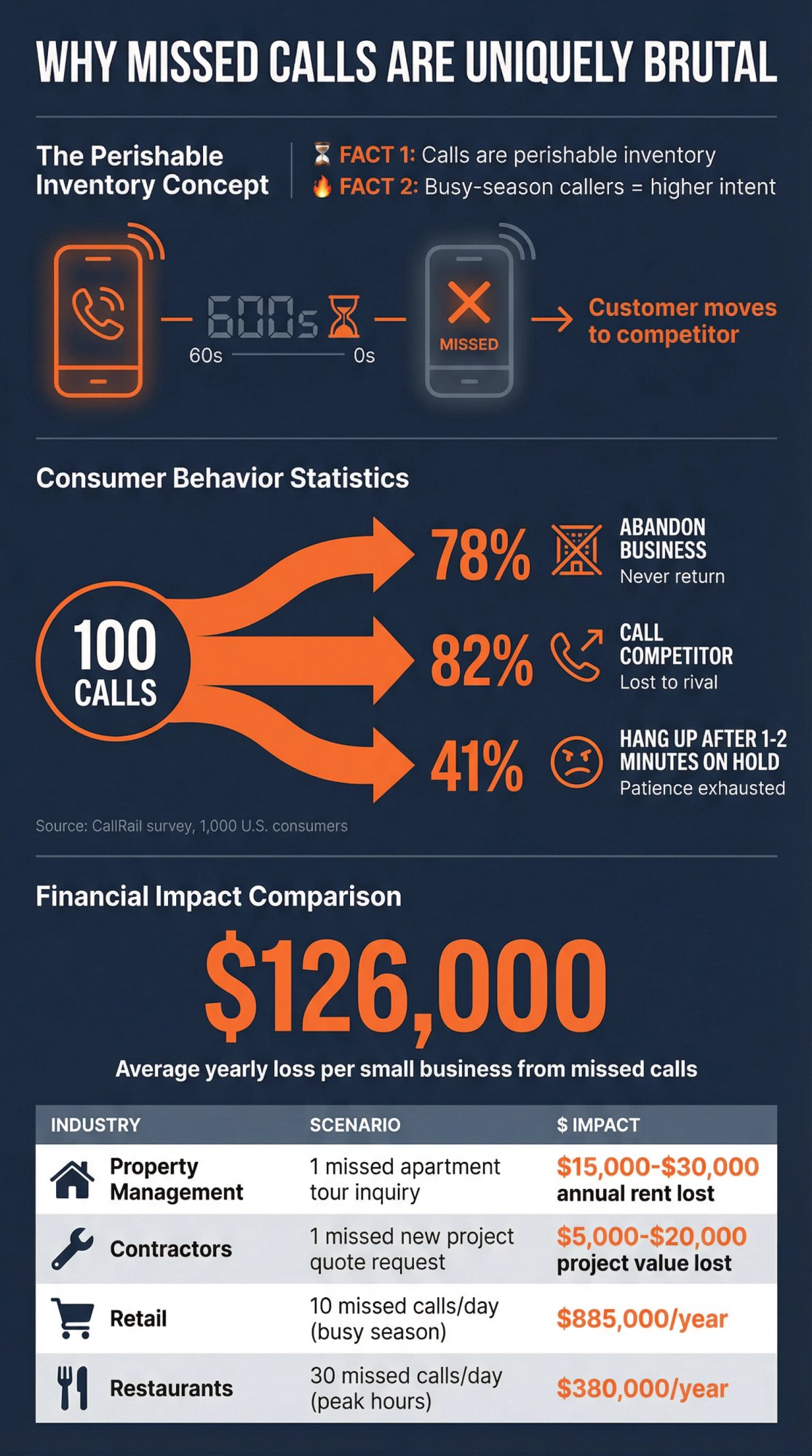
Two facts make busy-season missed calls uniquely brutal:
1. Calls are perishable inventory. You can't "store" a call for later. If it's not answered, the customer immediately tries the next option. Unlike an email that sits in an inbox, a phone call either gets answered right now or it's gone.
2. Busy-season callers are usually higher intent. When the weather is extreme, deadlines hit (tax season), or urgency rises (plumbing leak), the caller's willingness to buy is high right now, not later.
Recent data backs up what every owner feels in their gut:
A CallRail survey of 1,000 U.S. consumers found 78% have abandoned a business after an unanswered call, and 82% called a competitor instead. The same survey found 41% hang up after just 1-2 minutes on hold, and only 42% say they leave a voicemail.
Invoca reports that about 26% of calls never get answered based on customer platform data, and in some industries the unanswered rate is over 60%.
Now add a modern twist that many businesses miss: Hiya reports 80% of unidentified calls go unanswered. If your number looks unfamiliar or gets labeled badly, your callbacks (and even some inbound calls) won't connect.
Lost Revenue: What Each Missed Call Actually Costs#
Every missed call during a busy season isn't just a minor inconvenience. It's potentially a lost customer and lost revenue.
For property management, analysis of 170,000+ rental inquiries found 60.8% of calls went unanswered, especially in evenings and weekends. Property managers typically lose about 30% of their leasing opportunities due to missed calls. Even a single missed call can hurt. If an apartment tour inquiry goes unanswered and the prospect rents elsewhere, that could be $15,000 to $30,000 in annual rent gone.
SpectrumVoIP estimates that for a small retail business, missing just 10 calls a day can equate to roughly $885,000 in lost revenue over a year. Restaurants that miss 30 calls a day (take-out orders, reservations, etc.) were shown to lose over $380,000 annually.
And then there's the marketing waste. Research suggests you could be losing up to 30% of your marketing ROI simply due to poor call handling. Think about all the effort and money you spend to make the phone ring. If nobody answers when a customer responds, those marketing dollars are squandered.
Critical insight: The average small business loses about $126,000 per year due to missed calls. But this is completely preventable.
This is the core idea:
You don't just need "more answering." You need a system that turns every ring into a captured, routed, documented next step.
The 6 Types of Missed Call Problems (And How to Fix Each)#
Most businesses lump everything into "we miss calls." That hides the real cause.
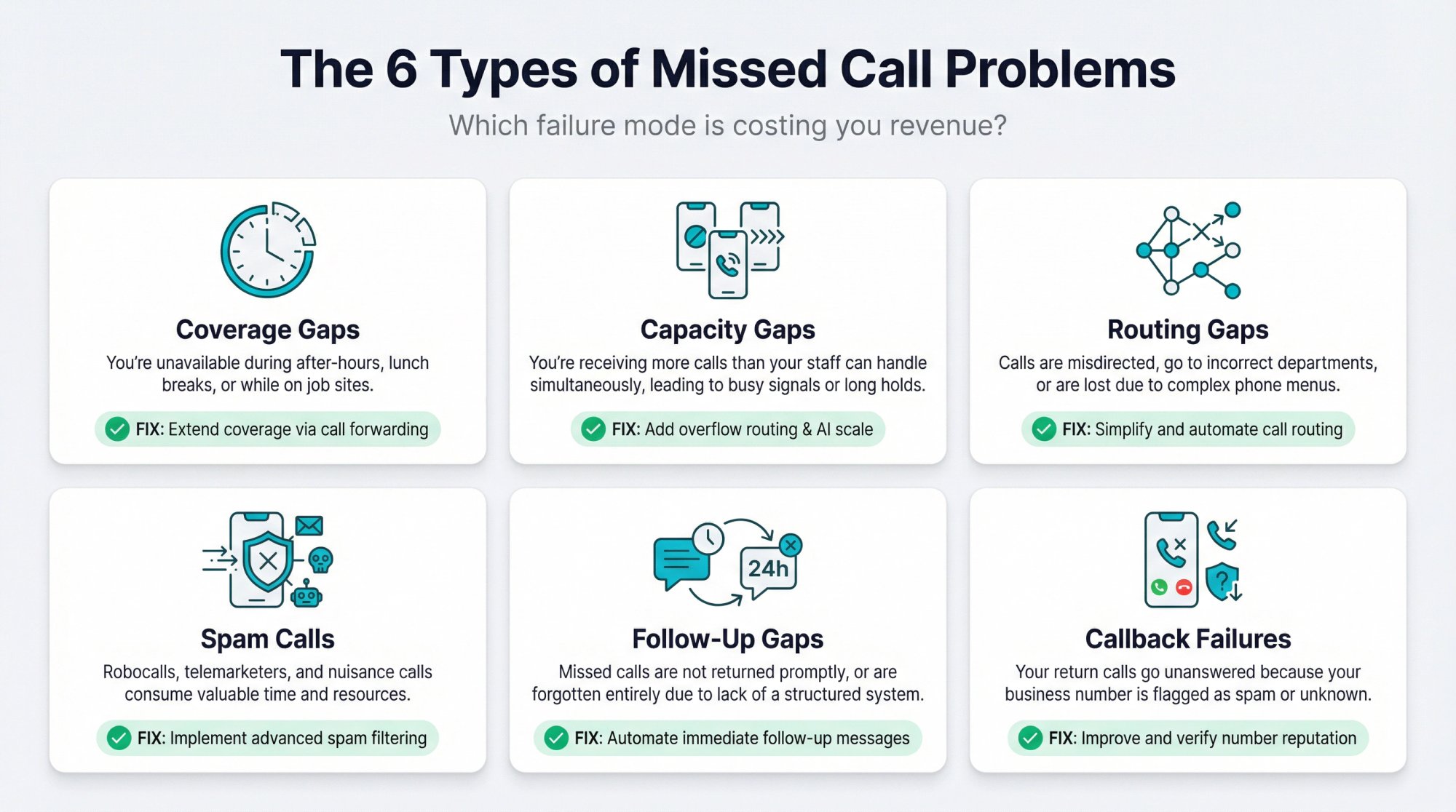
There are actually 6 different failure modes, and your fix depends on which one you actually have:
Coverage Gaps (After-Hours and Lunch Breaks)#
You're simply not available during certain times:
• After-hours (evenings, nights)
• Lunch breaks
• Weekends and holidays
• Job sites, court, showings, meetings
• Any time the office is unstaffed
The fix: Extend coverage through call forwarding, answering services, or AI receptionists.
Capacity Gaps (Too Many Calls, Not Enough People)#
You are available, but the call volume exceeds what humans can handle.
This usually happens because of:
• Not enough people answering
• One phone line (busy signals)
• Long call handle time (AHT)
• No triage, so low-value calls eat capacity
The fix: Add overflow routing, additional lines, or scalable solutions like AI that can handle unlimited simultaneous calls.
Routing Gaps (Calls Go to the Wrong Place)#
Calls go to the wrong person, bounce around, or ring a phone no one owns.
The fix: Set up proper call forwarding rules and hunt groups.
Spam Calls Stealing Your Attention#
Spam steals attention and makes you ignore unknown numbers.
Hiya's own reporting shows voice spam is still massive, including billions of suspected spam calls in a single quarter.
The fix: Implement spam filtering and call screening.
Slow or Inconsistent Follow-Up on Missed Calls#
You miss a call and the follow-up is slow or inconsistent, so the customer moves on.
The fix: Automated missed-call text-back and callback protocols.
Your Callbacks Don't Get Answered (Number Reputation)#
Even if you call back quickly, the customer doesn't pick up because:
• Your outbound number is unfamiliar
• It's labeled or suspected as spam
• Their phone screens unknown calls aggressively
Hiya's data showing 80% of unidentified calls go unanswered is the clearest signal that this is now a mainstream problem.
The fix: Text before calling, call from the same number they dialed, improve number reputation.
Your fix depends on which failure mode you actually have. So let's measure it.
How to Calculate Your Real Call Capacity in 15 Minutes#
You want three numbers:
① Call attempts per day (and per peak hour)
② Answer rate (what % are answered live)
③ Average handle time (AHT) for answered calls
If you don't have a phone system report, you can approximate:
• Count inbound call log entries for a "normal" day and a "busy" day
• Count how many you actually picked up
• Estimate how long calls take on average (2 minutes? 6 minutes? 12 minutes?)
The Simple Math: How Many Calls Can You Actually Handle?#
A single human can only do one live conversation at a time.
So your maximum calls per hour is basically:
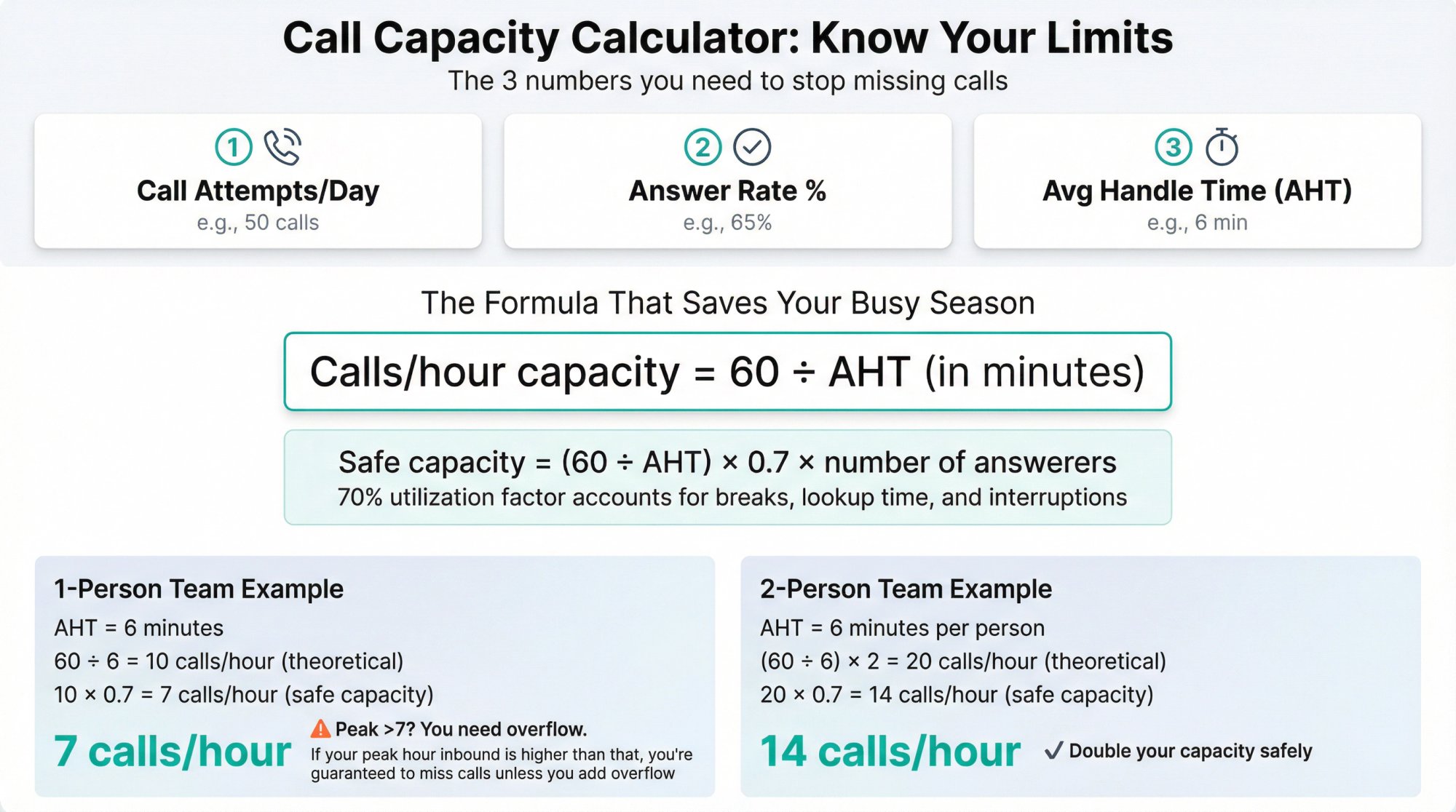
Calls/hour capacity = 60 / AHT (in minutes)
(then multiply by number of people answering)
Example:
• AHT = 6 minutes
• One person's theoretical capacity = 60 / 6 = 10 calls per hour
• Two people = 20 calls per hour
But "theoretical" is fantasy. Real life includes:
• Looking up info
• Scheduling and note-taking
• Bathroom breaks
• Dealing with walk-ins
So you should plan for 70% utilization max during peak, otherwise the queue explodes.
A quick usable version:
Safe calls/hour capacity ≈ (60 / AHT) × 0.7 × number of answerers
If your peak hour inbound is higher than that, you're guaranteed to miss calls unless you add overflow.
The 7-Layer System to Never Miss Another Call#
The best systems aren't one trick. They're layered.
Think of it like planes landing in bad weather. There are multiple backups before you crash into the ground.
Layer 1: Define Your Call Answer Standards#
During busy season, define a simple Service Level Agreement (SLA):
• "Every new lead gets a live answer or a meaningful interaction in under 60 seconds"
• "Every missed call gets a text in under 30 seconds and a callback attempt within 5 minutes"
• "Emergency calls route to the on-call person immediately"
Make it binary. Either you did it or you didn't.
Layer 2: Sort Calls by Priority (Stop Wasting Time on Low-Value Calls)#
Busy season failure often looks like "too many calls," but it's usually "too many unfiltered calls."
Create a call map with 4 buckets:
① New leads (high value)
② Existing customers (retain and protect)
③ Urgent vs non-urgent
④ Spam, vendors, wrong number
If you only do one thing in this entire guide, do this:
Write down the top 10 reasons people call you. Then design routing for each.
If you use an AI receptionist (like Eden), this is where it shines because it can classify intent and ask the right follow-ups consistently. Learn more about how AI phone answering works to understand the classification process.
Layer 3: Set Up Call Forwarding and Overflow Routing#
This is the "plumbing" that makes everything else possible.
You want at least one of these behaviors:
• Simultaneous ring: ring multiple phones at once
• Hunt group: ring phones in sequence
• Conditional call forwarding: forward only if you don't answer, you're busy, or unreachable
• After-hours forwarding: route calls differently outside business hours
Call Forwarding Codes for Major US Carriers#
These change sometimes by plan and carrier, so always test after setup.
| Carrier | Function | Activation Code | Deactivation Code |
|---|---|---|---|
| AT&T | Forward all calls | *72 | *73# |
| AT&T | Forward when busy | *90 | *91# |
| AT&T | Forward when no answer | *92 | *93# |
| T-Mobile | No reply forwarding | **61*1+PhoneNumber# | ##61# |
| T-Mobile | Not reachable | **62*1+PhoneNumber# | ##62# |
| T-Mobile | Busy | **67*1+PhoneNumber# | ##67# |
| Verizon | Forward all | *72 | *73 |
| Verizon | Conditional (no answer/busy) | *71 | *73 |
Source: AT&T Support | T-Mobile Support | Verizon
Verizon commonly supports *72 (forward all) and *71 (conditional no answer/busy transfer) with *73 to disable. The clearest official reference documents *71 for conditional forwarding, though it's from 2023 so verify and test.
If you want a step-by-step guide for Verizon specifically, Eden's blog has one you can follow.
Best Call Forwarding Setup for Busy Season#
If you still want to answer your own phone when you can, but never miss calls when you can't:
Use conditional call forwarding so calls only forward when you're busy or don't answer. Eden has a dedicated guide that explains how conditional forwarding works and how to set it up.
Layer 4: Replace Voicemail with Real-Time Lead Capture#
Voicemail is passive. During busy season, passive loses.
CallRail's survey suggests a majority of people won't leave a voicemail when you don't answer.
So your "first touch" should do at least one of these immediately:
• Capture name, number, and reason for call
• Offer booking
• Route emergencies
• Send a text that starts a conversation
Options (in increasing effectiveness):
① Better voicemail (last resort)
② Simple IVR (careful: too many menus kills conversions)
③ Live answering service (human)
Learn more about what happens when you lose business from voicemail and why virtual receptionists outperform voicemail.
Layer 5: Instant Text-Back for Every Missed Call#
If your phone system does nothing else, it should do this:
If a call is missed, text the caller immediately.
Why? Because texting is actually read.
Bandwidth's 2024 State of Messaging report states text messages still get open rates above 98%, compared to much lower typical email performance.
That doesn't automatically mean "spam people." It means: use a fast, respectful text to keep the lead alive.
Missed-Call Text-Back Script You Can Use Today#
Hi {first_name if known}, sorry we missed your call. This is {Business Name}. What can we help with today?

1. {Service A}
2. {Service B}
3. Something else

Reply with 1, 2, or 3 and we'll take care of you.
If you use Eden, there's a dedicated missed-call text-back solution that explains this flow: instant engagement after a missed call, qualification, and scheduling.
Layer 6: Block Spam Calls So Real Customers Get Through#
During busy season, spam isn't just annoying. It's capacity theft.
At minimum:
• Block obvious repeat spam numbers
• Consider blocking entire categories that never matter to you (for some businesses, toll-free spam is a big chunk)
• Use screening that ends robocalls quickly
Eden's AI receptionist approach includes IntelliSpam-style filtering as a built-in capability.
If you operate in a scam-heavy vertical (property management, insurance, contractors), Eden's industry pages explicitly call out spam/scam filtering and toll-free blocking.
Layer 7: Make Sure Your Callbacks Actually Get Answered#
This is the part almost nobody talks about.
You can do everything right and still lose if your callback doesn't get answered.
Why it happens:
• Phones and carriers aggressively label and screen calls
• Customers distrust unknown numbers
• Your business number reputation can be damaged (even if you're legitimate)
Hiya reports that 80% of unidentified calls go unanswered.
Regulators are actively pushing toward more verified caller identity. The FCC's 2025 documents describe proposals that would push more accurate caller name and related identity info to consumers.
How to Improve Callback Answer Rates#
• Call back from the same number the customer called (consistency helps recognition)
• Text first, then call (the text acts like a "who is this" preheader)
• Leave a short voicemail only if needed, then text: "Just left you a voicemail"
• Avoid rapid repeat dialing (can look spammy)
• Watch your number reputation (if customers say "it showed as spam," take it seriously)
This is also why systems that auto-text immediately after a missed call often outperform "we'll call you back later."
How to Reduce Call Volume with Self-Service Options#
Sometimes the best way to handle a flood of calls is to prevent certain calls from happening in the first place.
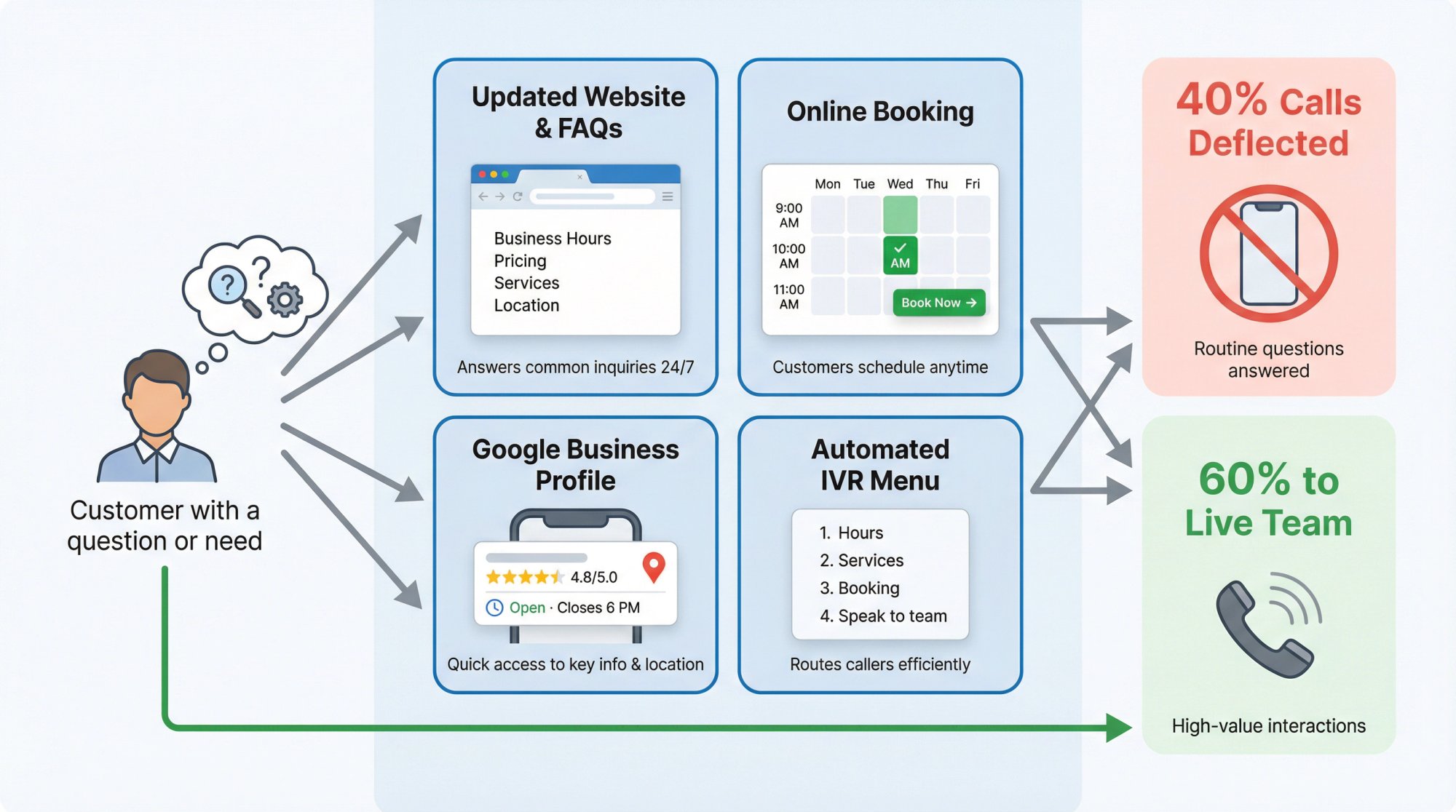
In busy seasons, a large chunk of calls may be routine inquiries that could be answered without tying up your phone lines or staff. By giving customers self-service alternatives, you can lower the call volume so that the truly important calls get through.
Consider implementing these:
Keep Your Online Information Current and Easy to Find#
Make sure your website, Google Business profile, and social media clearly list key information that people typically call about: current business hours, holiday closures, pricing or menu, basic services offered.
Often, customers call simply because they can't find this info quickly online. A well-crafted FAQ page can deflect a significant number of calls by equipping customers to get answers on their own.
Enable Online Booking and Contact Forms#
If appointment booking is a major driver of calls (think salons, dental offices, service businesses), enable online booking on your website. Let customers see available slots and book or request an appointment without calling.
Each appointment made online is one less call you have to handle manually. Customers appreciate the convenience of self-service, especially tech-savvy ones, and it eases your call load.
Set Up Automated Phone Information#
An IVR can provide automated info. Even a basic recorded message that plays answers to FAQs can help. The goal is not to trap callers in automation, but to serve simple needs automatically and reserve live interaction for more complex needs.
Why Self-Service Matters#
Research shows that lacking self-service options will naturally drive more people to phone support, increasing the burden on your team. By trimming down the "unnecessary" calls, you free up your phone lines for the truly critical interactions that do require a conversation.
Offer Callbacks Instead of Making People Wait on Hold#
Even with staffing and system improvements, you might still encounter times when calls are coming in faster than you can handle in real-time.
During peak season, hold times can creep up, and callers will abandon the call if they wait too long. One way to mitigate this is by offering a callback system.
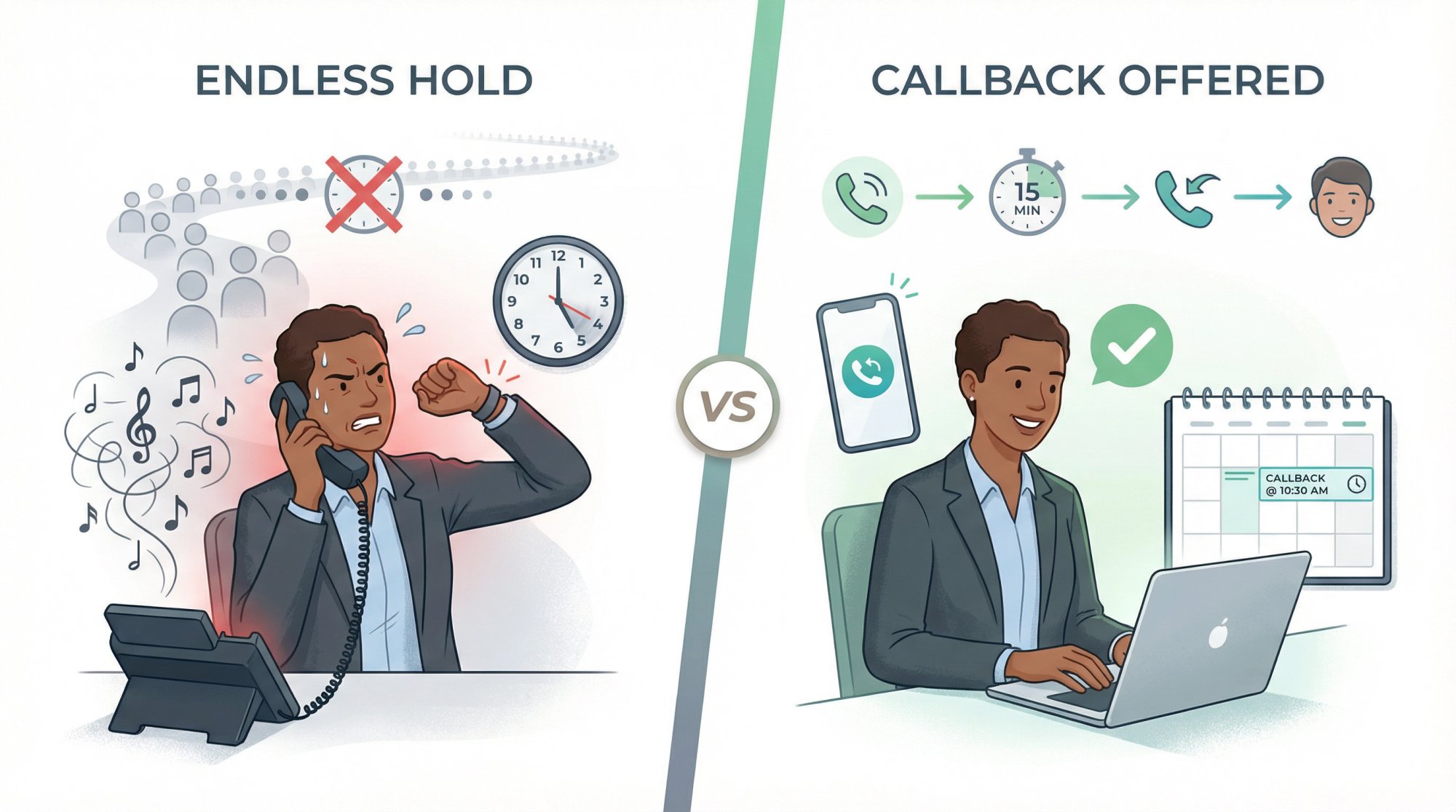
A callback system (sometimes called "virtual hold") means that instead of forcing the caller to wait on hold listening to hold music, you give them the choice to receive a call back when it's their turn or when someone is free.
Why is this helpful? Because it keeps the customer from hanging up and calling a competitor out of impatience. If they know you'll call them back soon, they're more likely to stick with you. It also shows respect for their time and can reduce their frustration.
If you don't have fancy call software, you can do a manual version: train whoever answers to offer a callback whenever appropriate. For instance, if you have only one person answering and multiple lines ringing, that person can quickly pick up a new call and say:
"Thank you for calling, we're experiencing high demand at the moment. Can I please take your number and call you back in 15 minutes?"
This approach at least turns a missed call into a scheduled follow-up. The key is you must honor that promise.
Keep in mind, a callback isn't as good as answering on the first ring (since many won't even wait or trust a callback). But when given the choice between holding indefinitely or knowing they'll get a return call, many will opt for the latter.
If you can't answer right that second, don't just leave callers in limbo. Give them a path to resolution (a callback) instead of a dial tone.
Which Call Answering Solution Is Right for Your Business?#
There's no single "best" solution. There's only "fits your call volume, budget, and workflow."
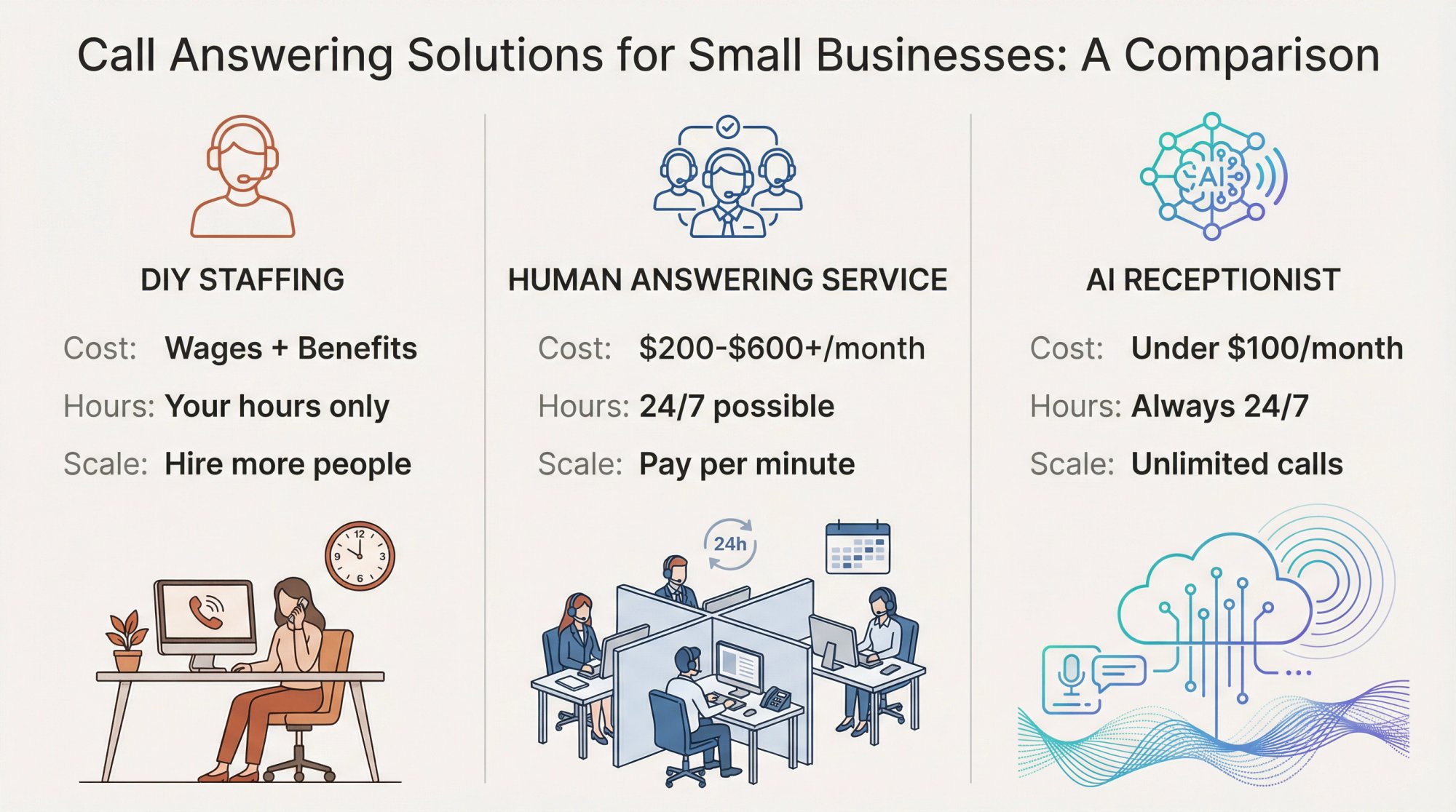
Here are the main options:
Option A: Handle It In-House with Better Systems#
Works if:
• Your peak call load isn't dramatically above your safe capacity
• You can add seasonal part-time help
• You can standardize scripts
Key moves:
• Add a second line
• Have a dedicated "phone block" role during peak hours
• Create scripts so AHT drops
• Stagger lunch breaks so phones are never left unattended
• Never leave the front desk empty at midday
Small scheduling tweaks like these can dramatically boost your answer rate. Even hiring an intern or bringing on a family member to answer phones during the peak of busy season can save many opportunities.
Option B: Hire a Human Answering Service#
A professional answering service functions as an extension of your team, catching the calls you'd otherwise miss.
How it works: You hire a service (usually for a monthly fee plus usage) and forward your calls to them whenever you want. When a call forwards, a trained live receptionist answers with your custom greeting and handles the call per your instructions.
What they can do:
• Take detailed messages, capturing the caller's name, number, and reason for calling
• Schedule appointments directly into your calendar (they'll integrate with Google or Outlook)
• Answer FAQs using info you provide
• Offer bilingual support (Spanish-speaking callers aren't lost)
• Filter urgent calls and patch directly to you or an on-call staff member
Small businesses using virtual receptionists often report higher customer satisfaction and conversion rates simply because calls are being answered promptly now. One small business owner found that after hiring a live answering team, their sales conversion jumped 40% because they never missed a potential sale.
Cost factor: Typical plans might range from around $200 to $600 per month depending on call volume.
This can be great for high-touch businesses, but do the math on minutes during peak season.
While not cheap, compare this to hiring a full-time receptionist (which could be $3,000+ a month in salary/benefits). Many businesses find the ROI well worth it: capturing even one or two big clients via the service can pay for itself.
Option C: Use an AI Receptionist for Unlimited Scale#
You get 24/7 coverage, fast intake, and consistent triage. Modern systems can book, transfer, and send summaries.
Eden's positioning is "AI receptionist that never misses a call," with fast setup and 24/7 coverage.
Here's how an AI receptionist can solve your missed-call problems:
Answers Every Call 24/7, No Breaks#
An AI doesn't sleep, take breaks, or have "off hours." It will answer calls any time of day, including nights, weekends, and holidays when your staff might be unavailable.
Picks Up on First Ring, Every Time#
Speed matters. AI receptionists pick up on the first ring every time. There's no waiting or chance for the caller to hang up out of impatience.
Handles Multiple Calls at Once (No Busy Signals)#
Perhaps the biggest advantage: an AI system can handle multiple calls at once, with no busy signals and no callers put on hold.
If five people call you at the same exact moment during a rush, a human team could only talk to one and the rest would wait or bounce. But an AI receptionist can seamlessly initiate five separate conversations at once. There is effectively infinite call capacity.
This scalability is crucial for busy seasons. You don't have to worry about call spikes. If a storm triggers 50 customers to call simultaneously, the AI can greet all 50 and triage their needs. No customer ever hears a busy tone or gets sent to hold.
Answers Common Questions and Books Appointments#
Today's AI phone agents are surprisingly sophisticated. The AI is typically programmed with your business's FAQs, policies, and scripts, so it can actually converse and help the customer.
For instance, the AI can provide business information (hours, location, services), answer frequently asked questions, and collect key details from the caller like their name, number, and what they need.
Some AI receptionists (such as Eden) are capable of scheduling appointments for the caller by syncing with your calendar and finding an open slot. They can even send a text or email confirmation to the customer with the appointment details, all without your involvement.
Routes Urgent Calls to Your Team Automatically#
Good AI systems know their limits and can work alongside your team. For example, if a call is identified as urgent (certain keywords like "emergency" are spoken), the AI can automatically transfer the caller to your on-call person or send an alert.
You set the rules. If someone says "no heat" to the AI, it might transfer to your cell immediately because it's likely an emergency HVAC outage. For less urgent issues, the AI can assure the customer someone will follow up and simply take a message.
Blocks Spam Automatically#
Answering services and AI receptionists filter out spam, blocking known spam numbers and detecting spam patterns. One Eden user reported that during their busy season the AI blocked 47% of incoming calls as spam, calls that would have otherwise tied up their phone and distracted them.
Costs 70-80% Less Than Human Receptionists#
Perhaps most appealing, AI receptionists cost only a fraction of a human staff or live service. Many AI services charge a flat monthly rate plus maybe usage minutes.
This is dramatically cheaper than paying multiple employees or hefty answering service bills. One analysis found that using an AI receptionist could be 70-80% cheaper than hiring a full-time receptionist, potentially saving small businesses $25,000 to $40,000 a year in wages.
And you never pay overtime. It handles as many calls as come in, no extra charge.
Real Results: Near-Perfect Answer Rates#
Companies using AI receptionists report capturing far more leads and virtually eliminating missed calls. In fact, businesses have achieved near 100% call answer rates and up to 60% more qualified leads captured, compared to their previous voicemail-ridden setup.
Comparing Your Options: DIY vs Human vs AI#
| Factor | DIY Staffing | Human Answering Service | AI Receptionist |
|---|---|---|---|
| Cost | Wages + benefits | $200-$600+/month | Typically under $100/month |
| Availability | Your hours only | 24/7 possible | Always 24/7 |
| Simultaneous calls | Limited by staff | Limited by service | Unlimited |
| Setup time | Immediate | Days to week | Minutes |
| Scalability | Hire more people | Pay more per minute | Automatic |
| Spam filtering | Manual | Some services | Built-in AI |
| Best for | Low volume, personal touch | High-touch industries | High volume, recurring questions |
Your 2-Week Busy Season Preparation Checklist#
Here's a simple operating procedure you can adopt.
2 Weeks Before Busy Season Starts#
1. Identify your peak demand patterns
Look at last year's busiest weeks and identify:
• Top 3 days of week
• Top 3 hours of day
• Top 3 call reasons
2. Map out your call types and priorities
List the top 10 call intents and mark:
• Urgent vs non-urgent
• Needs booking vs just info
• Must reach a human vs can be handled by intake
3. Choose your overflow trigger point
Pick one:
• Forward when busy
• Forward when no answer after X rings
• Forward after hours
• All of the above
4. Create call handling scripts
Your goal is to reduce AHT and reduce decision fatigue.
2 Days Before Busy Season Starts#
1. Test all your call routing
• Call from a phone not in your contacts
• Call when you're on another call
• Call after hours
2. Test your missed-call system
• Let it ring out
• Confirm you get a text and/or summary
• Confirm you can book or capture details
3. Set up daily call monitoring
Busy season needs a feedback loop:
• Review missed calls
• Review unanswered calls
• Adjust routing and scripts
Eden's dashboard concept includes a "call inbox" with recordings and transcripts, which is exactly what makes daily review feasible instead of painful.
Every Day During Busy Season#
Morning: Confirm routing is on, on-call transfers are correct
Midday: Spot check missed calls and text-back responses
End of day: Review the top 10 calls you missed and why
After Busy Season (1-Hour Review)#
• What % of calls got a "meaningful first touch"?
• What call types created the most congestion?
• What script changes would drop AHT next year?
Call Scripts You Can Use Right Now#
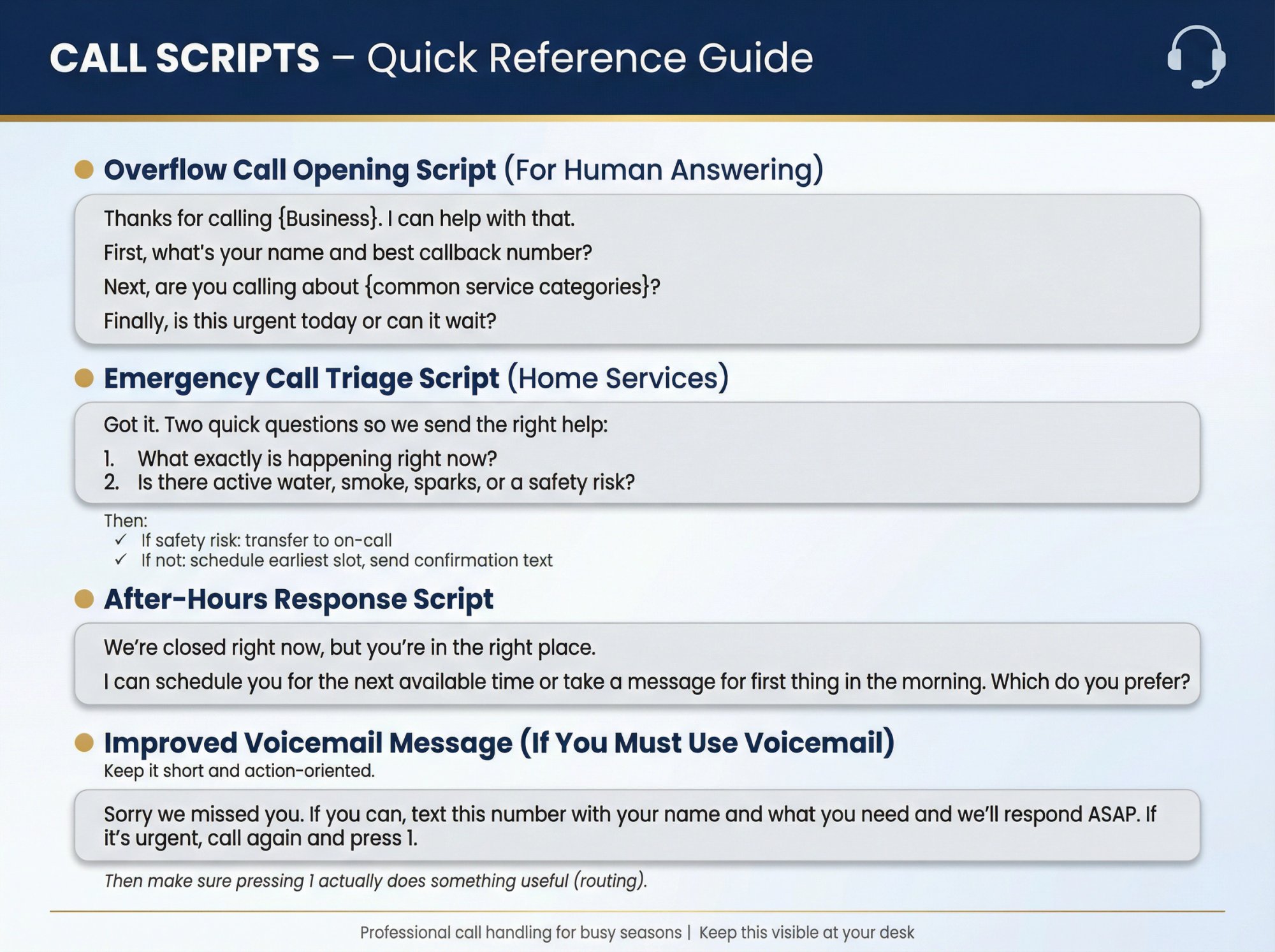
Overflow Call Opening Script (For Human Answering)#
Thanks for calling {Business}. I can help with that.

First, what's your name and best callback number?

Next, are you calling about {common service categories}?

Finally, is this urgent today or can it wait?
Emergency Call Triage Script (Home Services)#
Got it. Two quick questions so we send the right help:

1. What exactly is happening right now?
2. Is there active water, smoke, sparks, or a safety risk?
Then:
• If safety risk: transfer to on-call
• If not: schedule earliest slot, send confirmation text
After-Hours Response Script#
We're closed right now, but you're in the right place.

I can schedule you for the next available time or take a message for first thing in the morning. Which do you prefer?
Improved Voicemail Message (If You Must Use Voicemail)#
Keep it short and action-oriented.
Sorry we missed you. If you can, text this number with your name and what you need and we'll respond ASAP. If it's urgent, call again and press 1.
Then make sure pressing 1 actually does something useful (routing).
How to Use Eden to Stop Missing Calls (Without Sounding Robotic)#
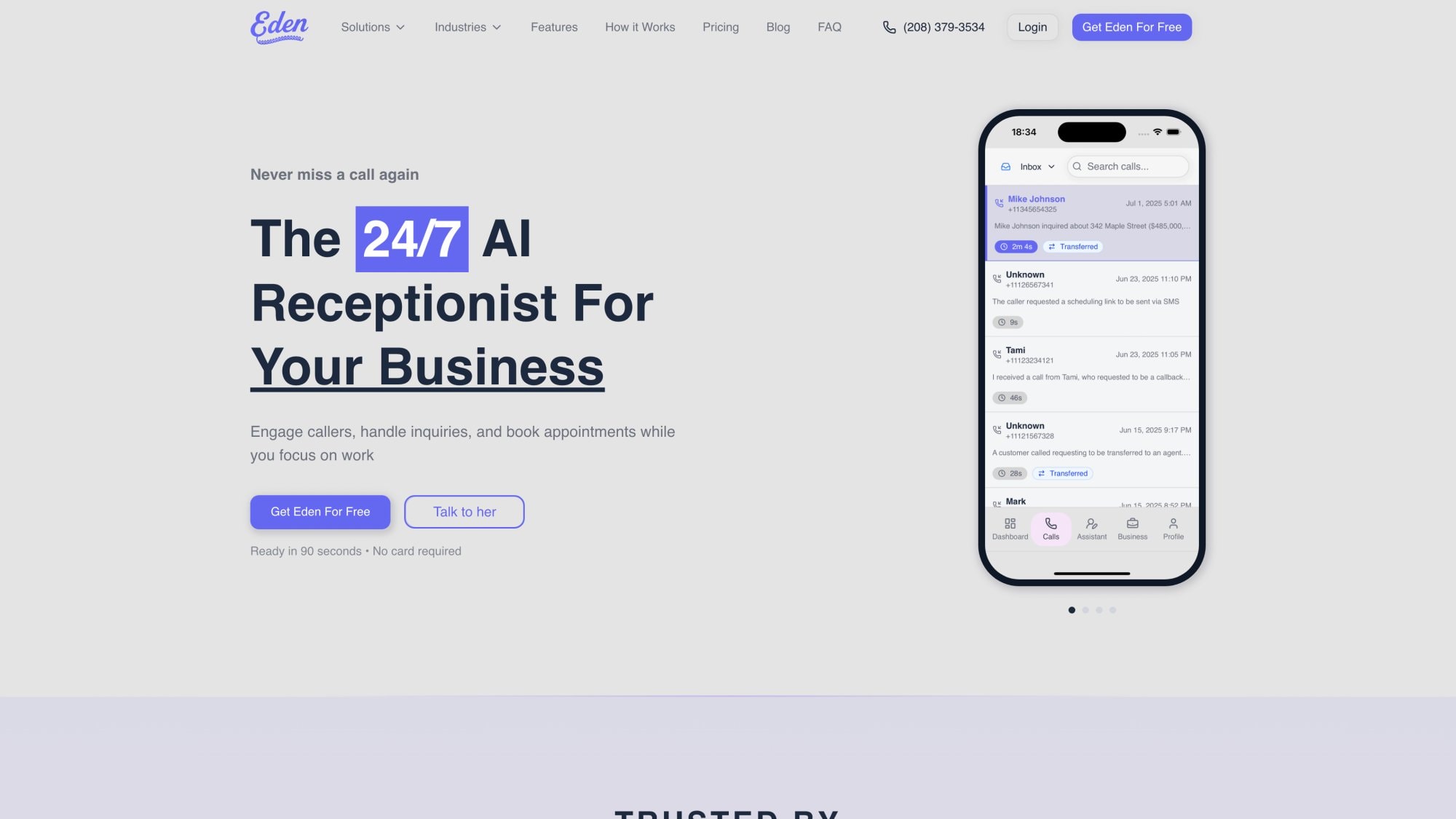
If you want to stop missing calls without hiring, the cleanest pattern is:
You keep your current business number. You forward calls to Eden when you're busy or unavailable.
Eden's call-forwarding content is extensive and practical, including:
• How to set up call forwarding in general
• Conditional call forwarding specifically
• How to forward business calls to an answering service
Two high-leverage Eden setups for busy season:
1. Overflow + after-hours answering
You answer when you can. Eden catches the rest.
2. Missed-call text back + booking
If you miss a call, Eden immediately starts a text conversation so the lead doesn't go cold.
If you want a quick overview of how a telephone answering service works (and how forwarding usually connects it), Eden's 2026 guide is a helpful reference.
New Reality: Some Callers Are Now AI Agents#
This matters because it changes how you should treat "weird" calls.
Invoca reported that pricing request phone calls from Google's AI surged sharply (reported as over 300% in November 2025), and that on average 26% of those calls go unanswered, with variation by industry.
Translation:
• Some calls will be automated but still represent real customer demand
• If you miss them, you still lose the job
Your system should capture intent and respond professionally even when the caller isn't a human.
Track Your Numbers and Keep Improving#
Implementing the above strategies will dramatically improve your call answer rate, but it's important to continuously monitor and adjust as needed.
Watch Your Missed Call Metrics#
Use your phone logs or service reports to keep an eye on how many calls are still going unanswered or going to voicemail. When are they happening? Perhaps you notice you still miss calls after 6 PM on weekdays.
Many systems let you generate reports. If not, even a manual tally from phone records can highlight patterns.
Ask Customers About Their Call Experience#
If you can, ask a few new customers how their call experience was. Did anyone have trouble reaching you or have to call twice? Sometimes customers will tell you, "I'm glad you called me back, I almost went elsewhere."
Adjust Your Staffing Based on What You Learn#
Perhaps after trying one season with staggered lunches, you still saw a dip in answered calls around 1-2 PM. Maybe you need to adjust further.
Use each year's experience to refine for the next. The goal is to systematically close any remaining gaps.
Update Your Call Scripts Based on Real Conversations#
This is especially relevant if you use an answering service or AI. Review the call transcripts or messages coming through. Are customers frequently asking something that the service/AI didn't handle?
Many AI services allow you to add new FAQs or adjust the greeting on the fly. Take advantage of that to improve the caller experience continuously.
Calculate Your ROI After Each Busy Season#
After the dust settles, assess how well your strategies worked. Did the number of missed calls drop? How many leads or sales did you capture that you might have lost last year?
For instance, if after introducing an AI receptionist you went from missing 50 calls in busy season to virtually 0, that's huge. Translate that into estimated revenue saved.
Plan for Growth and Unexpected Spikes#
As your business grows or changes, so will call patterns. Continuously ask "what if": What if call volume doubled suddenly? Do we have a plan? What if my key employee who answers most calls is out sick during busy week?
By thinking ahead with "if/then" scenarios, you won't be caught off guard.
Common Questions About Managing Call Volume#
How many rings before forwarding to overflow?#
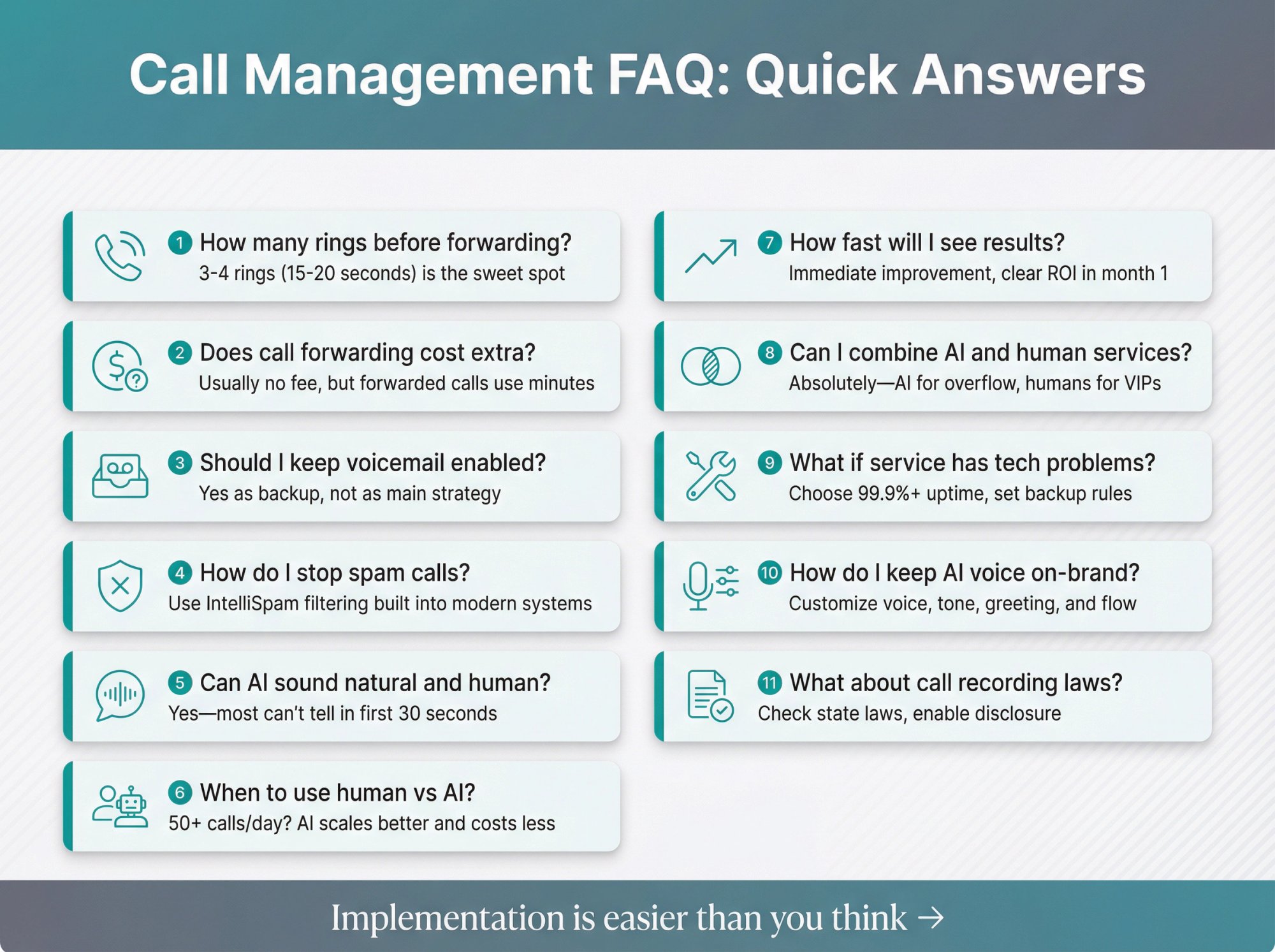
Enough rings that you can pick up if you're free, but not so many that the caller gives up. Busy-season callers are impatient by default, and hold time tolerance is low. CallRail found 41% hang up after 1-2 minutes on hold.
Three to four rings (about 15-20 seconds) is usually the sweet spot.
Does call forwarding cost extra on my phone plan?#
Usually there's no monthly fee to enable forwarding, but carriers often treat forwarded calls as normal usage (minutes). AT&T and T-Mobile document forwarding features and codes, but specifics depend on your plan.
Should I still keep voicemail enabled?#
As a backup, yes. As your main strategy in busy season, no. Many consumers won't leave a voicemail when you don't answer.
How do I stop spam from eating my minutes?#
Spam control is part of the call coverage system, not an optional add-on. Hiya's reporting shows spam call volumes are enormous.
Eden explicitly positions IntelliSpam-style filtering as part of its AI receptionist approach.
Can AI receptionists sound natural and human-like?#
Modern AI voice agents use natural language processing to understand caller requests. They can speak conversationally without requiring the caller to press 1 or 2.
The technology has improved dramatically. Most callers can't tell the difference between a well-configured AI and a human in the first 30 seconds of conversation.
When should I use human vs AI answering?#
Consider these factors:
• Call volume: If you get 50+ calls per day, AI scales better
• Complexity: If calls require nuanced judgment, human is better
• Budget: AI is typically 70-80% cheaper
• Hours: Both offer 24/7, but AI has no staffing limits
• Personal touch: Some industries benefit from human warmth
You can also use both. Have AI handle after-hours and overflow, with humans for VIP clients or complex issues.
How fast will I see results from these changes?#
Most businesses see results within the first week:
• Immediate: Call answer rate improves
• Week 1: Missed call count drops noticeably
• Month 1: Lead capture increases measurably
• Quarter 1: Revenue impact becomes clear
For AI or answering services, if you capture even 1-2 additional clients per month that you would have missed, the system typically pays for itself.
Can I combine AI and human answering services?#
Absolutely. Many businesses use a hybrid approach:
• AI handles after-hours and high-volume overflow
• Humans handle VIP clients or complex sales calls
• AI screens and routes, humans close deals
This gives you the best of both worlds: scalability when you need it, personal touch where it matters.
What if my answering service has technical problems?#
Choose providers with strong uptime guarantees. Most reputable services (including Eden) have 99.9%+ uptime.
As a backup, you can set up multiple forwarding rules:
• Primary: Forward to AI/answering service
• Secondary: If no answer, forward to your cell
• Tertiary: Voicemail as last resort
How do I keep the AI voice on-brand?#
Most AI services let you customize:
• Voice selection (male, female, accent)
• Tone (professional, friendly, casual)
• Greeting script
• Response patterns
Eden, for example, allows full customization of the AI's persona, welcome message, and conversation flow. You can make it sound as formal or conversational as your brand requires.
Turn Busy Season Into Your Best Revenue Season#
If you want to stop missing calls during busy seasons, don't rely on willpower.
Build a layered system:
① Define your SLA
② Triage by intent
③ Route and overflow at the carrier level
④ Replace voicemail with real first-touch
⑤ Add missed-call text back
⑥ Block spam
⑦ Protect callback deliverability
If you implement even half of this, you'll feel the difference within a week.
If you want a ready-made version of the overflow + capture + booking stack, Eden is built for exactly this: call forwarding into a 24/7 AI receptionist that captures lead details, can book, can transfer, and can text back instantly.
All the data and solutions discussed here are up-to-date as of 2025-2026, reflecting the latest in consumer behavior and call-handling technology. By acting on these insights now, you'll be well prepared to handle the next surge in demand without missing a beat (or a call).
A ringing phone is the sound of opportunity. While your competitors are letting their phones ring out or scrambling with overload, you'll be capturing those customers and building a reputation for outstanding availability.
In today's market, the business who answers is the business who wins. Turn your busy season into boom season.
Get started with Eden's 24/7 AI receptionist and never miss another call.
Ready to Transform YourCustomer Experience?
Join hundreds of businesses using Eden AI to handle calls, book appointments, and provide 24/7 customer support.