Can You Run a Business Without a Receptionist?
Running a business without a receptionist? Get 24/7 call coverage, lead capture, and booking for $99/month vs. $53K/year. Here's how.
January 20, 2026
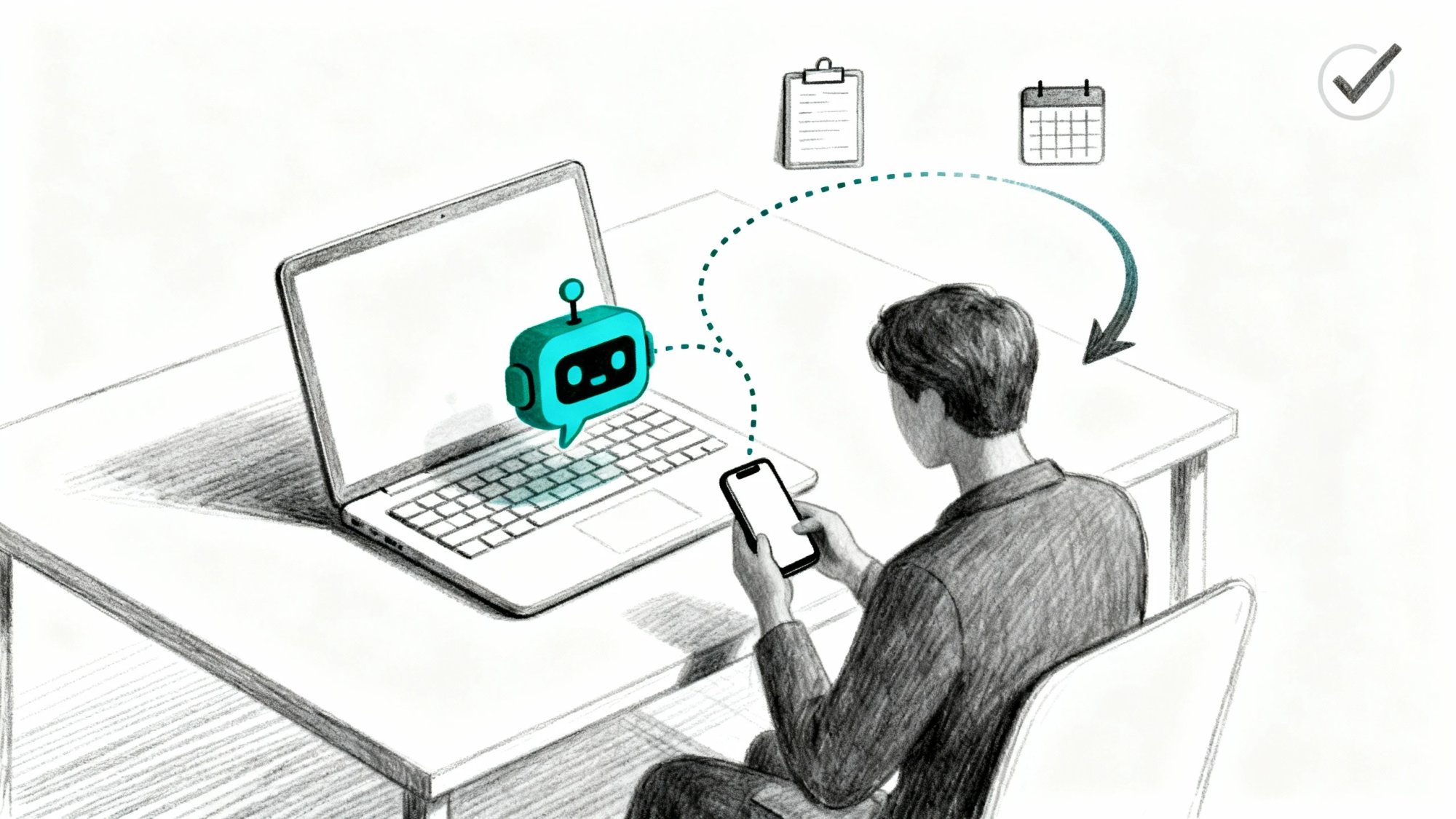
If you're asking this question, you're not really asking about a job title.
You're asking: "How do I make sure customers get helped instantly, without hiring a full-time person to sit by the phone?"
Here's the truth: Yes, you can absolutely run a business without a receptionist. But you cannot run a business without receptionist outcomes.
What are receptionist outcomes? Simple:
• Calls get answered (or at least captured properly)
• Leads get routed, qualified, and followed up fast
• Appointments get booked without endless back-and-forth
• Customers never hit dead ends like busy signals or voicemail black holes
• Spam doesn't consume your attention or tie up your line
This guide shows you how to design that system end-to-end, with real pricing, honest trade-offs, and copy-paste templates you can use today.
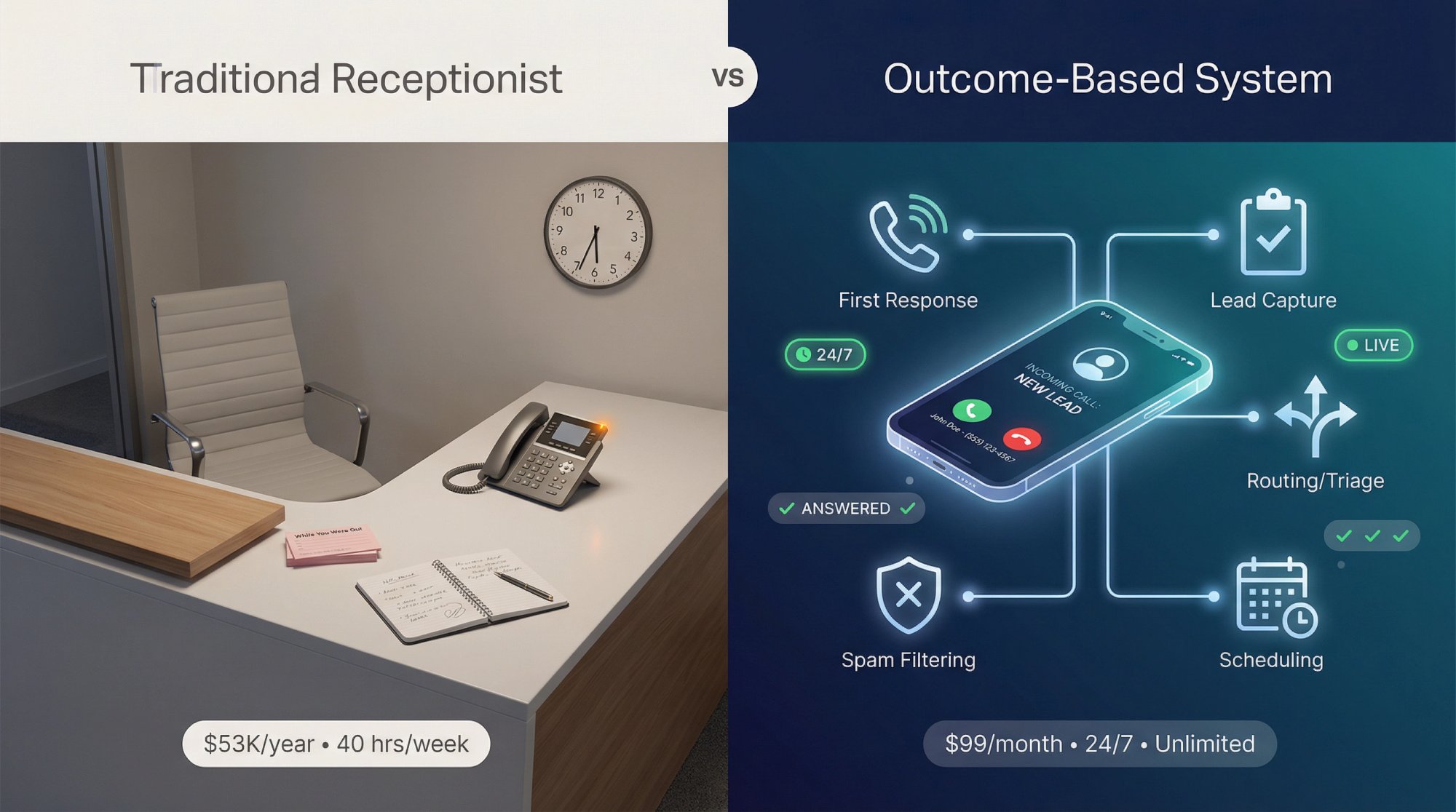
What Does a Receptionist Do (And What Are You Actually Replacing)?#
A receptionist traditionally serves as the face and voice of your business. The classic duties include greeting visitors and managing lobby sign-ins, answering incoming calls and routing them to the right person, managing appointments and calendars for your team, handling basic inquiries about hours, services, and directions, sorting mail and deliveries, and sometimes administrative tasks like data entry or billing support during downtime.
These tasks matter for keeping a business responsive and organized. A good receptionist ensures every caller or visitor feels attended to. So why would you choose to go without this role?
The simple answer: cost and efficiency.
Most owners overlook this reality.
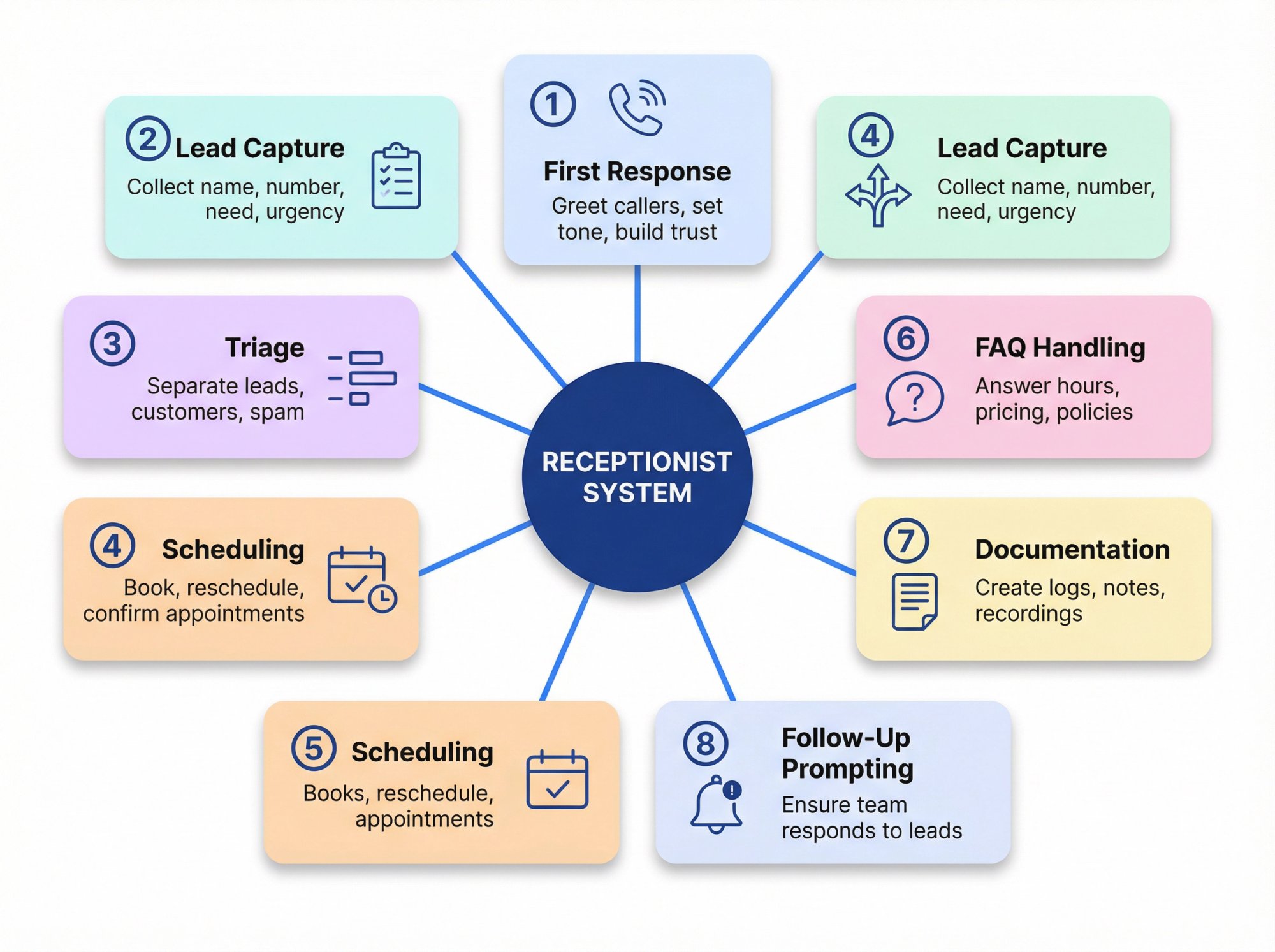
A receptionist isn't just "answering the phone." It's actually a bundle of eight distinct functions:
① First response
Greeting callers, setting the right tone, building trust immediately
② Lead capture
Collecting name, number, reason for calling, urgency, location, best callback window
③ Triage
Distinguishing new leads from existing customers, vendors, and spam. Separating emergencies from routine requests.
④ Routing
Transferring calls to the right person or taking a detailed message
⑤ Scheduling
Booking appointments, handling reschedules, confirming times, managing cancellations
⑥ FAQ handling
Answering common questions about hours, service area, pricing, policies, directions, what to expect
⑦ Documentation
Creating notes, summaries, call logs, and recordings for follow-up
⑧ Follow-up prompting
Making sure your team actually responds to captured leads
Running without a receptionist means replacing these eight functions. Not pretending they disappear.
That's the first critical insight: you don't need the person, but you absolutely need the system.
How Much Revenue Do You Lose From Missed Calls?#
Here's the physics problem nobody talks about: calls arrive randomly, but work does not.
Calls don't show up neatly every 20 minutes when you're free. They cluster. If your average call takes 4 minutes and you get 10 calls during a busy hour, that's 40 minutes of talk time in a 60-minute window. You now have only 20 minutes left for everything else.
This is why "I'll just answer my own phone" feels fine until you get busy. Then it falls apart.
The Missed-Call Reality (2024-2026 Data)#
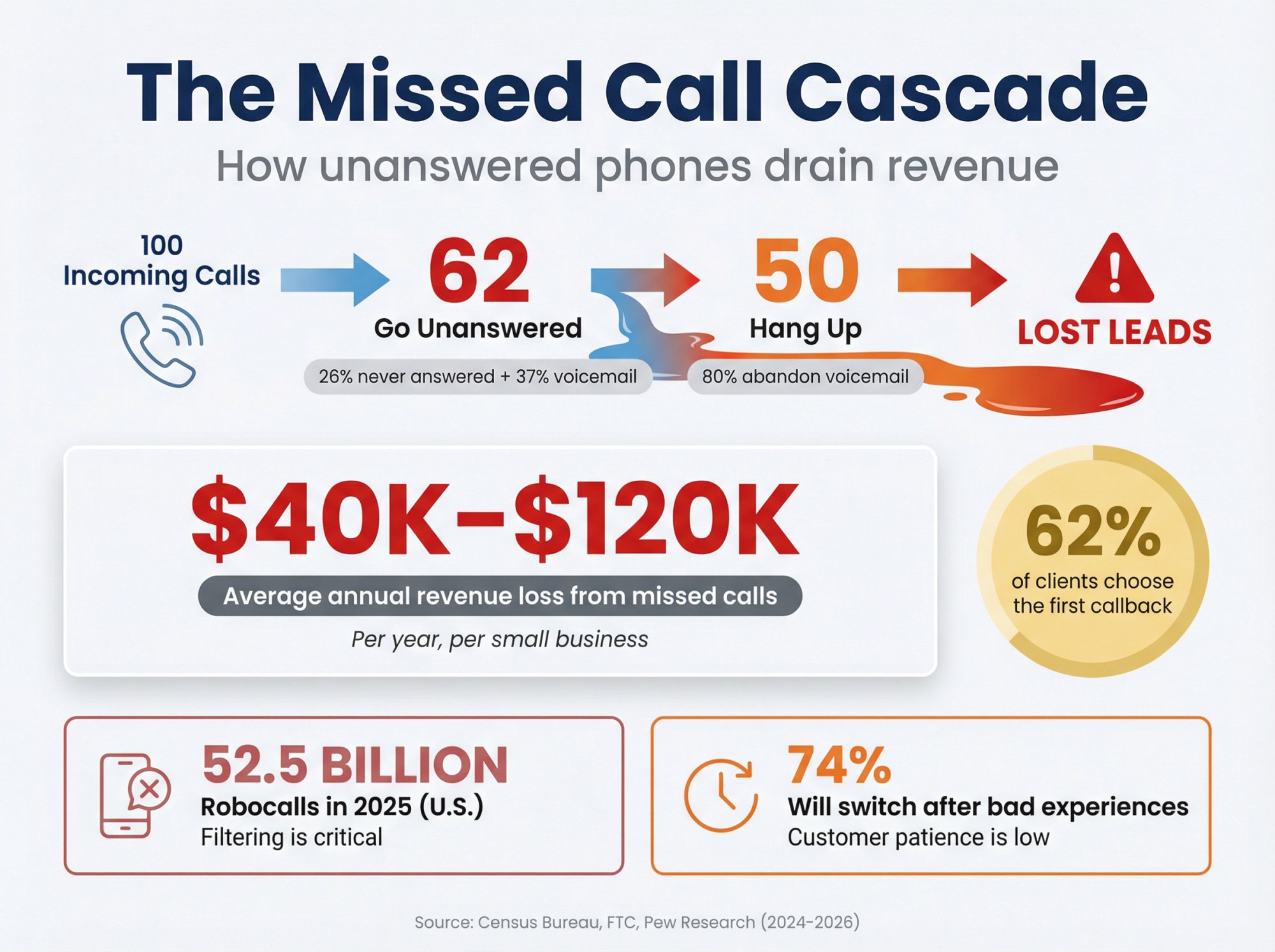
Research from Census Bureau economic indicators shows that businesses answer only about 38% of incoming calls on average. That means nearly two-thirds of callers don't reach a live person.
More specifically, industry call analytics research indicates that about 26% of calls never get answered. In home services specifically, 27% of calls go unanswered.
What happens to those unanswered calls? Roughly 37-38% go to voicemail, and another chunk just ring out. Now consider the customer's perspective: about 80% of callers hang up when they hit voicemail, without leaving a message. They assume no one is available and move on.
Think about that. Four out of five potential customers are gone if you don't answer the phone in real time.
In fact, 80-85% of people will not bother to call back or leave a voicemail if their call isn't answered. This is why understanding how much business you lose from voicemail is so critical.
This has a direct impact on the bottom line. By some estimates, the average small or mid-sized business loses around $120,000 in revenue each year due to missed calls. Even more conservative analyses find a typical small company losing at least $40,000+ per year from unanswered calls.
Real-world example: A home services company (plumber, HVAC, electrician) that doesn't answer after-hours calls is effectively handing those jobs to competitors. Customers with an urgent issue will call the next provider within minutes if you don't pick up.
Similarly, law firms report that 62% of clients go with the first attorney who calls them back. A slow or missed response means losing the client entirely.
Spam Makes the Problem Worse (And It's Huge)#
In 2025, U.S. consumers received 52.5 billion robocalls, according to Federal Trade Commission robocall tracking data (reported January 8, 2026).
So a "receptionist system" isn't just about answering. It's also about filtering. If you can't screen spam effectively, your phone becomes a liability instead of a business asset. This is where call screening solutions become essential.
Customers Are Less Patient Than You Think#
Recent consumer research from Pew Research Center found:
• 48% of consumers said they're frustrated by a lack of 24/7 customer support availability
• 74% said they would switch to a competitor after multiple bad experiences
You don't need 24/7 human staff. But your customers increasingly expect something to happen when they reach out. Silence doesn't cut it anymore. A 24/7 answering service can bridge that gap.
What Does a Full-Time Receptionist Really Cost?#
This is where people accidentally lie to themselves.
A full-time in-house receptionist is expensive. Not just the hourly wage, but the fully loaded cost including benefits, taxes, and overhead.
The Bureau of Labor Statistics lists median pay for "Receptionists and Information Clerks" at $17.90/hour (May 2024 data). That works out to about $37,232 per year for a full-time position.
Then comes the part most owners ignore: benefits and overhead.
According to BLS Employer Costs for Employee Compensation data (June 2025), benefits are about 29.8% of total compensation for private industry. If benefits represent 29.8% of total comp, that means wages are roughly 70.2%. This implies total compensation is about 1.42x the base wage.
Quick math:
→ Wage cost: $17.90/hour = $37,232/year
→ Fully loaded total comp: approximately $53,000/year (using the 1.42x factor)
Industry salary research estimates put the average base pay for a receptionist at around $38,500/year, which comes to about $54,000 when you factor in taxes and benefits. The numbers align.
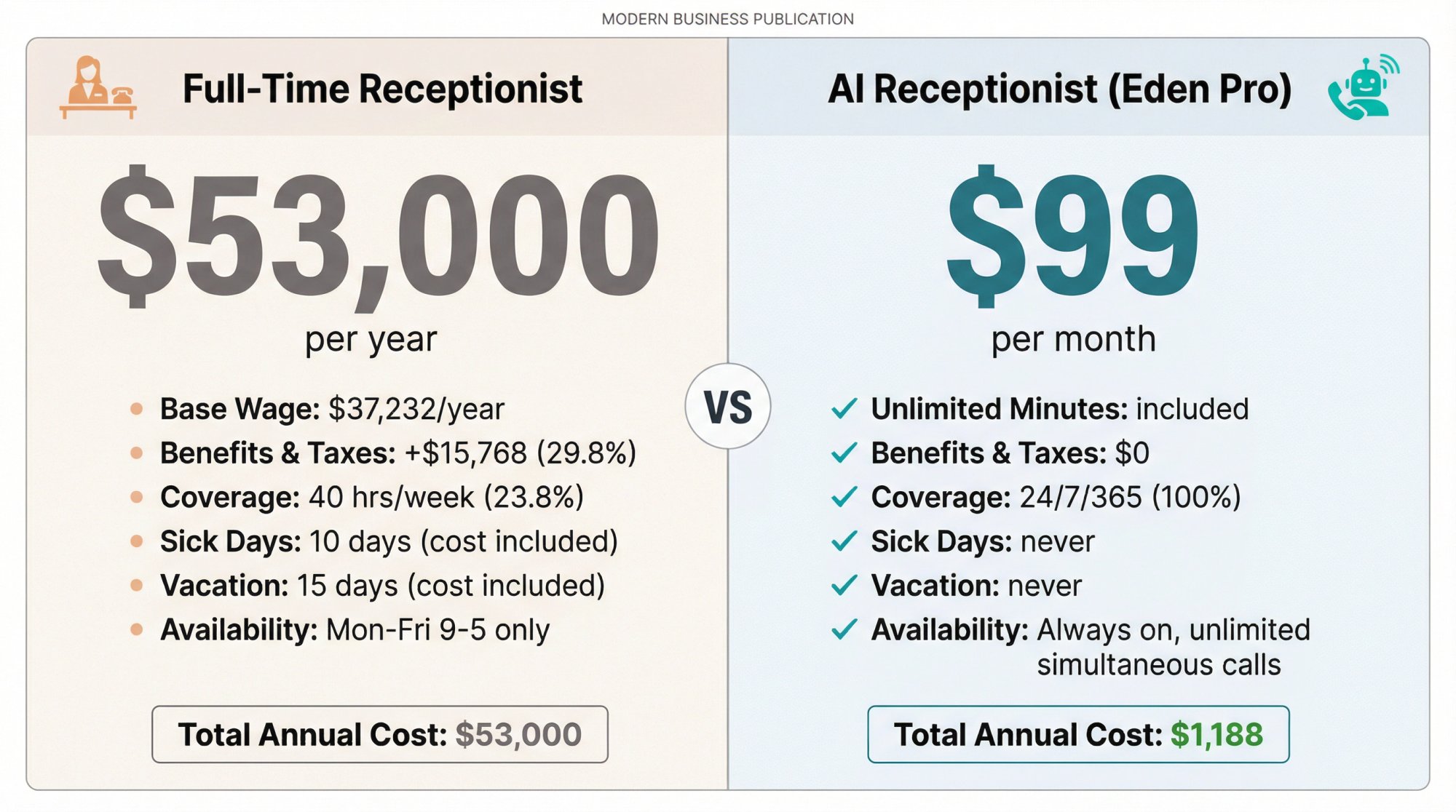
And that buys you roughly 40 hours per week. Not evenings. Not weekends. Not vacations, sick days, or peak bursts.
If you truly wanted 24/7 live coverage with in-house staff, you would need multiple shifts (roughly 4.2 full-time equivalents to cover 168 hours per week). That quickly becomes a six-figure annual commitment even before management overhead.
Plus, not every business has enough call volume or visitor traffic to keep a receptionist fully occupied. Many small businesses don't really have enough work to keep a full-time receptionist busy. They end up paying someone to just "be there." This is a common scenario explored in what to do when you can't afford a receptionist.
That's the hidden cost: you're paying for availability, not just productivity.
When You Can Skip a Receptionist (And Be Fine)#
You can usually skip a dedicated receptionist if most of these are true:
• You get low inbound call volume (and it's not spiky or clustered)
• Calls are rarely urgent
• Customers comfortably use online booking or email for requests
• You have no walk-ins (or you can handle them with signage or a doorbell system)
• Losing the occasional call does not materially impact revenue
• Your business is not built on fast competitive response (like local services, real estate leads, or legal intake)
If that's you, your "system" might be a clean, professional business voicemail, a web form plus a scheduling link on your website, a shared inbox and a strict callback rule (respond within X hours).
Just be honest with yourself: "fine" depends on your market and margins. If every lead counts, even low volume matters.
When Missing Calls Quietly Kills Your Business#
You likely need real coverage if:
• Every lead is valuable (legal services, high-ticket consulting, B2B projects)
• Customers call competitors quickly (home services, property management, real estate)
• You regularly get after-hours calls that turn into revenue
• You have multiple locations or multiple teams that need coordination
• Calls require structured intake (service details, case type, address, urgency level)
• Spam and vendor calls are frequent enough to disrupt your day
The hidden cost isn't only missed revenue. It's also constant interruption that kills deep work, context switching that reduces quality output, lower quality work when you're always half-listening for the phone, slower follow-up because you can't respond while on a job, and burnout from being "always on call."
If your business depends on both focus and responsiveness, you need a better system than "call me and hope I pick up." This is especially true for industries that need outsourced receptionist services.
Receptionist Alternatives in 2026: Real Pricing and Trade-Offs#
Below is the practical menu. No magic solutions. Just honest trade-offs.
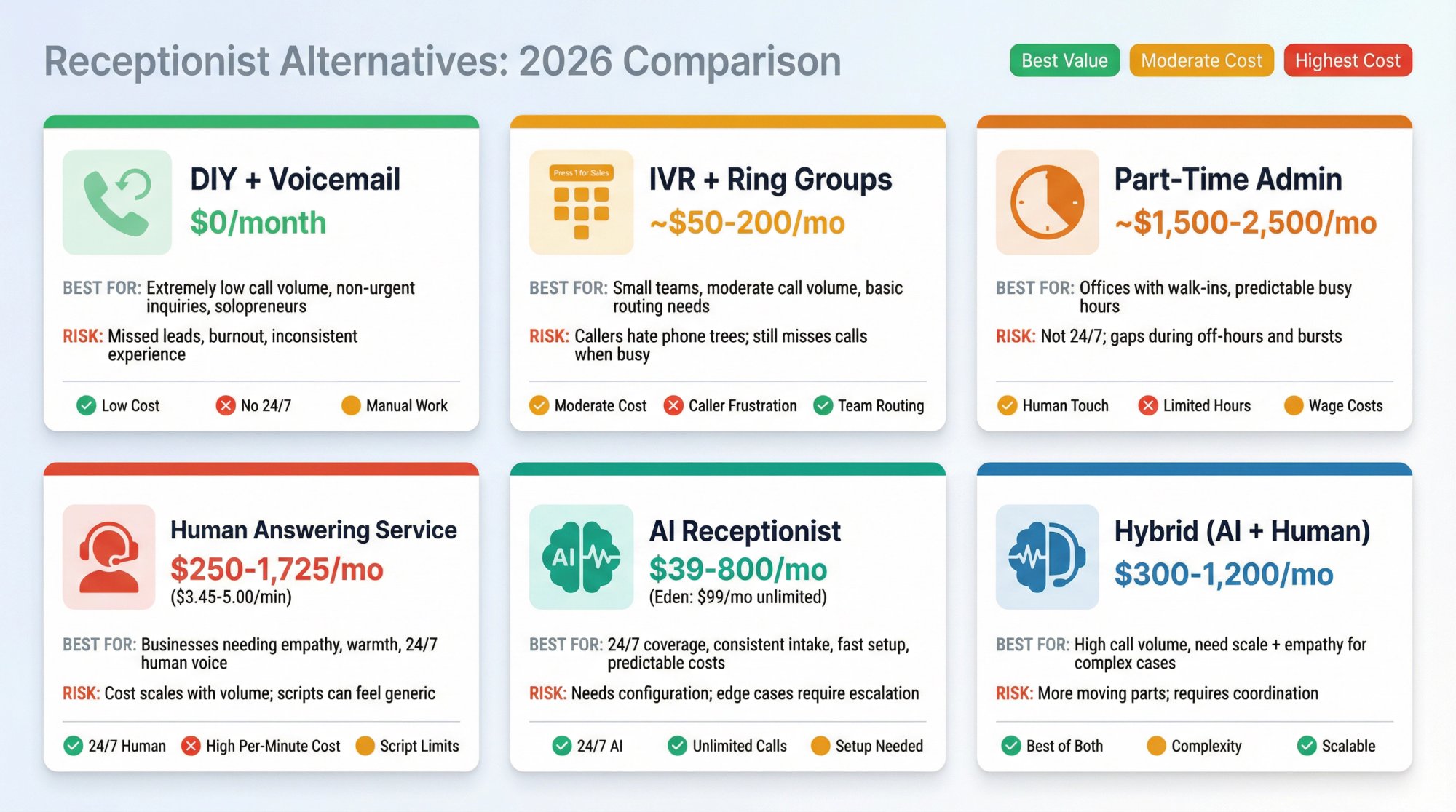
Option 1: DIY (You Answer + Voicemail)#
Best for: Extremely low call volume, non-urgent inquiries, solopreneurs with predictable schedules
Risk: Missed leads, inconsistent customer experience, burnout from constant availability
If you do this, at least upgrade voicemail into a system:
• Set up voicemail-to-text/email so you know immediately when someone calls
• Create an SLA: "We call back within X minutes during business hours"
• Provide a backup contact path (text line, web form, email address)
This works when calls are infrequent and your customers are patient. Learn more about professional voicemail greeting samples to make the best impression.
Option 2: IVR (Phone Menu) + Ring Groups#
Best for: Small teams that can share calls, moderate call volume, need basic routing
Risk: Callers hate phone trees when they're urgent. You still face the "nobody is free" problem.
IVR helps with routing ("Press 1 for sales, Press 2 for support") but it does not solve capacity. If everyone is busy, calls still go to voicemail. Consider call routing solutions for better management.
Option 3: Part-Time Admin or Shared Office Manager#
Best for: Offices with walk-in visitors plus phone needs, businesses with predictable busy hours
Risk: Still not 24/7 coverage. Still misses bursts. Part-time schedules create gaps.
This can work if your calls align with when the part-time person is available. But you're still paying wages, and you're still limited to those hours.
Option 4: Outsourced Human Answering Service#
Best for: Businesses that want a human voice 24/7, need empathy and flexibility in conversations
Risk: Cost scales with volume. Scripts can feel generic if not customized well.
| Plan | Monthly Cost | Minutes Included | Per-Minute Rate |
|---|---|---|---|
| 50 minutes | $250 | 50 | ~$5.00 |
| 100 minutes | $395 | 100 | ~$3.95 |
| 200 minutes | $720 | 200 | ~$3.60 |
| 500 minutes | $1,725 | 500 | ~$3.45 |
That's roughly $3.45 to $5.00 per minute depending on your tier.
Many virtual receptionist plans start around $200-$300 per month, and even robust plans (hundreds of minutes of calls) often cost under $1,000/month. Compare that to the $4,000+ per month true cost of an in-house hire. It's not uncommon to save $30,000 or more per year by using virtual receptionists instead of a full-time employee. Learn more about virtual receptionist cost.
Human answering services are great when you need warmth, judgment calls, and complex interactions. The trade-off is cost and occasional script limitations. Compare this to AI receptionist vs voicemail vs human options.
Option 5: AI Receptionist#
Best for: 24/7 coverage, consistent intake every time, fast setup, predictable costs
Risk: Needs good configuration. Edge cases may require escalation paths to humans.
An AI receptionist is software that answers calls with an intelligent, human-like voice. It uses advanced speech recognition and natural language processing to have actual conversations with callers.
What AI receptionists can do:
• Greet the caller professionally
• Understand their request in natural language
• Answer FAQs instantly (hours, service area, pricing basics)
• Collect contact info (name, number, reason for calling)
• Schedule appointments directly into your calendar
• Transfer calls to you or your team when needed
Crucially, they never sleep or take breaks, and they can handle unlimited simultaneous calls. Five people calling at once? No problem. This means no caller ever hears a busy signal or gets sent to voicemail due to line overload.
| Plan | Monthly Cost | Calls Included |
|---|---|---|
| 50 calls | $95 | 50 |
| 150 calls | $270 | 150 |
| 500 calls | $800 | 500 |
AI pricing is often more predictable than per-minute human answering. You pay for calls handled, not minutes consumed. Learn more about how much an AI receptionist costs.
Eden is a leading AI receptionist built specifically for small businesses. It offers 24/7 live answering, instant lead capture, bilingual support (English and Spanish), smart spam filtering, and on-the-spot booking (on Pro and higher plans). Setup takes about five minutes: pick a number, paste your website, forward your line. Done.
Eden's pricing starts at $39/month for 200 minutes and $99/month for unlimited minutes (Pro plan). That's a fraction of a human receptionist's cost, with none of the scheduling gaps. Discover the benefits of using AI receptionists.
Option 6: Hybrid (AI Handles 80%, Humans Handle Exceptions)#
Best for: Businesses that need both scale and empathy, high call volume with occasional complex situations
Risk: More moving parts to manage, but usually the best balance for growing businesses
The hybrid approach uses AI for routine calls (scheduling, FAQs, lead capture) and routes complex or sensitive calls to human agents. You get 24/7 coverage at AI prices, with human backup when needed.
How to Build Your Reception System (Step-by-Step)#
A receptionist is not a person. It's a system.
And you can design that system deliberately, whether you're using a human, AI, or hybrid approach.
Step 1: List Your Top 15 Call Reasons (In Plain English)#
Open your call logs (or your memory if you don't track calls yet) and write what people actually call about. Common buckets:
• "I need pricing"
• "Can you come today?"
• "Do you service my area?"
• "I want to schedule an appointment"
• "I need to reschedule"
• "I have a problem with my last service"
• "Emergency" (burst pipe, lockout, no heat, etc.)
• "Billing question"
• "Directions or hours"
• "Vendor trying to sell me something"
You can't design good routing until you know what's actually arriving on your phone line. This is where call handling services can help structure your approach.
Step 2: Create a 3-Level Priority Model#
You need a rule that works when you're busy. Here's a simple framework:
P0: Emergency / Time-Sensitive
Examples: water leak, lockout, no heat in winter, legal deadline, property management emergency
P1: New Money
New leads, estimate requests, consultation requests, anything that could turn into revenue
P2: Everything Else
Billing questions, vendor calls, routine customer support
This priority system tells you (or your coverage solution) how to handle each call type when resources are limited.
Step 3: Decide What Must Be Handled Live vs. Can Wait#
This is where you stop bleeding revenue.
A simple default rule:
→ P0: Handle live or transfer immediately to on-call person
→ P1: Capture live with detailed intake, then fast callback within 15 minutes
→ P2: Capture details, respond by next business day
Understanding what inbound calls are and how to prioritize them is key to this system.
Step 4: Write Your "Intake Minimums" (What Must Be Captured Every Time)#
If you only implement one thing from this guide, do this.
For new leads, the minimum information you need to capture is:
• Full name (first and last)
• Callback number (verify it's correct)
• What they need (short summary in their words)
• Address or service area (so you know if you can help)
• Urgency and timing ("Emergency," "This week," "Just researching")
• Best callback time (morning, afternoon, evening)
• How they found you (optional but useful for marketing)
This becomes your non-negotiable standard. Every lead capture (voicemail, AI, human service, web form) should collect at least these fields. This is the foundation of effective lead capture.
Step 5: Build a Routing Matrix (Copy-Paste Template)#
Here's a table you can copy and customize:
| Call Type | Priority | What to Collect | Where It Goes | Target Response |
|---|---|---|---|---|
| Emergency | P0 | Issue + address + callback | On-call phone | 5 minutes |
| New lead | P1 | Intake minimums (Step 4) | Sales/owner | 15 minutes (business hours) |
| Existing customer issue | P2 | Name + job ref + issue | Support queue | Same day |
| Billing question | P2 | Invoice # + name + question | Admin/bookkeeper | 24 hours |
| Vendor / spam | None | None | Block or archive | Never |
That table becomes your "receptionist brain." Share it with your team or configure it into your AI or human answering service. Learn how call forwarding solutions can implement this routing.
Step 6: Make Your FAQ List Brutally Practical#
Most SMB FAQs are too fluffy. Your callers want answers to:
• Do you service my ZIP code?
• Are you open right now?
• What is your price range?
• How soon can you come?
• Do you do emergency calls?
• Do you offer free estimates?
• What are your cancellation policies?
Write out clear, honest answers to these. If you're using an AI receptionist like Eden, you'll configure these as part of your knowledge base so the AI can answer instantly.
Step 7: Implement Your Coverage (Choose Your Mechanism)#
This is where solutions differ based on which option you picked earlier.
DIY: Set up voicemail-to-email, create a strict callback SLA, provide alternate contact methods
Human answering service: Write a script, set escalation rules, train the service on your business
AI receptionist: Configure knowledge base, set routing rules, grant booking permissions
Hybrid: AI handles first line, human fallback for edge cases
The key is that you've now defined what needs to happen. The mechanism is just how you execute it. Learn how to forward business calls to an answering service properly.
Step 8: Decide Your Follow-Up SLA and Enforce It Like Law#
The fastest "receptionist replacement" win isn't fancy tech. It's speed.
For web leads, research from Hennessey Digital's 2025 study on law firms found that 33% respond in 10 minutes or less and 39% take more than 2 hours or don't respond at all.
Even if you're not a law firm, the pattern is the same: most businesses are slower than they think, and speed creates competitive advantage.
Also, industry research from the Small Business Administration notes that more than half of CRM leaders say customers expect problem resolution in three hours or less.
So set an SLA like this:
→ New leads: Respond within 15 minutes during business hours
→ After-hours leads: Respond by 9:00am next business day
→ Emergencies: Immediate response or transfer
Then actually measure it weekly. Understanding how to stop missing calls when with clients is part of this discipline.
Step 9: Track Three Metrics Weekly#
You don't need a complex dashboard at first. Just track:
① Answer Rate
What percentage of calls are handled live (not sent to voicemail)?
② Lead Capture Rate
Of new leads, what percentage have name + number + need captured correctly?
③ Time to First Response
Average time in minutes from call to first callback
If those three numbers improve, revenue usually follows.
How to Handle Walk-Ins Without a Receptionist#
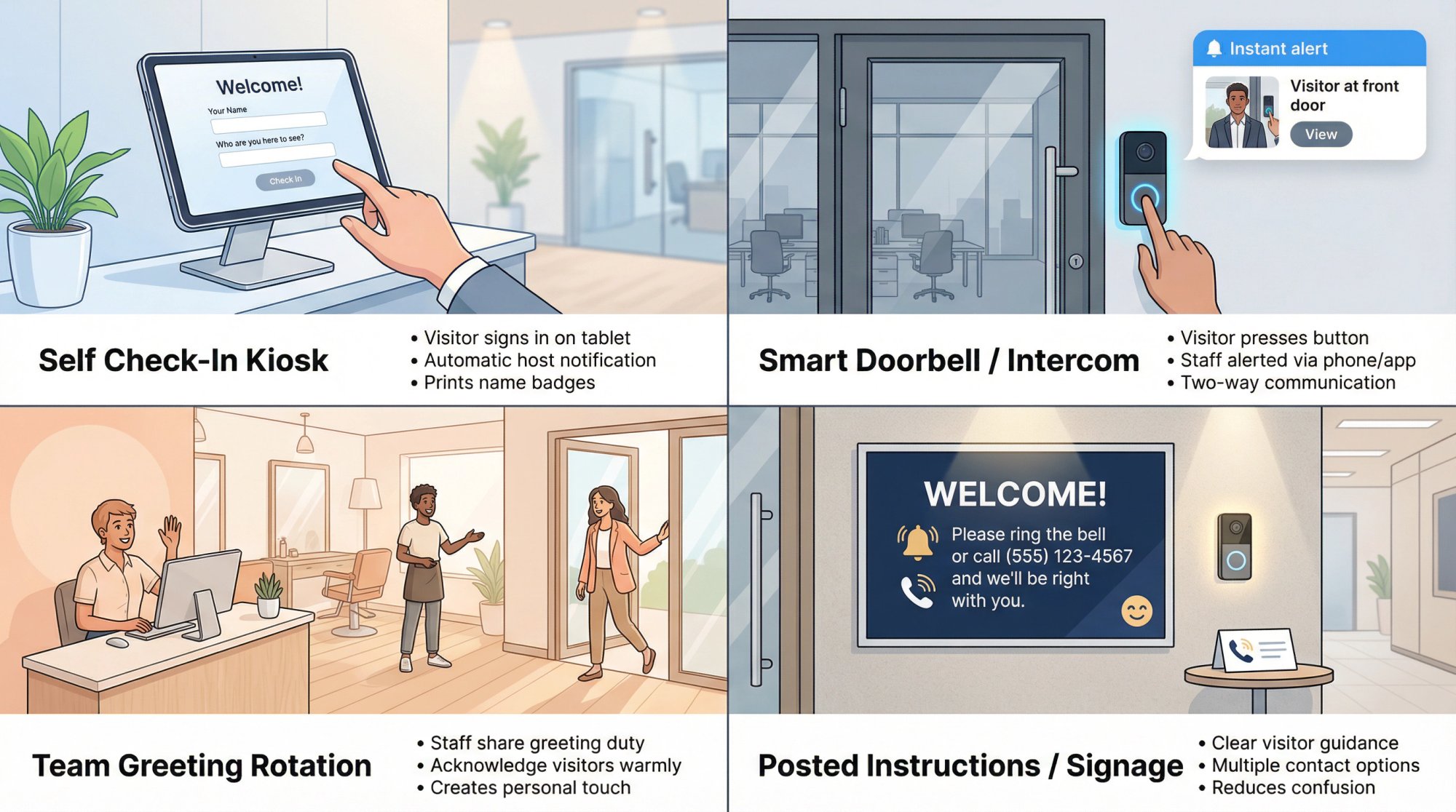
What about actual walk-ins or visitors to your office? Traditionally, a receptionist would welcome them. If you don't have that person, you need an alternative way to greet and manage visitors. Several approaches work:
Self Check-In Kiosks#
A popular solution in modern offices is a visitor management kiosk or tablet. Systems like Greetly, Envoy, or Sine can run on an iPad in your lobby.
When a visitor arrives, they're guided to sign themselves in on the screen by entering their name, who they're there to see, and any other info. The system then automatically notifies the employee host via text, email, or Slack that their guest has arrived. It can even print a name badge.
This not only replaces the receptionist sign-in function, it adds security and record-keeping (you get a log of everyone who comes in).
Intercoms and Smart Doorbells#
If your office is behind a locked door or you have low visitor traffic, a simple intercom or smart doorbell (like Ring) can do the job. Visitors press a button to alert you or your team. Many modern intercoms will call a designated phone or send a push notification to staff.
Team Greeting Rotation#
In certain businesses (like small clinics, salons, or gyms), staff can share the duty of greeting walk-ins. For example, in a salon without a receptionist, any stylist or employee who sees a client come in should at least acknowledge them and let them know someone will be right with them.
Post Information and Instructions#
If you anticipate times when no staff might be front-facing, consider posting a friendly sign for visitors. For example:
Welcome! Please ring the bell or call (555) 123-4567 and we'll be right with you.
This gives visitors a clear next step instead of standing around wondering if anyone knows they're there.
Compliance: Call Recording and Texting Rules#
I'm not your lawyer, but here's the practical version of what you need to know.
Call Recording#
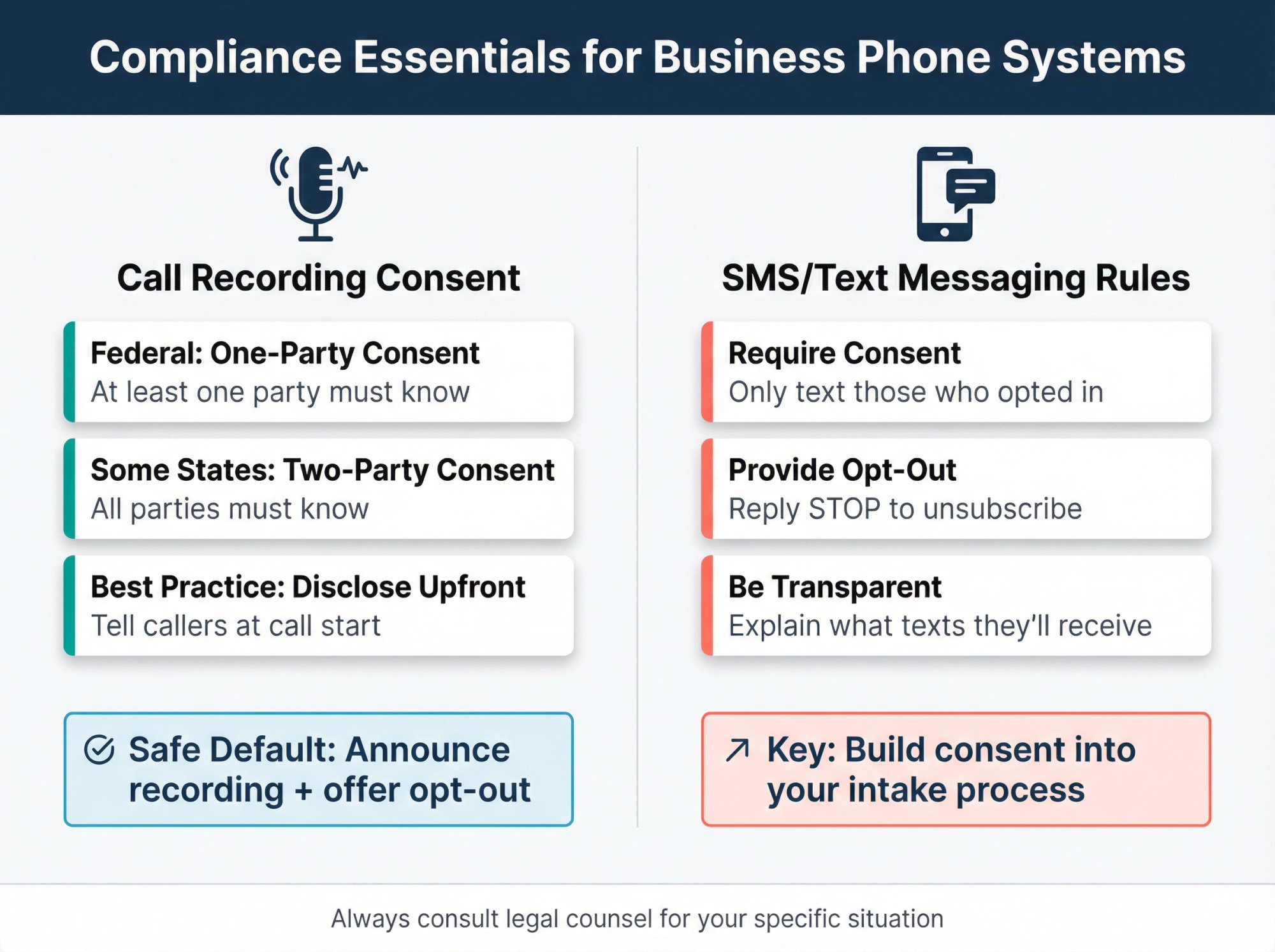
Federal law generally requires consent of at least one party to record calls, while states can require stricter rules (two-party consent in some states).
If you serve callers across state lines, the safest default is:
• Disclose recording at the start of the call
• Give an opt-out option (or provide an alternate contact path)
That prevents legal headaches and is also good customer communication. Something like: "This call may be recorded for quality and training purposes." Learn more about call recording solutions.
Texting#
If you text callers (appointment confirmations, scheduling links, follow-ups), you need to think about consent and opt-out.
Telemarketing rules and legal interpretations shift over time, and courts can change outcomes. For example, the FCC's "one-to-one consent" rule for lead generation was vacated by the Eleventh Circuit in January 2025, and the FCC later removed it after the court decision.
Practical takeaway: Build your process so it's robust even as rules evolve:
• Be transparent about texts upfront
• Only text people who initiated contact or explicitly opted in
• Include opt-out language when appropriate (like "Reply STOP to unsubscribe")
This keeps you on the right side of regulations and builds customer trust.
The 2-Minute Decision: Do You Need a Reception System?#
Still not sure if you need a receptionist system? Take this quick assessment.
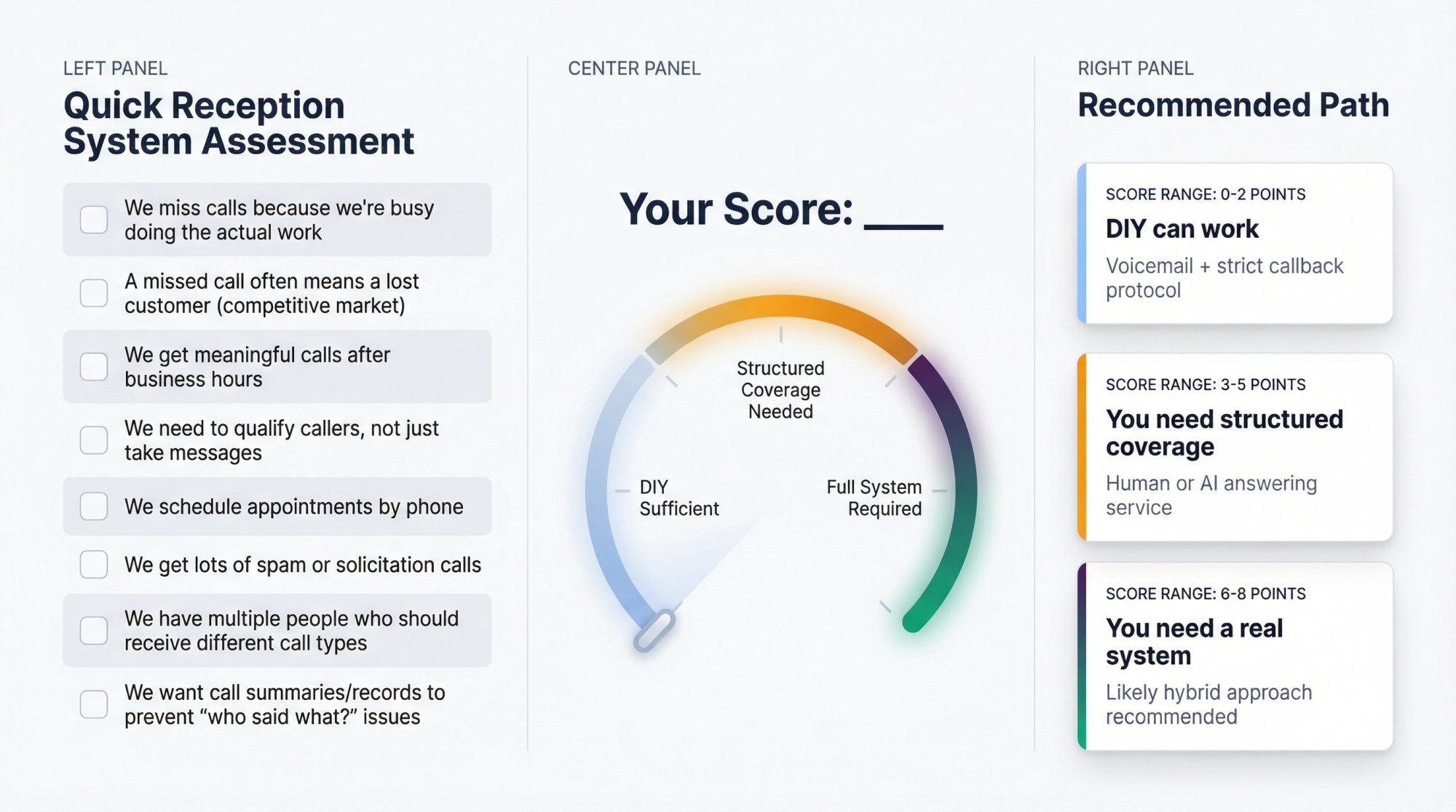
Give yourself 1 point for each "yes":
-
We miss calls because we're busy doing the actual work
-
A missed call often means a lost customer (competitive market)
-
We get meaningful calls after business hours
-
We need to qualify callers, not just take messages
-
We schedule appointments by phone
-
We get lots of spam or solicitation calls
-
We have multiple people who should receive different call types
-
We want call summaries/records to prevent "who said what?" issues
Your score:
→ 0 to 2: DIY can work (voicemail + strict callback)
→ 3 to 5: You need structured coverage (human or AI service)
→ 6 to 8: You need a real receptionist system, likely hybrid
This scorecard gives you an honest assessment of where you stand.
How Eden Solves the "No Receptionist" Problem#
If your goal is to stop missing calls without staffing phones, Eden is built for exactly that scenario.
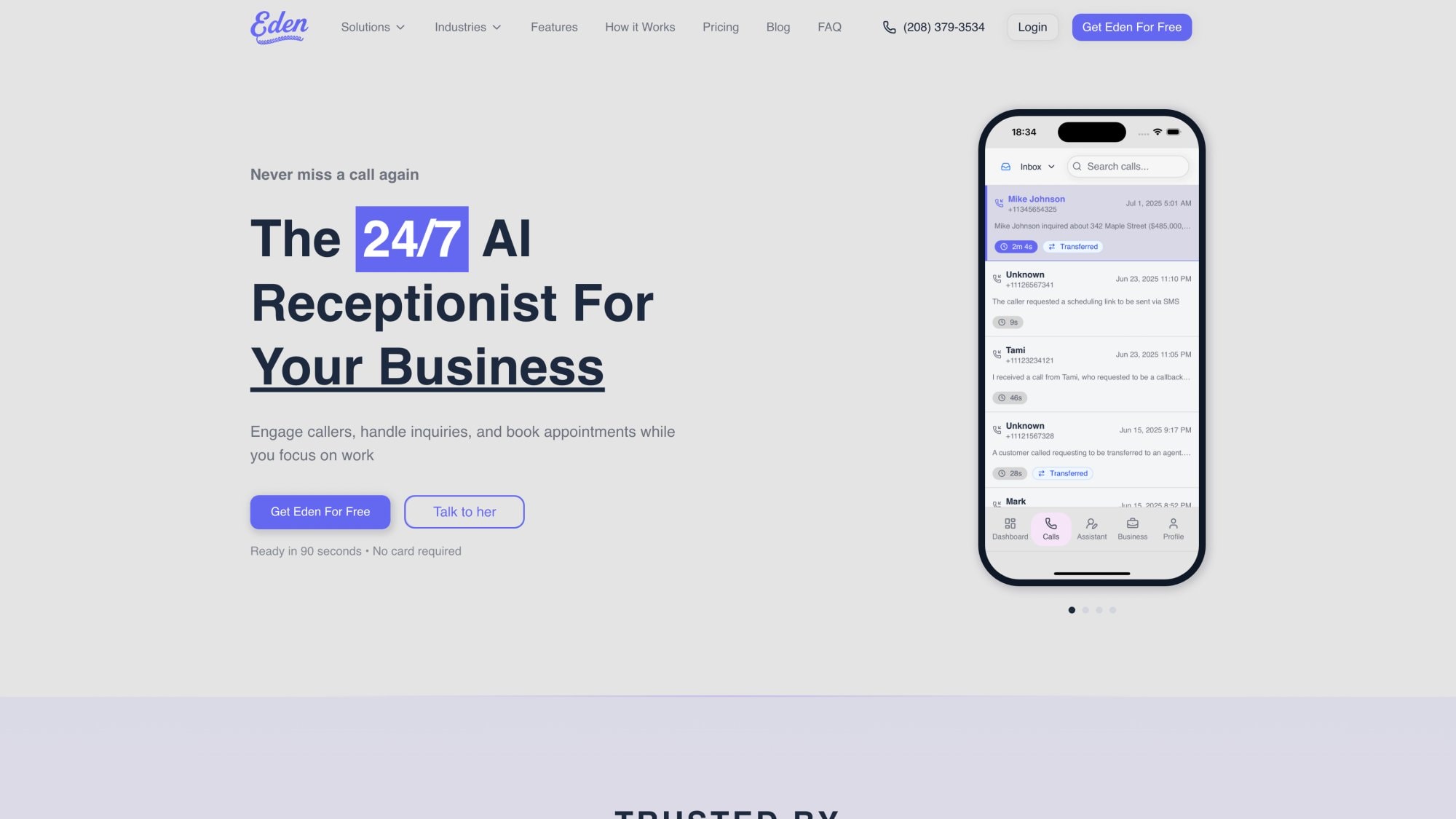
Eden is an AI phone receptionist that delivers all the receptionist outcomes we talked about earlier, without the receptionist headcount or cost.
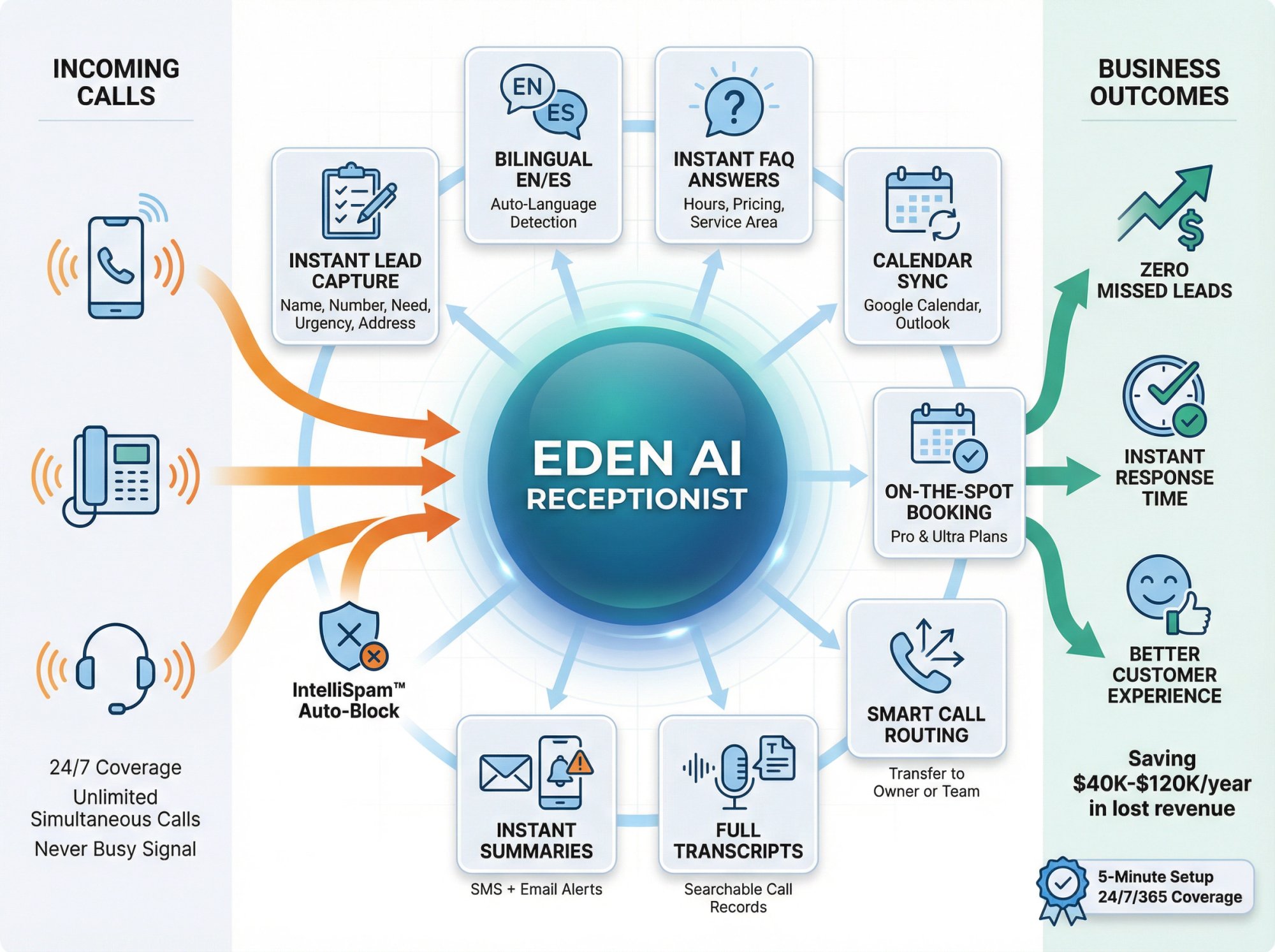
What Eden Does#
Eden answers every call 24/7 with a natural, conversational voice. It can:
• Greet callers professionally and set the right tone for your business
• Capture leads completely (name, callback number, service needed, urgency, address)
• Answer FAQs instantly about your hours, service area, pricing basics, and policies
• Book appointments directly into your Google Calendar or Outlook (on Pro plan)
• Route and transfer calls to you or your team when needed (Pro plan)
• Filter spam automatically with IntelliSpam technology so robocalls never reach you
• Send instant summaries via SMS and email after every call
• Speak bilingual English and Spanish fluently, switching automatically based on the caller's language
Crucially, Eden never sleeps, never takes breaks, and can handle unlimited simultaneous calls. That means no caller ever hears a busy signal or gets sent to voicemail because your line is tied up.
How Eden Fits the Framework in This Guide#
Remember the "Reception Coverage System" we built earlier? Eden is designed to execute it:
→ Intake minimums (Step 4)? Eden captures them every time.
→ Routing matrix (Step 5)? Configure call transfer rules based on urgency and call type.
→ FAQ list (Step 6)? Upload your FAQs and Eden answers instantly.
→ Follow-up SLA (Step 8)? Eden sends you summaries in real time so you can respond fast.
→ Metrics (Step 9)? Eden's dashboard tracks every call with transcripts and analytics.
Eden Pricing vs. Hiring a Receptionist#
We showed earlier that a full-time receptionist costs about $53,000 per year (or $4,000+ per month) for 40 hours per week.
Eden offers:
• Plus Plan: $39/month for 200 minutes (great for low to moderate call volume)
• Pro Plan: $99/month for unlimited minutes (perfect for busy seasons and high call volume)
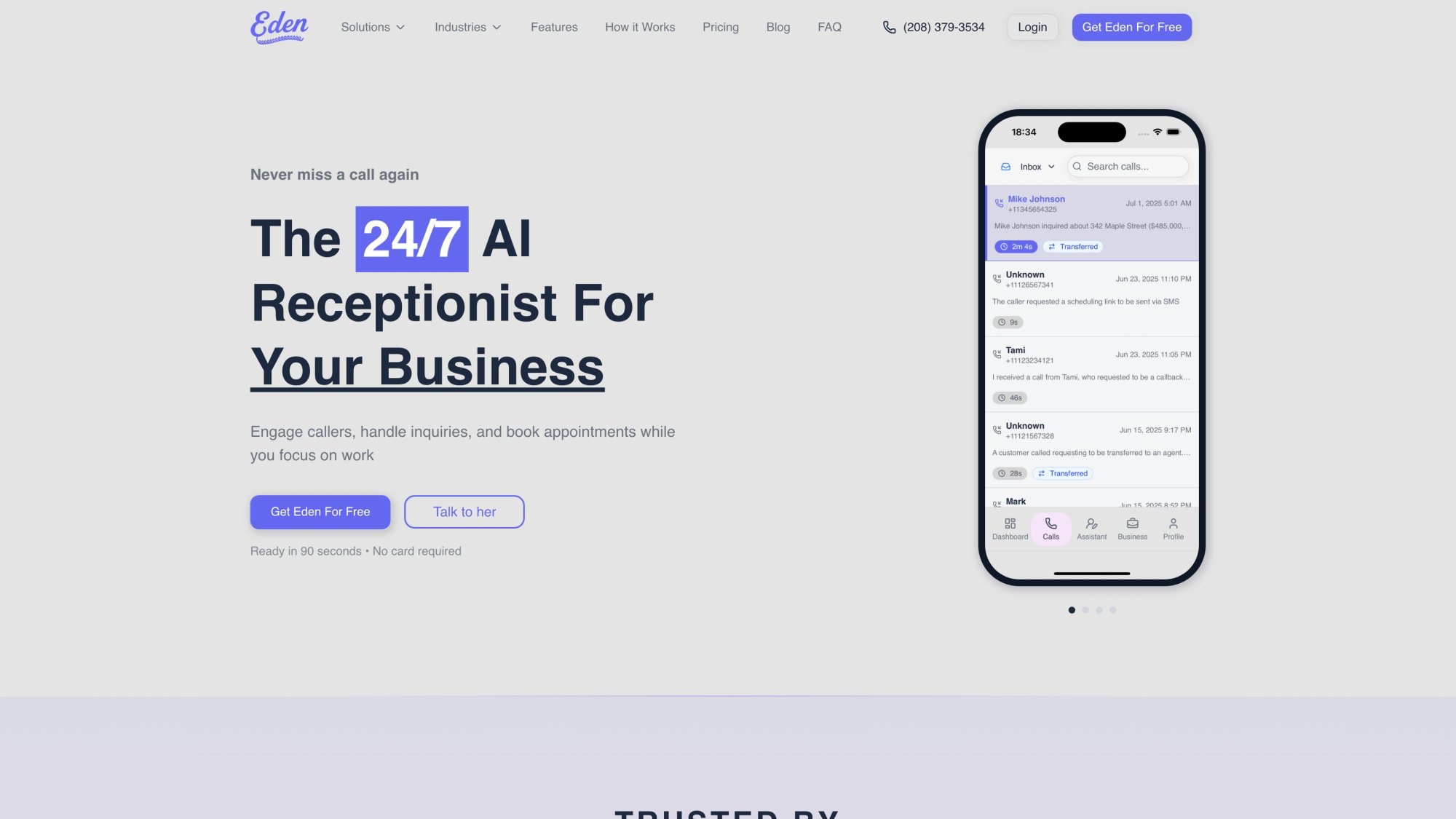
That's $39 to $99 per month for 24/7 coverage with no gaps, no vacations, no sick days. You're saving thousands of dollars per month compared to hiring.
And setup takes about five minutes: pick a local number, paste your website (Eden scrapes your business info), forward your line. You're live.
Resources That Pair Well With This Guide#
Eden's blog also has helpful resources on topics we covered:
• Why voicemail loses leads and what to do instead
• Call forwarding fundamentals (so you can go live correctly without technical headaches)
• Virtual receptionist pricing guide (updated for 2026)
• How much does a virtual receptionist cost? (detailed breakdown)
Try Eden Risk-Free#
Eden offers a free trial with 30 minutes of call time for one week. You can test it with real calls, see how it handles your business, and decide if it's the right fit.
If you're evaluating options, use the framework we built in this article:
→ Can it capture your intake minimums every time? ✓
→ Can it route emergencies correctly? ✓
→ Does it reduce spam effectively? ✓
→ Will your team actually respond faster because of it? ✓
If the answer is yes across the board, you can run without a receptionist and still operate like a business that never misses a lead.
Get started with Eden here and stop missing calls today.
Frequently Asked Questions#
Can you really run a business without a receptionist?#
Yes, absolutely. But you can't run a business without receptionist functions. You need a system to answer calls, capture leads, route inquiries, and follow up fast. That system can be a human receptionist, an AI receptionist like Eden, a virtual answering service, or even a well-designed DIY setup with voicemail-to-email and strict callback protocols.
The key is making sure the eight core receptionist functions get handled: first response, lead capture, triage, routing, scheduling, FAQ handling, documentation, and follow-up prompting. If those are covered, you're fine without the traditional receptionist role. Read more about what a receptionist does.
How much does a full-time receptionist actually cost?#
A full-time receptionist costs about $53,000 per year when you include wages, benefits, and overhead. That breaks down to roughly $4,000+ per month for 40 hours per week.
If you want 24/7 live coverage with in-house staff, you'd need about 4.2 full-time equivalents to cover all shifts, which quickly becomes a six-figure commitment.
Compare that to AI receptionists like Eden at $39-$99 per month, or human virtual receptionist services at $200-$1,000+ per month. The savings are significant.
What happens to calls when you don't have a receptionist?#
Without a receptionist or coverage system, calls typically go to voicemail. And the problem is: about 80% of callers hang up when they hit voicemail without leaving a message. They assume no one is available and move on to the next provider.
Research shows that businesses answer only about 38% of incoming calls on average, and 26% of calls never get answered at all. This leads to $40,000 to $120,000 in lost revenue per year for the average small business.
That's why you need a system (human, AI, or hybrid) to ensure calls get captured even when you're busy. Learn about the cheapest way to answer business calls 24/7.
How do AI receptionists actually work?#
AI receptionists use advanced speech recognition and natural language processing to have real conversations with callers. They can understand what people are asking, respond intelligently, and take actions like booking appointments or transferring calls.
Eden, for example, works like this:
① A call comes in and Eden answers immediately with a professional greeting
② Eden listens to what the caller needs and responds naturally
③ It can answer FAQs from your business's knowledge base
④ It captures lead information (name, number, reason for calling, urgency)
⑤ It can book appointments into your calendar or transfer the call to you
⑥ After the call, it sends you a summary via SMS and email with a full transcript
The AI handles unlimited simultaneous calls, never sleeps, and learns your business from your website and FAQ setup. Discover how AI phone answering works.
Is an AI receptionist better than voicemail?#
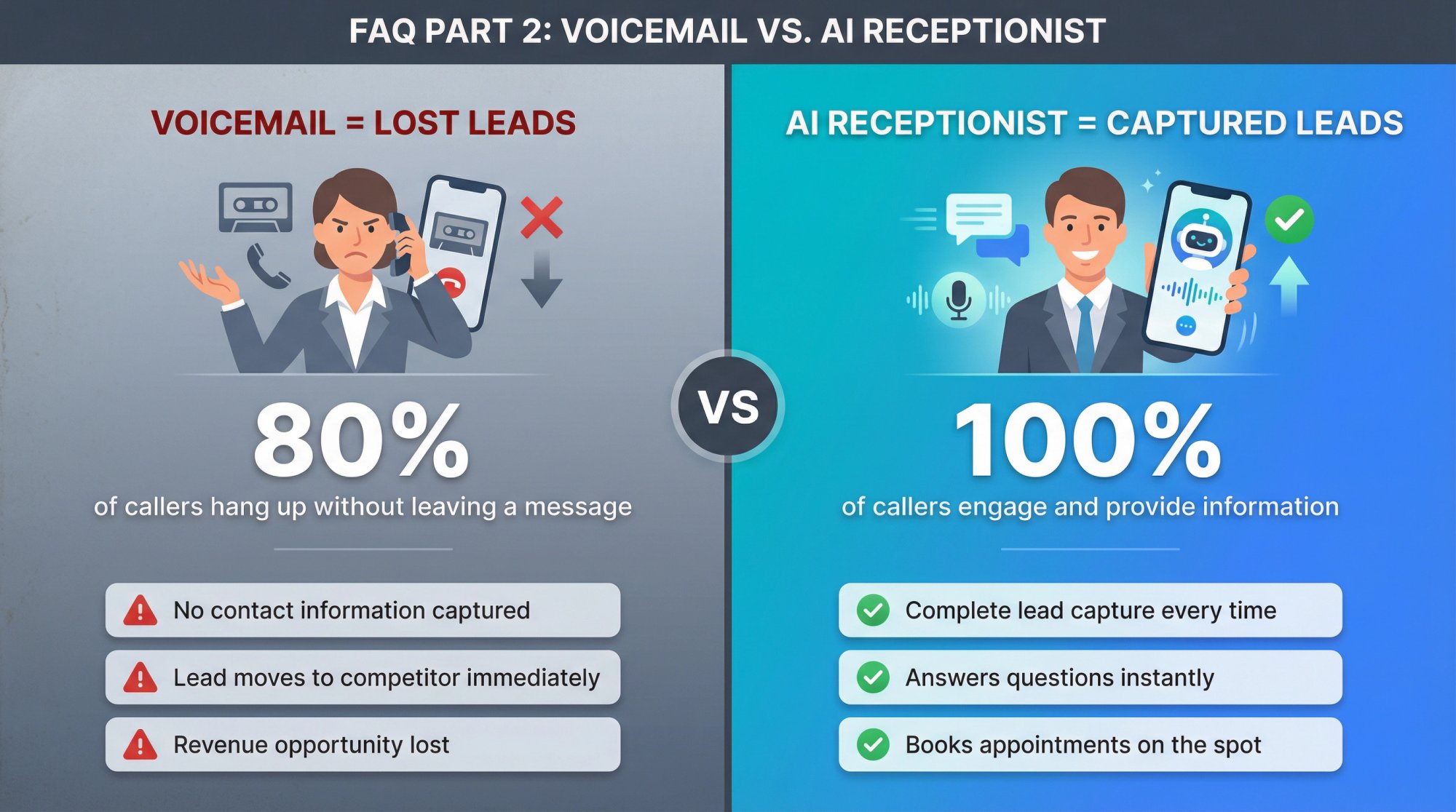
Absolutely. Voicemail is passive and most callers don't leave messages. 80% of callers hang up on voicemail without leaving any information, which means you lose the lead entirely.
An AI receptionist is active and interactive. It:
• Engages the caller immediately instead of asking them to leave a message and wait
• Asks qualifying questions to understand what they need
• Captures complete information every time (name, number, reason, urgency)
• Answers common questions on the spot without waiting for a callback
• Books appointments in real time instead of playing phone tag
Think of it this way: voicemail is a black hole. AI receptionists like Eden turn every call into a captured lead with actionable information. Compare the cost analysis.
What about handling visitors without a receptionist?#
You have several options for managing walk-in visitors without a front desk person:
• Self check-in kiosks: Systems like Greetly, Envoy, or Sine run on an iPad. Visitors sign themselves in and the system notifies the host automatically.
• Intercoms and smart doorbells: Visitors press a button that alerts your team via phone call or app notification.
• Team greeting rotation: Staff share the responsibility of acknowledging visitors when they arrive.
• Posted instructions: A simple sign like "Please ring the bell or call (555) 123-4567" gives visitors a clear next step.
The key is having a clear process so visitors aren't left wondering if anyone knows they're there.
Do I need to worry about call recording laws?#
Yes, but it's manageable. Federal law generally requires consent of at least one party to record calls. Some states require two-party consent (both caller and business must know the call is being recorded).
The safest approach if you serve customers across state lines:
• Disclose recording at the start of the call ("This call may be recorded for quality and training")
• Offer an opt-out or alternate contact method
This keeps you legally safe and builds customer trust. Most AI receptionist services like Eden include compliant recording notices as part of their setup.
How fast should I respond to phone leads?#
Speed matters enormously. Research from Hennessey Digital found that 33% of law firms respond to web leads in 10 minutes or less, while 39% take more than 2 hours or don't respond at all.
The firms that respond fast win more clients. The same is true for phone leads.
Best practice SLA:
→ New leads during business hours: Respond within 15 minutes
→ After-hours leads: Respond by 9:00am the next business day
→ Emergencies: Immediate response or transfer to on-call
With Eden, you get instant SMS and email summaries after every call, so you can respond within minutes even if you were busy when the call came in.
What's the difference between a human answering service and an AI receptionist?#
Human answering services:
• Real people answer calls following a script
• Great for complex conversations that need empathy and judgment
• Cost: $200-$1,700+ per month depending on call volume
• Pricing is usually per minute (typically $3-$5 per minute)
• Limited by agent availability (though 24/7 coverage is possible with larger services)
AI receptionists:
• Software answers calls with natural language AI
• Excellent for consistent intake, FAQs, scheduling, and routing
• Cost: $39-$800+ per month depending on features and volume
• Pricing is often per call or unlimited (not per minute)
• Handles unlimited simultaneous calls without any wait time
• Never sleeps, never takes breaks
Both work. The choice depends on your call complexity and budget. Many businesses use a hybrid approach: AI handles routine calls, humans handle exceptions. Learn about AI call answering services.
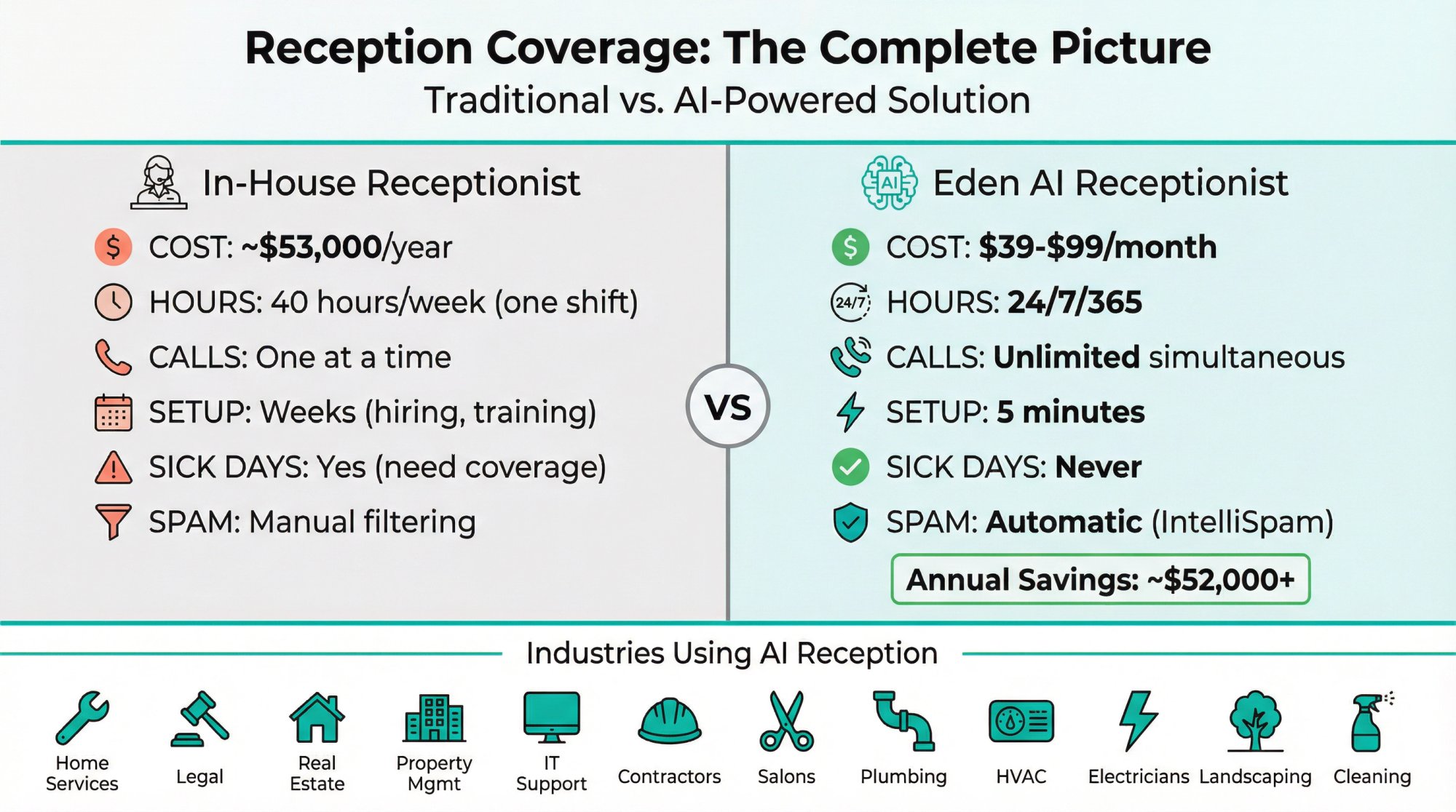
How does Eden compare to hiring a receptionist?#
Let's look at the key differences:
| Factor | Full-Time Receptionist | Eden AI Receptionist |
|---|---|---|
| Cost | ~$53,000/year ($4,000+/month) | $39-$99/month |
| Hours | 40 hours/week (one shift) | 24/7/365 |
| Simultaneous calls | One at a time | Unlimited |
| Setup time | Weeks (hiring, training) | 5 minutes |
| Sick days / vacations | Yes (need coverage) | Never |
| Spam filtering | Manual | Automatic (IntelliSpam) |
| Call recording | Extra setup | Built-in with transcripts |
| Bilingual support | Depends on hire | English + Spanish fluent |
| Consistency | Varies | Perfect every time |
Eden gives you receptionist outcomes without receptionist costs, schedules, or limitations. You get 24/7 coverage, instant lead capture, and professional call handling for a fraction of the price.
Can an AI receptionist handle multiple calls at once?#
Yes. This is one of the biggest advantages. Eden can handle unlimited simultaneous calls.
If five people call your business at the exact same time, Eden answers all five instantly. No busy signal. No hold music. No "all of our representatives are currently busy."
A human receptionist (or even a team of humans) can only handle one call at a time. Every additional simultaneous call goes to voicemail or a queue.
With AI, no caller ever waits.
What industries benefit most from running without a traditional receptionist?#
Businesses that benefit most from AI receptionists like Eden include:
• Home services: Plumbers, HVAC, electricians, landscapers (field workers can't answer phones)
• Legal services: Law firms, solo attorneys (calls during court sessions get missed)
• Real estate: Agents are often out showing properties
• Property management: Tenant calls come 24/7, emergencies happen after hours
• Small professional services: Accountants, IT support, consultants (busy with client work)
• Contractors: General contractors, roofers (on job sites, can't pick up)
• Local retail and services: Salons, gyms, pet groomers (hands-on with customers)
Basically, any business where:
① You're often too busy to answer the phone
② Calls come outside business hours
③ Missing a call means losing revenue
④ You don't have enough call volume to justify a full-time receptionist
That's where AI receptionists like Eden shine.
Final Takeaway#
You don't need a receptionist.
You need:
• A reliable first response every time the phone rings
• Consistent intake of lead information
• Fast follow-up (within minutes, not hours)
• Smart routing based on urgency and call type
• Spam defense so junk calls don't waste your time
• And ideally, on-the-spot booking to eliminate phone tag
Once you design those as a system, "no receptionist" stops being a gamble and becomes a competitive advantage.
In today's business landscape, the traditional receptionist behind a desk from 9 to 5 is no longer the only way (or even the best way) to handle customer interactions. Yes, you can run a business without a receptionist, and do it successfully.
Companies across industries have embraced virtual receptionists, automated systems, and team-based workflows to ensure every call and visitor is handled promptly without the cost and constraints of a dedicated employee.
The crucial insight: while the person can be optional, the function is not. You cannot afford to ignore calls or leave customers hanging just because you've cut the receptionist role.
But with the strategies outlined above (AI that answers calls in seconds, self-service appointment booking, digital visitor sign-ins, structured coverage systems), you can cover those functions brilliantly.
In fact, you might deliver an even better experience: callers never hit voicemail, hold times disappear, and inquiries get handled at midnight just as well as at noon. All of this while you save money and free up your team's time.
Get started with Eden and build your receptionist system today.
Ready to Transform YourCustomer Experience?
Join hundreds of businesses using Eden AI to handle calls, book appointments, and provide 24/7 customer support.