Why Best Leads Call (and Worst Leads Email)
Your best prospects call because urgency and complexity demand it. Your worst leads email. Here's the data and systems to handle both.
January 28, 2026
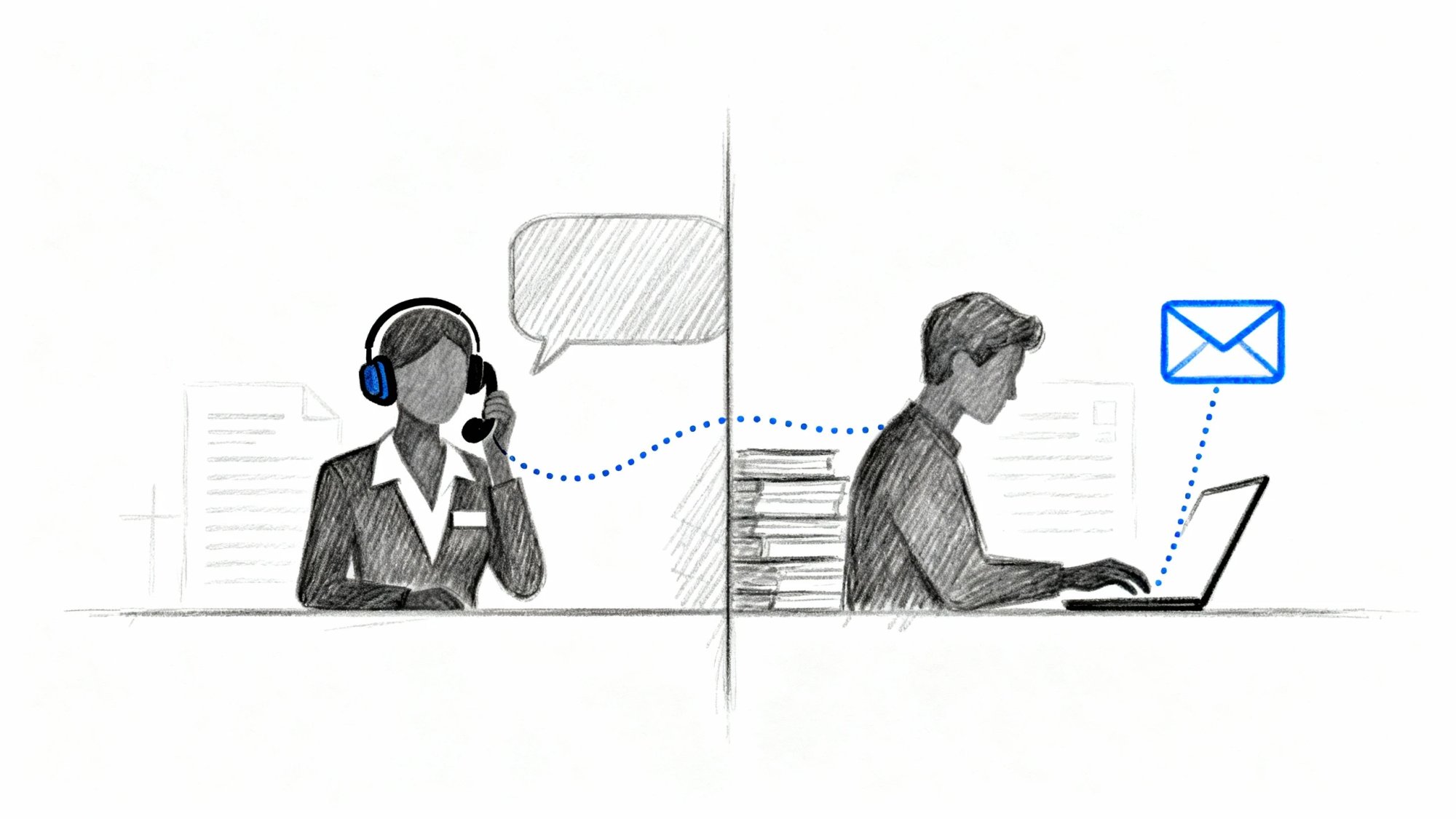
If you run a service business, you've probably felt this in your bones: the callers are the ones who actually buy. The emails? Often "How much?" (with no details), "Just curious," or a vendor pitch you didn't ask for.
This guide explains why that pattern exists with current data, and more importantly, gives you a practical system to capture and convert high-intent phone leads (even when you're busy or closed), filter and salvage email leads (so you only spend time where it pays), and engineer your inbound channels so more of your best prospects choose the phone in the first place.
Why Channel Choice Reveals Customer Intent#
People pick channels based on risk, urgency, and effort.
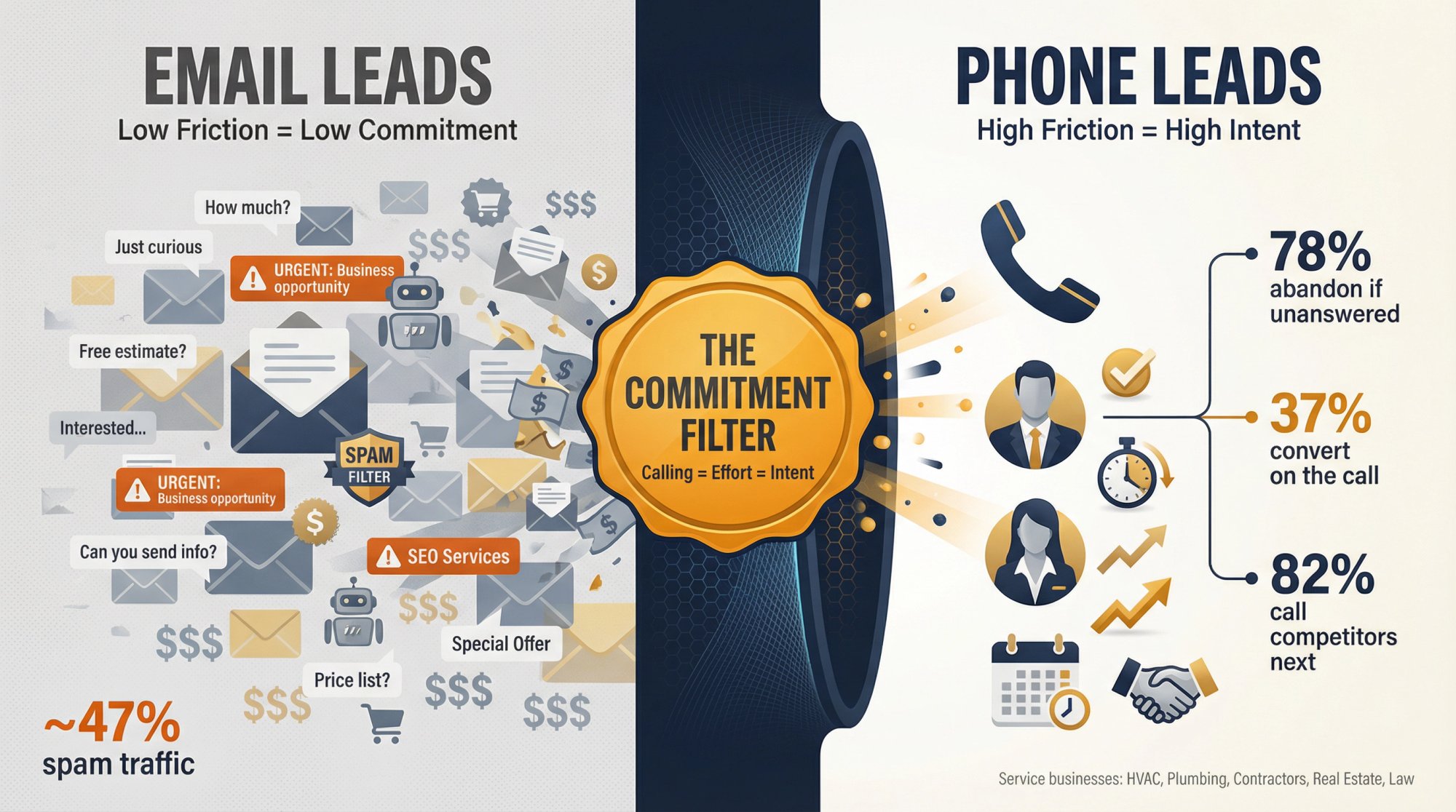
A phone call is a "high-friction" action: it requires real-time attention, social energy, and the willingness to engage in a two-way conversation. That friction is exactly why calls skew toward higher intent.
Email is "low-friction": it's async, copy/pasteable, and easy to send to multiple businesses at once. Great for shoppers doing early research but also for spam, bots, and vendors.
When you treat calls and emails as equally valuable "leads," you end up with two painful outcomes.
→ You under-invest in your highest-intent channel (calls)
→ You over-invest time in low-intent noise (email)
Let's ground that with current evidence.
Phone Lead Statistics: What Research Shows (2025-2026)#
How Fast High-Intent Prospects Move to Competitors#
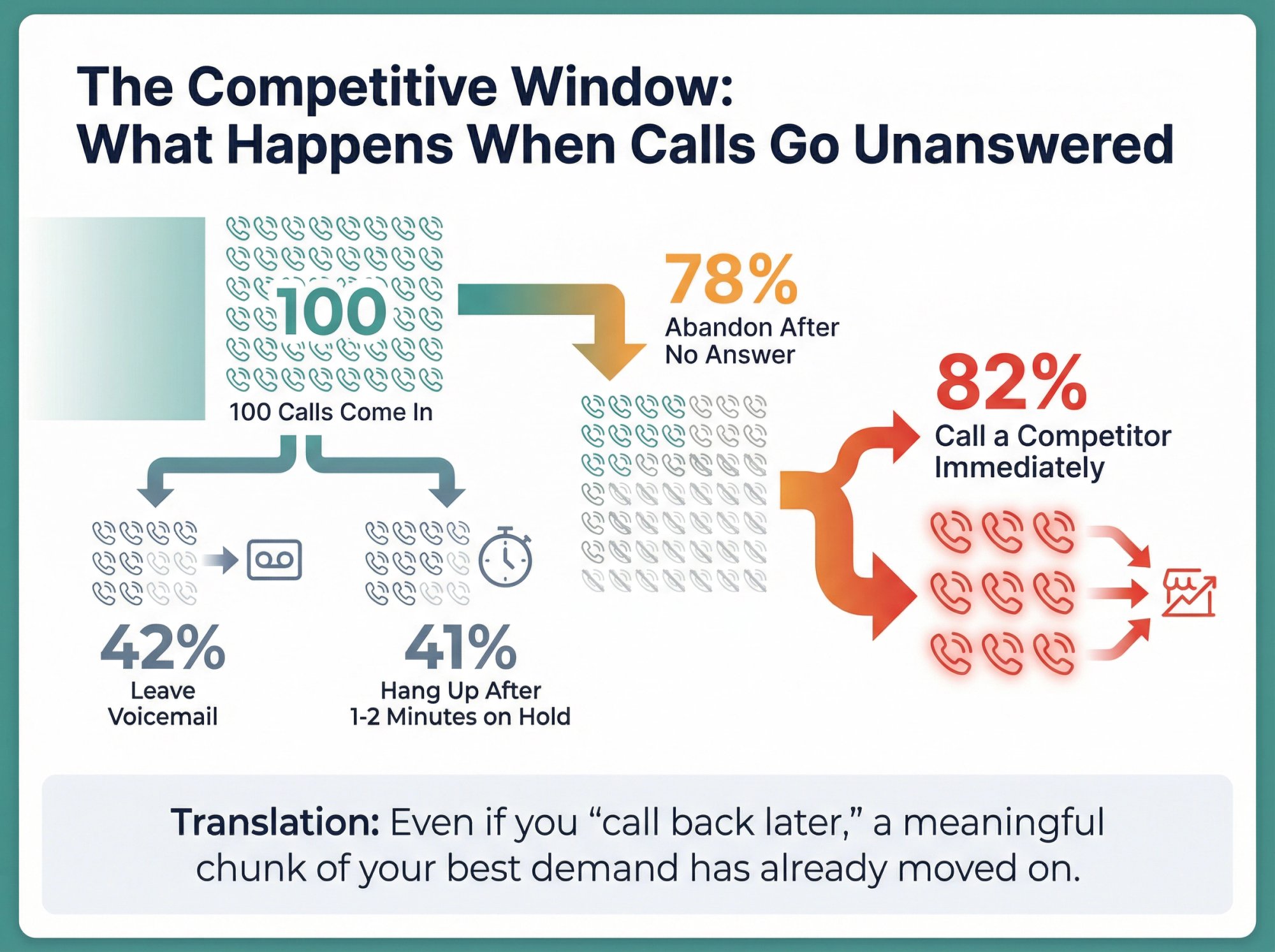
Consumer research of 1,000 U.S. consumers (published September 25, 2025) found some striking patterns:
| Caller Behavior | Percentage |
|---|---|
| Have abandoned a business after an unanswered call | 78% |
| Immediately call another business when unanswered | 21% |
| Leave a voicemail when unanswered | 42% |
| Hang up after 1-2 minutes on hold | 41% |
| Will call a competitor if you don't answer | 82% |
Translation: Even if you "call back later," a meaningful chunk of your best demand has already moved on.
Why Phone Conversations Convert Better Than Email#
Industry benchmark reporting (based on AI analysis of 60+ million phone calls across nine industries) shows:
→ 35% of calls driven by digital marketing are leads
→ 37% of those leads convert on the call
→ 35% of businesses never even ask callers to buy or book
Calls aren't just "inquiries." They're often near-purchase moments. And many businesses still fail at the basic mechanics of converting them.
When Customers Choose Phone Over Email#
TransUnion research (October 31, 2024) reported "nearly eight out of 10" consumers consider phone calls important for communicating with businesses and notes calls remain essential for complex or urgent issues.
Contact Center Pipeline's research-based writeup (April 23, 2025) highlights that for high urgency, telephony is the top choice (49%) and telephony preference has risen substantially since 2018, while email is less preferred for complex interactions due to back-and-forth.
Despite "digital-first" narratives, voice is still the default when the stakes are real.
Email Spam Statistics and Bot Traffic Data#
This matters because "worst leads email" is often a supply problem, not a "people are bad" problem.
→ Kaspersky's 2024 reporting put spam at 47.27% of global email traffic (nearly half)
→ Imperva's 2025 Bad Bot Report highlights that automated traffic surpassed human activity: 51% of all web traffic, and bad bots account for 37% of internet traffic
Email and web forms are low-friction channels that are easily flooded by vendors, automated spam, and low-commitment shoppers. Your job is to design your intake so you keep the gold and shed the sludge.
Why Your Best Leads Call: 7 Real Reasons#
1. Why Calling Signals High Purchase Intent#
A caller is spending real-time attention now. That's a signal:
→ They've got a problem worth solving
→ They believe you might solve it
→ They want forward motion today
How to use it: Treat every call like it could close today. Your job isn't "take a message." Your job is "move them to a next step." Learn more about effective call handling strategies.
2. When Urgent Problems Drive Phone Calls#
In services, urgency isn't manufactured. It's inherent: no heat, flooded bathroom, legal deadline, showing request, "I need this by Friday."
Consumer survey data shows people won't wait long for help, and many will call a competitor if you don't answer. This is why having an after-hours answering service is critical for capturing urgent demand.
How to use it: Build a routing path for urgent calls that never depends on "check voicemail later." Consider implementing 24/7 call answering to ensure no urgent call goes unanswered.
3. How Phone Calls Reduce Decision-Making Time#
Email forces back-and-forth. Calls compress uncertainty:
"Are you in my area?"
"Can you do it this week?"
"Ballpark price?"
"What's the process?"
"Is this an emergency?"
This matches why customers still prefer telephony for high-urgency and high-complexity interactions.
How to use it: Put a structured discovery process inside the call (a short intake) so you control the conversation and don't waste time. An AI receptionist can handle this intake process consistently 24/7.
4. Why Voice Builds Trust Faster Than Email#
In high-stakes services, trust closes deals. Voice helps:
→ Tone and confidence come through
→ Misunderstandings get corrected instantly
→ Objections surface and get handled
How to use it: Don't hide behind forms. Make voice easy for people who are ready. Explore the benefits of using AI receptionists to maintain this trust-building channel without hiring additional staff.
5. What High-Value Buyers Need From Service Providers#
Email is great for sending information. Calls are great for making decisions.
Industry benchmarks show a meaningful share of leads convert on the call.
Critical insight: End every call with one of three outcomes: Booked, Transferred, or Committed next step (scheduled callback, quote process explained, etc.).
For businesses that need to book appointments, this is where an automated system pays for itself immediately.
6. How Phone Calls Filter Out Tire-Kickers#
Calling is harder than emailing "How much?" That friction filters.
How to use it: Make your "call to action" clear:
→ "Call for availability today"
→ "Call for exact pricing (depends on X)"
→ "Call if this is urgent"
For businesses struggling with lead qualification, phone calls naturally pre-qualify prospects based on their willingness to engage.
7. Why Phone Leads Generate More Revenue#
Industry research analyzing 1.1M+ leads across SMBs highlights how much demand is driven by channels like Google Ads / GBP / organic that often result in calls.
How to use it: Treat call answer rate as a growth lever, not a support metric. Understanding what inbound calls are and how they drive revenue is critical for service businesses.
Why Your Worst Leads Email: 8 Patterns#
Email isn't "bad." It's just where low-commitment and automated behavior congregate.
1. Why Email Works for Price Shopping#
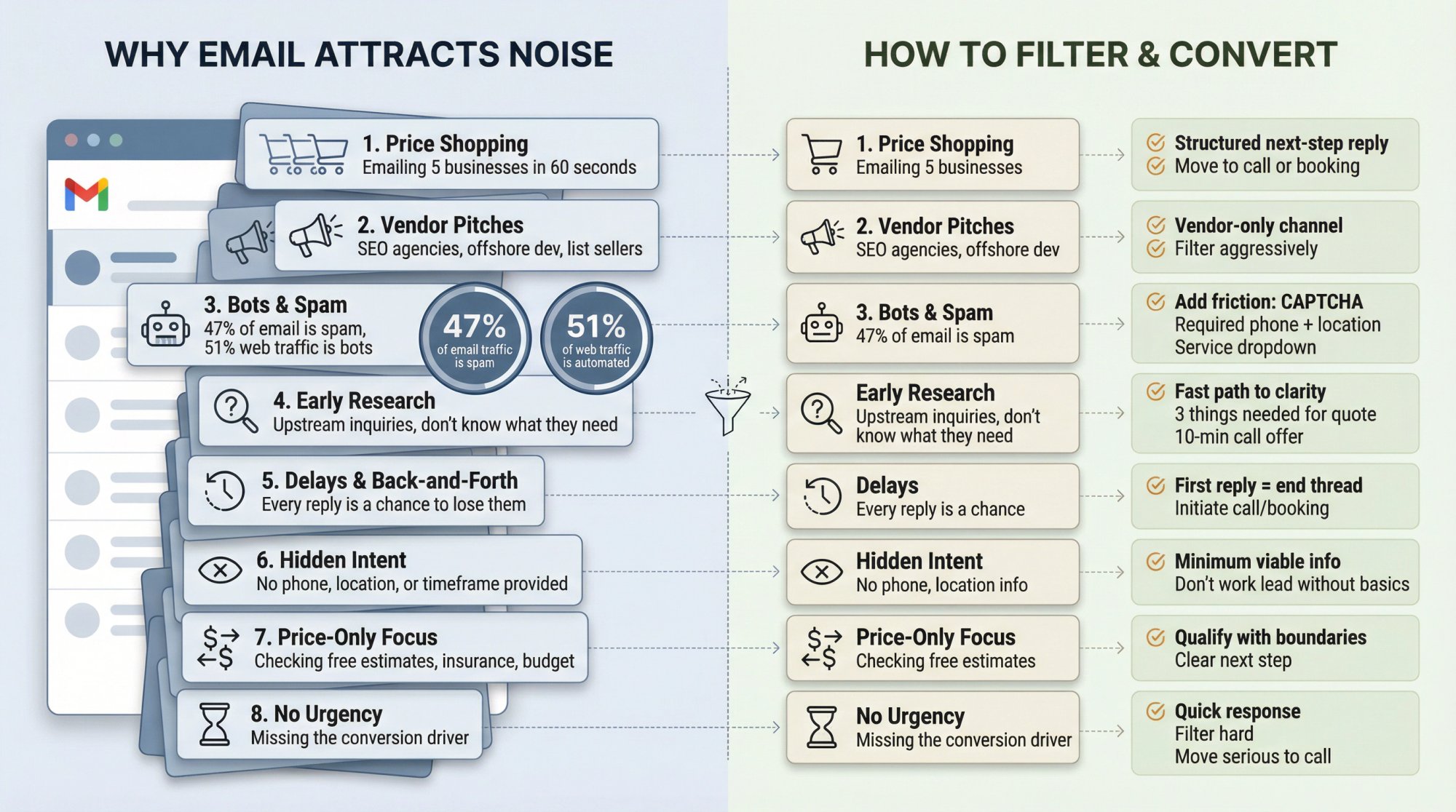
People can email 5 businesses in 60 seconds. Many are shopping for the lowest price, the fastest response, or any answer at all.
Fix: Respond with a structured "next-step" that moves them to commitment (call or booking).
2. Where Vendor Sales Pitches End Up#
SEO pitches, "partnerships," list sellers, offshore dev shops. This is why your inbox feels cursed.
Fix: Create a vendor-only channel (a form or alias) and filter everything else aggressively.
3. How Bots and Spam Target Email Forms#
If nearly half of global email traffic is spam, you'll see that downstream. And as automated web traffic grows, web forms and inboxes see more junk.
Fix: Add friction and validation:
• CAPTCHA / anti-bot tooling on forms
• Required phone number
• Required location
• Required service type (dropdown)
4. Why Email Attracts Early Research Inquiries#
Email leads are often upstream: they don't know what they need yet.
Fix: Give them a fast, clear path to clarity:
→ "Here are the 3 things we need to quote accurately..."
→ "Here's our starting range..."
→ "Pick a time for a 10-min call..."
5. How Email Creates Delays That Lose Customers#
Every back-and-forth is a chance to lose them.
Fix: Your first reply should be designed to end the thread by initiating a call or booking.
6. What Email Hides About Customer Intent#
With calls, you automatically get:
• A phone number
• A real-time conversation
• Urgency cues
With email, you often get:
• "Hi"
• No phone
• No location
• No timeframe
Fix: Don't "work the lead" until you've got the minimum viable info.
7. Why Price Shoppers Prefer Email#
Some people are checking:
• "Do you do free estimates?"
• "Do you take my insurance?"
• "Can you do it for $___?"
Fix: Qualify politely with boundaries and next step.
8. Why Email Lacks Urgency Signals#
And urgency is where conversion lives. This doesn't mean you ignore email. It means you build a system to respond quickly, filter aggressively, and move serious people to a call.
How to Handle Each Lead Channel (Quick Reference)#
Use this table as your operating system for inbound.
| Channel | What it usually signals | What to do (best practice) | What NOT to do |
|---|---|---|---|
| Phone call | High intent / urgency / complexity | Answer fast, run a 60-120s intake, book/transfer/commit next step | Send to voicemail or "we'll call you back sometime" |
| Missed call | High intent that you failed to catch | Immediate text-back + quick callback + scheduling link | Wait hours; call once from an unknown number |
| Early research, multi-quoting, vendor spam | Auto-acknowledge + ask 3 qualifying questions + offer booking/call | Write a long essay; engage endlessly without basics | |
| Web form | Mid intent; also bot-prone | Structured fields + validation + rapid follow-up | Open text box only; no phone required |
| Chat/SMS | Convenience; sometimes urgent for younger cohorts | Offer quick answers + direct bridge to booking/call | Treat it like email and respond tomorrow |
If you adopt nothing else from this guide, adopt this: Don't process all "leads" the same way. Process them based on the channel's intent signal.
How to Convert Phone Leads in 90 Seconds#
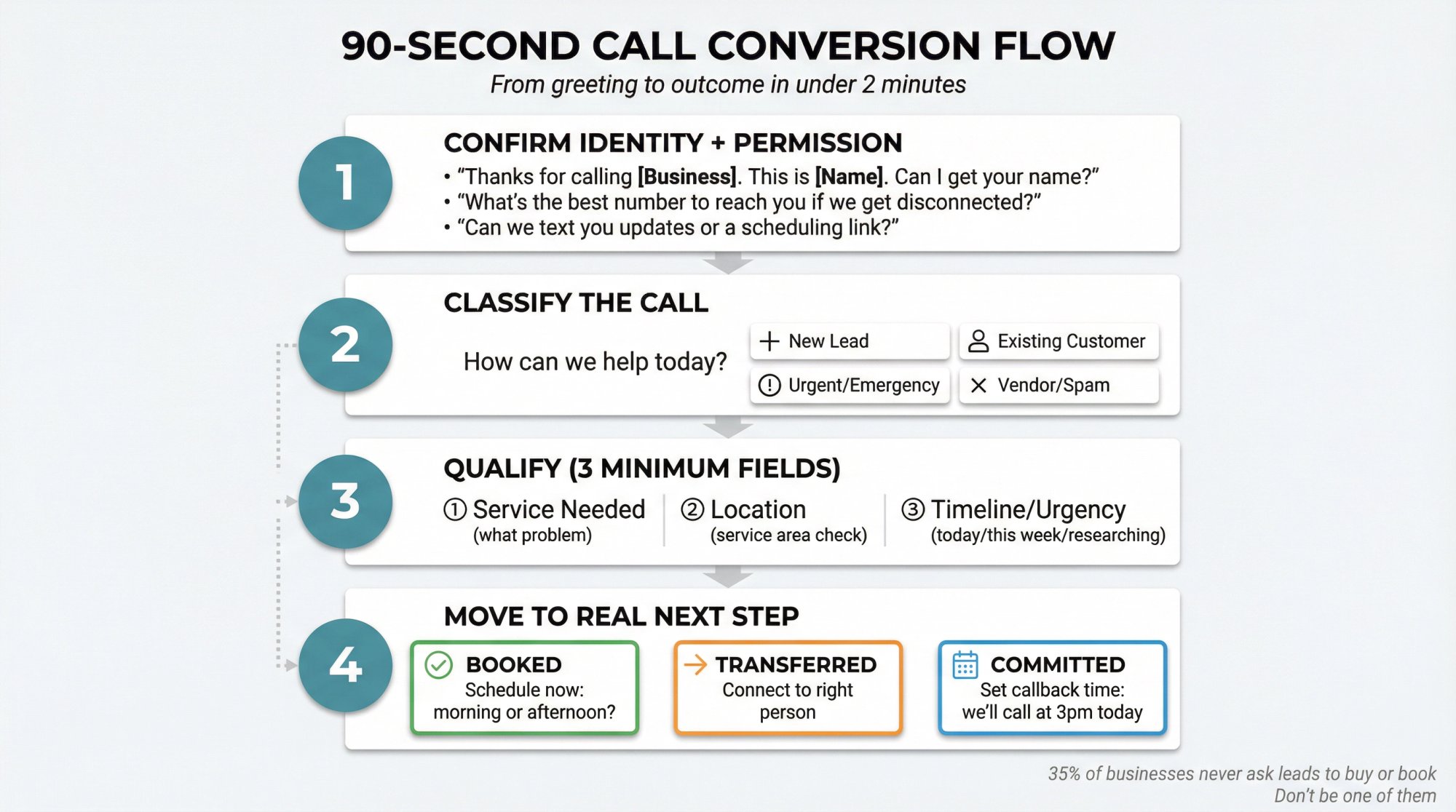
A phone call is your best shot at compressing time-to-trust. Here's the intake flow that works across most service SMBs.
Step 1: Confirm identity + permission
• "Thanks for calling [Business]. This is [Name/Team]. Can I get your name?"
• "What's the best number to reach you if we get disconnected?"
• If you text: "Can we text you updates or a scheduling link?"
Step 2: Classify the call in one question
"How can we help today?"
Then bucket into one of:
• New lead (quote / availability / pricing)
• Existing customer (service / support)
• Urgent/emergency
• Vendor/spam/wrong number
Step 3: Qualify with 3 fields (minimum viable)
① Service needed (what problem)
② Location (service area check)
③ Timeline/urgency (today / this week / researching)
Step 4: Move to a real next step
Your call should end in one of these outcomes:
Booked: "I can get you scheduled. Does tomorrow morning or afternoon work?"
Transferred: "Let me connect you with the right person."
Committed: "We'll call you at 3pm today with an estimate. What's the best time window?"
Why this matters: Industry research found 35% of businesses never ask leads to buy or book. That's a conversion leak you can fix immediately. For businesses in specific industries, see our guides for plumbers, HVAC companies, law firms, and real estate agents.
3 Email Reply Templates That Convert Leads#
Your goal with email is usually not "close by email." It's "qualify quickly and create a commitment."
Template A: The "Quote-Ready" Reply#
For serious emails:
Subject: Re: [Service] – a couple quick details

Hi [Name], happy to help. To give an accurate estimate, can you reply with:

1. Address / ZIP
2. What you're looking to have done (1-2 sentences)
3. Ideal timeframe (ASAP / this week / this month)

If it's easier, you can call us at [phone], or grab a time here: [booking link].

[Signature]
Template B: The "Pricing Range + Next Step" Reply#
For vague "how much?" inquiries:
Subject: Re: Pricing

Hi [Name], pricing depends on a few variables (size/condition/scope). Typical projects start around [range], but to confirm we'll need: ZIP + a quick description + timeframe.

Fastest way is a 10-minute call. What's a good number and time?
Template C: The "Vendor Filter" Reply#
Subject: Re: Inquiry

Thanks, this inbox is for customer service requests.

If you're offering services to our business, please send details to: [vendor email].

(We don't review vendor pitches here.)
The principle is consistent: add structure, then convert to call/booking.
What Happens When You Miss High-Intent Calls#
Consumer research makes this brutally clear: people abandon after missed calls, and many call competitors.
So the #1 operational question becomes:
"How do we answer every high-intent call without hiring a full-time receptionist?"
That's exactly the gap Eden exists to fill. Learn more about what to do when you can't afford a receptionist.
How We Built Eden for This Exact Problem#
We're Eden, an AI receptionist designed to answer calls 24/7, capture lead details, and move callers toward booking or a transfer. Our core promises include 24/7 coverage, call recording/transcription, instant notifications via SMS/email, and the ability to send scheduling links via SMS. See how AI phone answering works for a detailed explanation of the technology.
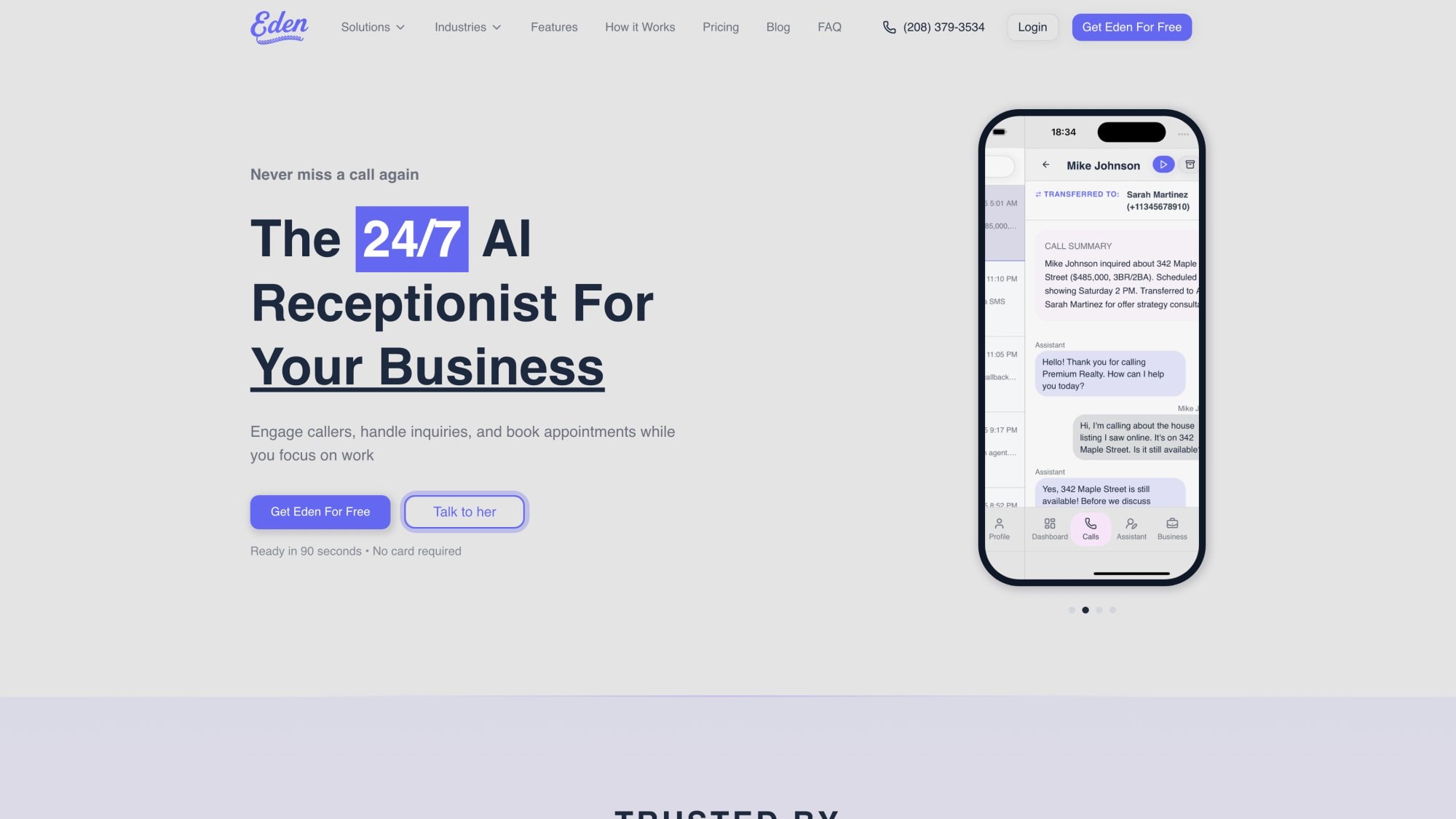
The Practical Eden Setup for "Best Leads Call" Businesses#
1) Use conditional call forwarding (so you keep first dibs)
Instead of forwarding every call away from your phone, conditional call forwarding sends calls to Eden only when you're busy/no-answer/unreachable. So you still answer when you can, but you stop losing leads when you can't. We provide a step-by-step guide to conditional forwarding and how it acts as a safety net. Learn how to set up call forwarding for your specific phone system.
2) Write a conversion-focused greeting
Your greeting should do two things:
• Reassure ("you reached the right place")
• Direct ("I can schedule you / get details / route emergencies")
Check out our professional phone greeting examples to craft the perfect message for your business.
3) Add 3-6 custom qualification questions
You're building the equivalent of a great front-desk intake:
• Service needed
• Location/ZIP
• Urgency
• Preferred appointment times
• Budget constraints (optional)
• "Is this for an existing account?" (routing)
4) Enable booking or link-based scheduling
Eden supports instant booking and can send scheduling links by SMS. If you're looking for appointment booking software, our calendar integration works with Google Calendar and Outlook.
5) Turn on spam filtering + screening rules
Your goal is to protect your attention. Eden positions itself as blocking spam and filtering unwanted calls. Learn more about call screening solutions to keep your line clear for real customers.
How to Recover Missed Calls Automatically#
Even with great coverage, you'll still miss some calls: meetings, dead zones, peak rush.
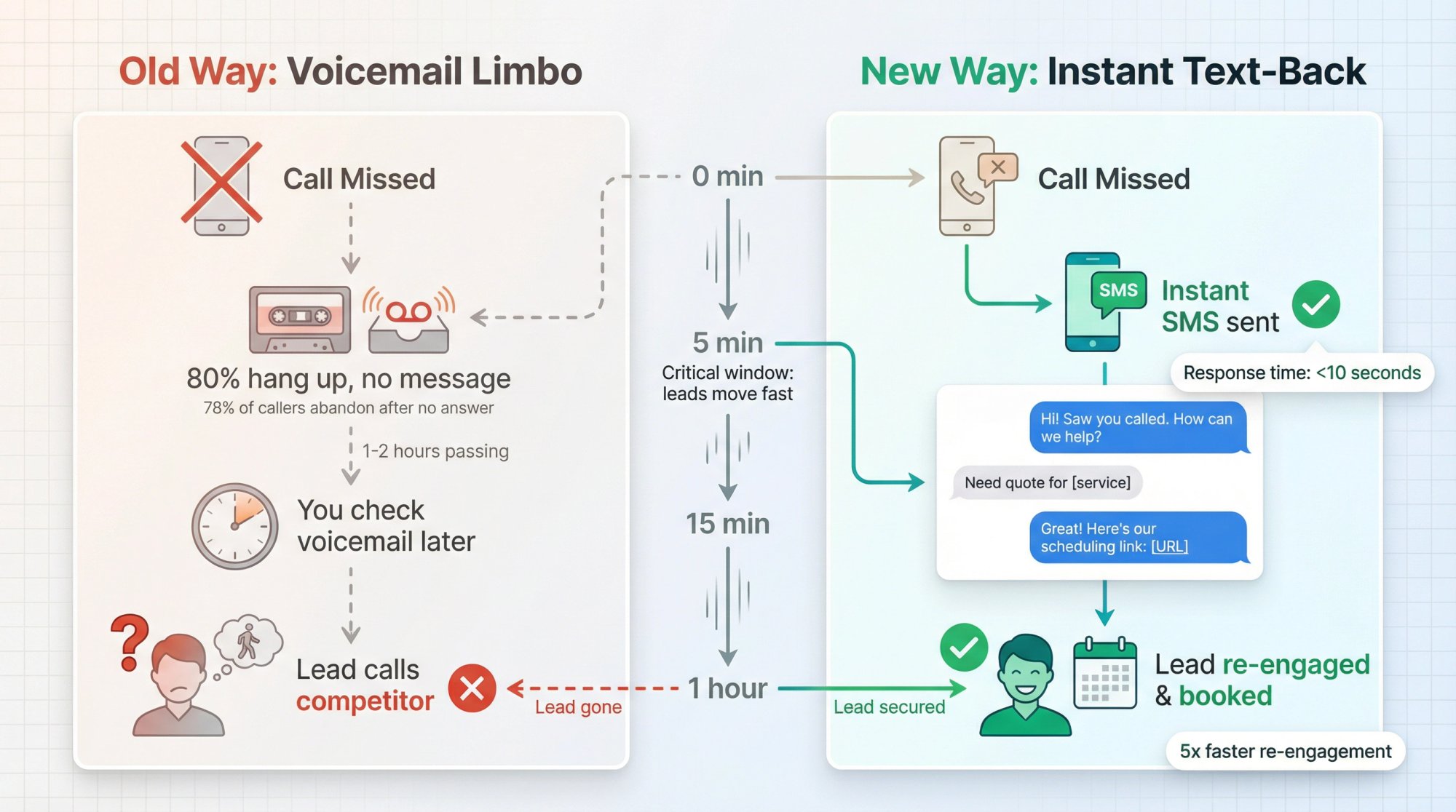
A high-leverage move is immediate, contextual text-back. Eden has a dedicated missed call text back solution that describes sending an instant text after missed calls to start a conversation, qualify, schedule, or escalate urgent requests.
This matters because:
• Your best lead called because they wanted help now
• If you miss them, you need a system that responds in seconds, not hours
Read more about how much business you lose from voicemail and why recovery systems matter.
Call Metrics That Actually Matter#
Track these weekly:
① Answer rate = answered calls / total calls
② Time-to-answer (or time to engage if AI answers)
③ Lead rate = qualified leads / total calls
④ Booking rate = booked appointments / qualified leads
⑤ Transfer-to-close rate (for urgent/closer calls)
⑥ Missed-call recovery rate = recovered conversations / missed calls
⑦ Email-to-call conversion rate = emails that become scheduled calls
Then run one improvement per week:
• "Reduce hold time"
• "Add two clarifying questions to intake"
• "Change greeting to offer booking earlier"
• "Add missed-call text-back"
• "Tighten email qualification"
How to Get More Prospects to Call Instead of Email#
If you want the best prospects to call, you must signal that calling works.
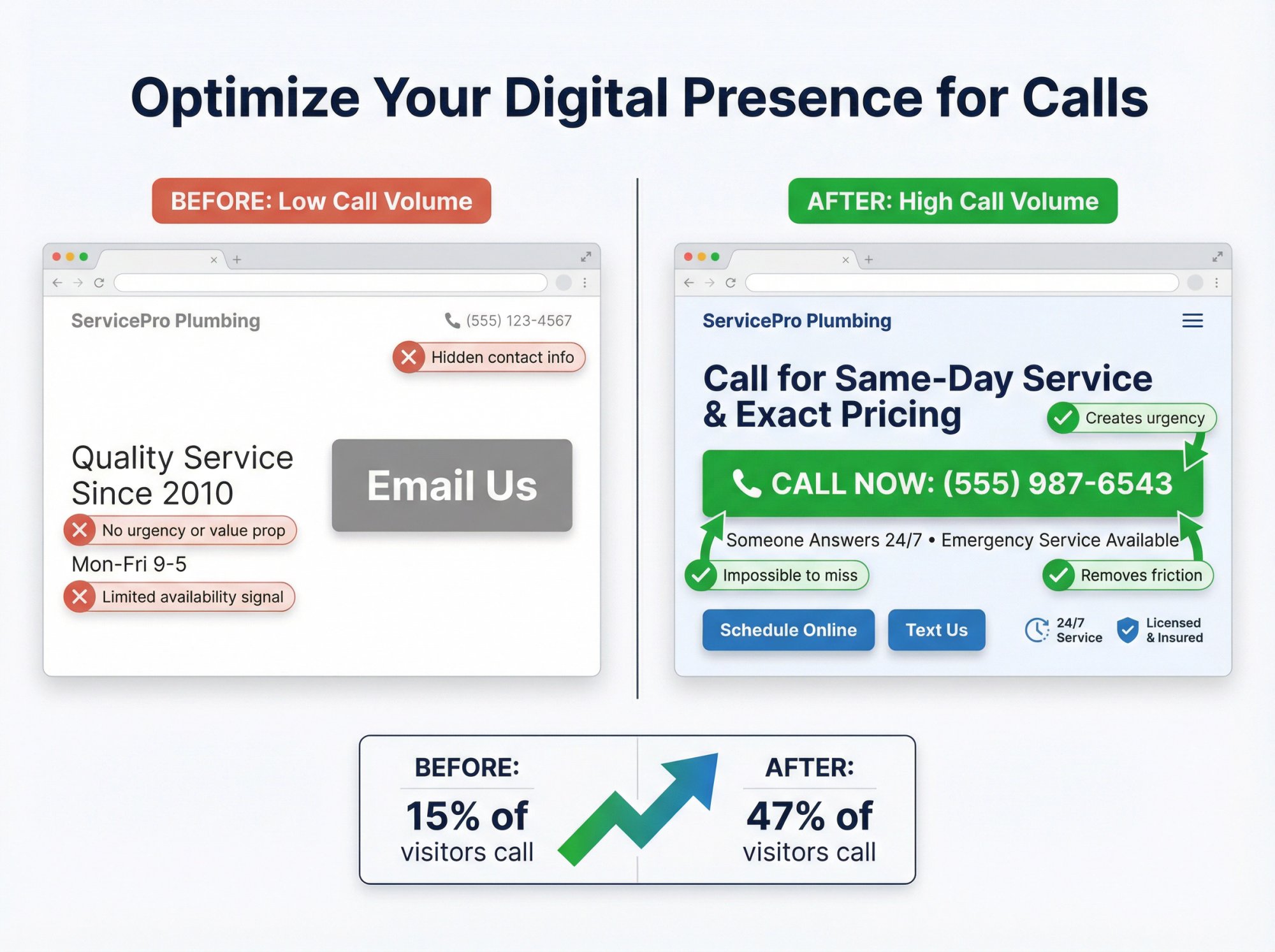
Make it obvious you answer#
• Put your phone number in the most visible spots (header, contact, Google Business Profile)
• Add language like "Call now. Someone answers 24/7."
Explore our industry-specific solutions to see how different businesses implement this strategy: contractors, electricians, property management, and accounting firms.
Make the call worth it#
• "Call for same-day availability"
• "Call for exact pricing (depends on scope)"
• "Call for emergency dispatch"
Remove friction after hours#
If your best leads call nights/weekends, you need a real answer path. Eden is explicitly positioned around 24/7 answering and fast setup. Consider a weekend answering service if you get significant after-hours demand.
Common Questions About Phone vs Email Leads#
"But I get spam calls."#
Yes. That doesn't mean calls are bad. It means you need filtering and routing. Spam exists in every channel; email is just quieter because it's hidden in your inbox. Learn about call routing solutions to handle this systematically.
"Some of my best leads email."#
True. Enterprise buyers, referral intros, attachment-heavy requests, and people with accessibility needs may email first. The right move isn't to dismiss email. It's to upgrade it into a booked call quickly.
"I don't want to sound salesy on the phone."#
Booking a next step isn't salesy. It's service. (And failing to ask is a measurable conversion leak.) Check out these phone answering service tips to strike the right balance.
Bottom Line#
The reality of service business in 2026:
• Calls are high-intent because they're high-commitment, and people use them when urgency or complexity is real
• Missed calls are expensive because prospects don't wait, and many call competitors. Learn about how much money you lose from unanswered calls
• Email is noisier because it's low-friction and easily abused by spam, vendors, and automation
If you want to win in 2026, don't treat inbound as "a pile of leads." Treat it as an intent-sorted queue, and build different systems for each channel.
Eden's job in that system is straightforward: answer every call, capture what matters, and move serious prospects to booking or transfer, 24/7. Explore our complete guide to AI call answering services.
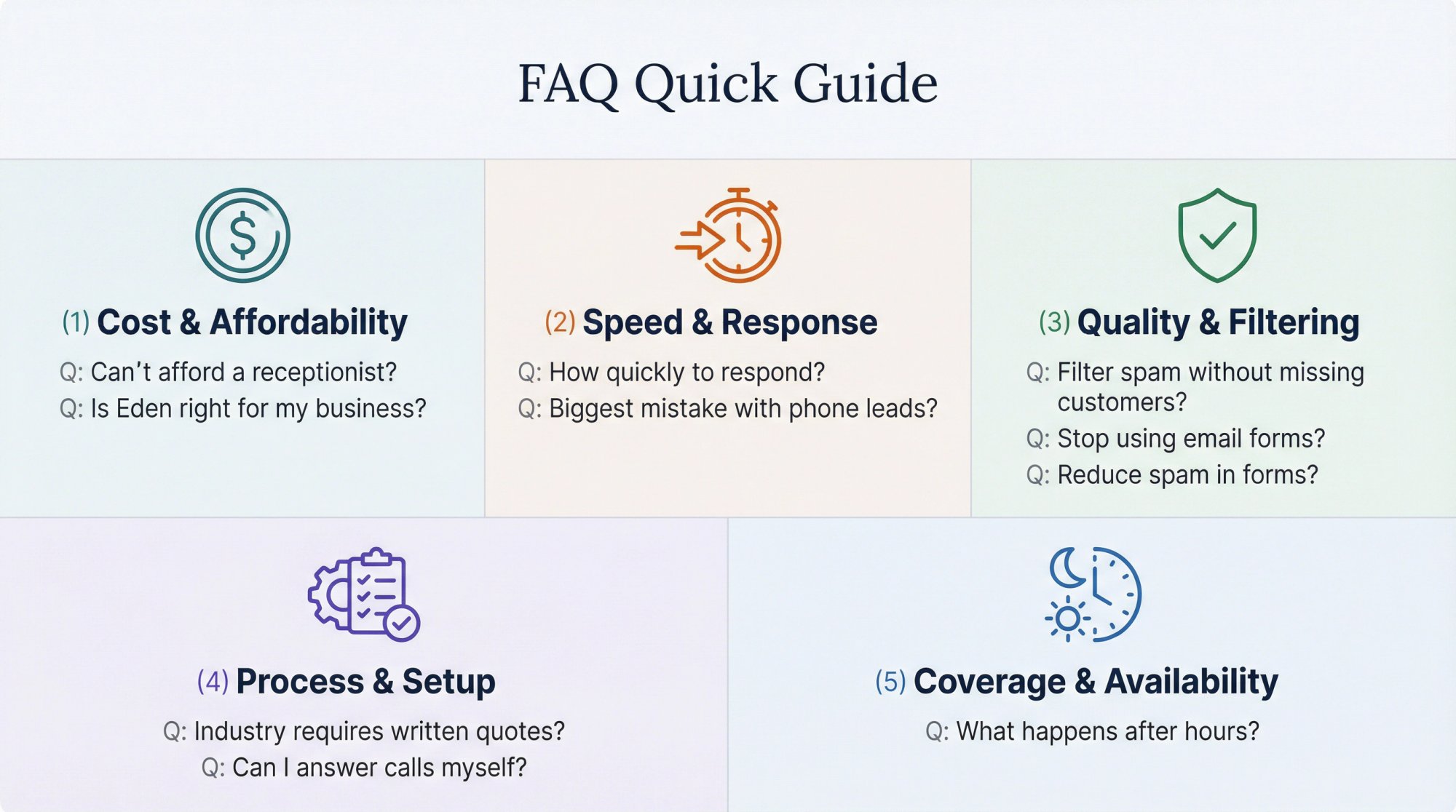
Frequently Asked Questions#
Q: What if I can't afford a full-time receptionist?
Most small businesses can't. That's why AI receptionists like Eden exist. At $39-$99/month with unlimited calls, you get 24/7 coverage without the $30,000+ annual cost of a full-time hire. The AI handles intake, qualification, and booking while you focus on delivering service. Learn more about AI receptionist costs.
Q: How quickly do I need to respond to calls and emails?
For calls: answer immediately or within seconds. For emails: respond within 5 minutes if possible, definitely within 1 hour. Research shows responding within 5 minutes makes you 21 times more likely to convert a lead than waiting 30 minutes. And 78% of buyers choose the first company that responds to them. Read about managing customer expectations for more timing strategies.
Q: What's the biggest mistake businesses make with phone leads?
Not answering the phone. 80% of callers hang up on voicemail, and 85% never call back. Every missed call is essentially handing a live customer to your competitor. The second biggest mistake? Failing to ask for the sale. 35% of businesses never ask callers to buy or book. Discover what happens when customers call competitors.
Q: How do I filter out spam calls without missing real customers?
Use a multi-layered approach: enable spam detection (many AI receptionists have this built-in), block toll-free numbers if you don't need them, maintain a blocklist of repeat offenders, and require basic qualification info before routing to your team. The key is filtering before the call reaches your attention.
Q: Should I stop using email forms entirely?
No. Some prospects prefer email for legitimate reasons (accessibility needs, detailed requests with attachments, enterprise buyers following procurement processes). But you should redesign your email process to qualify quickly and upgrade serious inquiries to calls. Think of email as a stepping stone to a call, not a replacement for one.
Q: What if my industry requires detailed written quotes?
Then email has a role. But you can still use the phone to gather the information, build trust, and set expectations before sending the written quote. A 5-minute call to understand needs, followed by a detailed email quote, converts far better than an email-only exchange.
Q: How do I know if Eden is right for my business?
If you're a U.S.-based small business that gets service inquiries by phone, misses calls during busy times or after hours, and wants to capture more leads without hiring staff, Eden is built for you. We serve all SMBs except restaurants (not ideal for reservation systems) and healthcare providers (we don't have HIPAA accreditation). Try the 30-minute free trial to see if it fits. Check if your industry is a good fit: cleaning services, construction, marketing agencies, or IT companies.
Q: Can I keep answering calls myself sometimes?
Absolutely. That's what conditional call forwarding is for. Calls only go to Eden when you're unavailable, busy, or after hours. You keep first dibs on every call. Think of it as a safety net, not a replacement. Learn how to forward business calls without losing control.
Q: What happens to calls after hours?
With Eden, they get answered immediately, 24/7. The AI greets the caller, captures their information, answers common questions, and can even book appointments into your calendar if you enable that feature. You get a summary via SMS and email, so you can follow up on urgent matters the next business day. Read more about emergency answering services for urgent after-hours scenarios.
Q: How do I reduce spam in email forms?
Add friction: CAPTCHA, required phone numbers, required service selection dropdowns, and required location fields. Make the form harder for bots to auto-fill. Also, create a separate "vendor inquiries" form and email address, so you can route marketing pitches away from your main customer service inbox.
Ready to Transform YourCustomer Experience?
Join hundreds of businesses using Eden AI to handle calls, book appointments, and provide 24/7 customer support.