Best Virtual Phone System for Small Business (2025)
Stop losing money to missed calls. Virtual phone systems cut costs 50-75%, work anywhere, and make small businesses look professional in 2025.
November 27, 2025
You're losing money every time your phone rings and nobody answers.
That's the harsh reality for most small businesses. While you're helping a customer, meeting with a vendor, or just catching lunch, potential clients are calling your competitors. The ones who answer. And research shows that customers still overwhelmingly prefer the phone for urgent issues. 54% of them, in fact. When they can't reach you, they move on.
But here's what's changed: you don't need expensive equipment, complex installations, or a full-time receptionist anymore. Virtual phone systems have transformed how small businesses handle calls, and they're more accessible than ever in 2025.
This guide will walk you through everything you need to know about virtual phone systems for small businesses. What they are, how they work, why they're replacing traditional phone lines, and how to choose the right one for your company.
What Is a Virtual Phone System?#
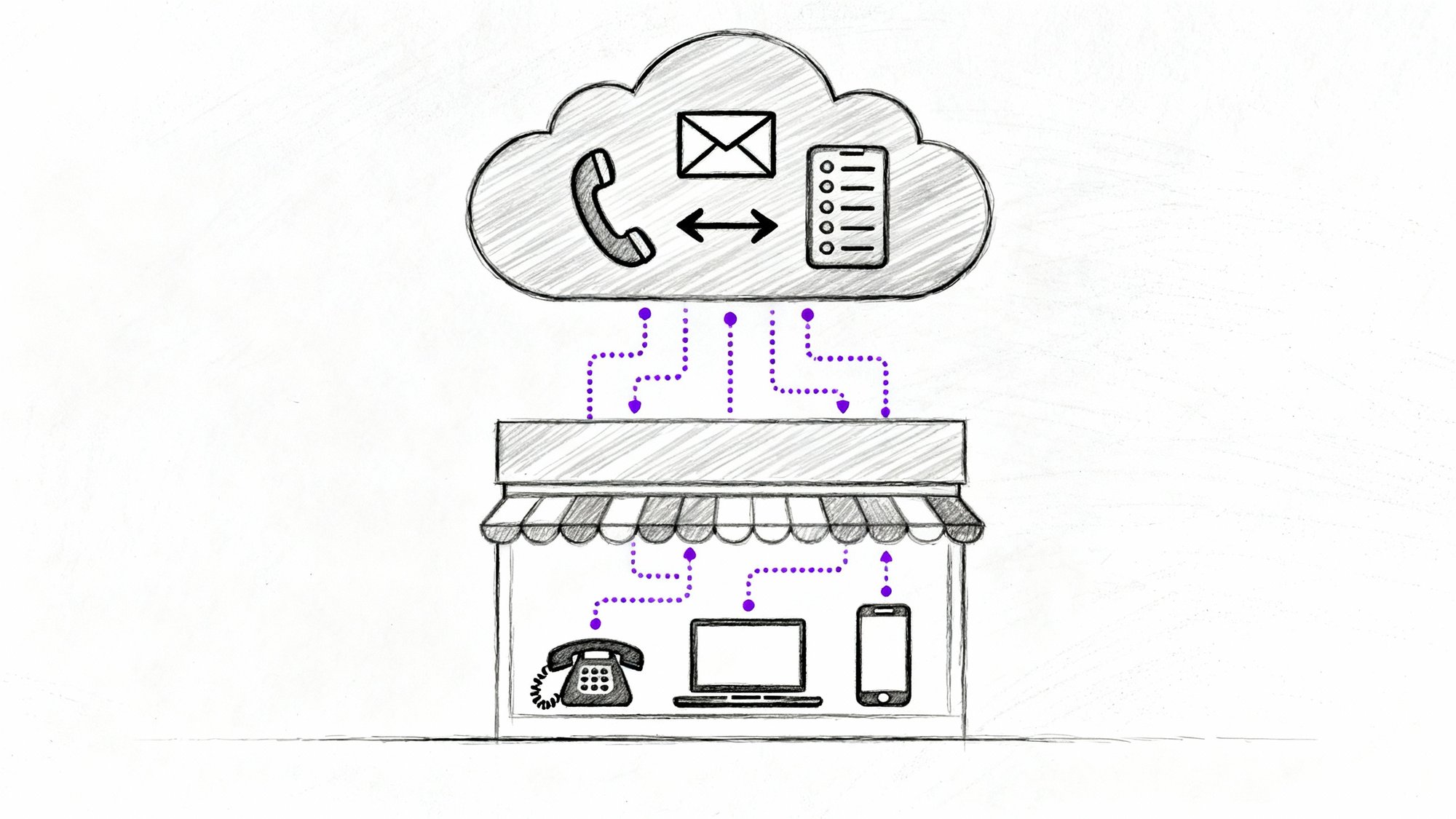
A virtual phone system is a cloud-based business phone service that uses your internet connection instead of traditional phone lines. You and your team can make and receive calls from anywhere using a computer, smartphone, or VoIP desk phone, all sharing the same business number.
Think of it this way: your business phone isn't a physical thing anymore. It's a service you access through apps and devices you already own.
How Virtual Phone Systems Work#

Here's what makes them different from the landline sitting on your desk:
Cloud-hosted infrastructure: The phone system runs on your provider's servers, not in your office. They handle the technical stuff (call routing, voicemail storage, connection to the phone network) while you just use the service.
Internet-based calling: Calls travel over your internet connection using VoIP technology, which is why you don't need physical phone lines. One decent internet connection replaces all those phone jacks and copper wires.
Multi-device flexibility: The same business line rings on your desk phone, laptop, smartphone, or tablet. Answer wherever you are. Make outbound calls from any device, and they'll show your business caller ID.
Unified business number: Everyone on your team can have an extension on the main number. When someone calls your business, they might hear "Press 1 for Sales, Press 2 for Support" or the call might ring multiple team members at once. You control all this through a web dashboard.
No hardware requirements: You don't need to buy a PBX box or install complicated equipment. Most businesses just download apps and start calling. (You can buy VoIP desk phones if you want that physical handset feel, but they're optional.)
Virtual Phone System vs Traditional Phone: What's the Difference?#
Let's make this concrete. Here's how a virtual phone system compares to the old-school setup:
| Feature | Traditional Landline/PBX | Virtual Phone System |
|---|---|---|
| Infrastructure | Physical phone lines and on-site PBX box | Cloud-based, hosted by provider |
| Installation | Technician visit, wiring, days or weeks | Sign up online, configure in minutes |
| Location | Tied to your office | Use from anywhere with internet |
| Devices | Desk phones only | Smartphones, computers, tablets, desk phones |
| Adding lines | Call phone company, wait, pay installation fees | Add through web dashboard instantly |
| Features | Basic calling, maybe voicemail | Auto-attendant, call routing, analytics, integrations, and more |
| Maintenance | Repair techs, service calls | Provider handles everything remotely |
| Scalability | Limited by physical capacity | Add users/numbers on demand |
| Cost | High upfront + monthly fees | Low monthly subscription per user |
The bottom line? Virtual phone systems give you flexibility and mobility that traditional systems can't touch. And for small businesses, that flexibility is everything.
Why Small Businesses Are Switching to Virtual Phone Systems#
More than half of small businesses have already dropped their landlines. Here's why virtual phone systems are becoming the standard:
How Much Money Does a Virtual Phone System Save?#
Cost matters when you're running a small business. Virtual phone systems can reduce communication costs by 50% to 75% compared to traditional phone services.
Where the savings come from:
-
No hardware to buy. Traditional business PBX systems can cost thousands in equipment and installation. Virtual systems? You pay a monthly fee per user and you're done.
-
Lower monthly bills. Most small business virtual phone plans run $15 to $40 per user per month, often with unlimited calling included. Compare that to per-line charges from traditional phone companies.
-
No maintenance costs. When something breaks with a landline system, you call a technician. With virtual phones, the provider fixes issues on their end. You're not paying for service calls or replacement parts.
-
Included features. Things that cost extra with traditional phones (voicemail transcription, call recording, auto-attendant, analytics) come bundled in virtual plans. One flat fee covers everything.
New businesses can reduce startup communication costs by up to 90% by choosing virtual from the start instead of installing traditional phones. That's money you can spend on growing your business instead of maintaining phone infrastructure.
How Fast Can You Set Up a Virtual Phone System?#
Remember waiting weeks for the phone company to come out? Those days are over.
Setting up a virtual phone system is remarkably simple:
① Sign up online (takes about 5 minutes)
② Choose your business number (local, toll-free, or port your existing number)
③ Download the app on your devices
④ Configure your greeting and routing through the web dashboard
⑤ Start taking calls
No technician visits. No drilling holes. No waiting. If you have a good internet connection, you're ready to go.
Need to add a new team member? Create their extension in the dashboard, send them the app, and they're connected in minutes. Want a second phone number for a marketing campaign? Add it instantly. Need to change your business hours or greeting? Update it yourself, right now.
This speed matters when you're trying to move fast as a small business. You don't have time to wait for infrastructure.
How to Work From Anywhere With a Virtual Phone System#
The biggest shift in the past few years? Remote and hybrid work are now normal, even for small businesses.
Virtual phone systems make this possible:
Answer calls on any device. Your receptionist works from home? No problem. Sales guy is at a client site? He can still take calls on the business line through his phone. Everyone stays connected through the same system.
No more "I'm not in the office" excuses. With apps for mobile and desktop, your team can work from anywhere with internet. The office, home, coffee shop, airport. Clients call the same number and reach you wherever you are.
Ring multiple devices simultaneously. Set up the system to ring your desk phone and mobile at the same time. Or ring you first, then your assistant if you don't answer in 10 seconds. You control the call flow.
Here's a real-world example: A small real estate agency has agents constantly out showing properties. Each agent has the company's virtual phone app on their smartphone. When a client calls the main office number, it automatically routes to the right agent's mobile. The client gets immediate help, never realizing the agent isn't at a desk. The broker sees all call activity in the dashboard and knows every lead is being handled.

That flexibility? It's why VoIP usage jumped 212% during the pandemic-driven remote work boom. And even now, 67% of mobile workers report higher productivity with virtual phone solutions because they can resolve customer issues faster without being chained to a specific location.
How to Look More Professional With a Virtual Phone System#
Small businesses need to compete with bigger companies. A virtual phone system helps you sound bigger and more established.
Professional greetings and menus: Set up an auto-attendant that answers with "Thank you for calling ABC Services. For sales, press 1. For support, press 2." Even a one-person business can sound like a real company with a reception department.
Extensions for everyone: Give team members (or different departments) their own extensions. "Press 3 to reach John in accounting." It makes you seem organized and established.
Business caller ID: All your outbound calls show your business name and number, not random cell phone numbers. Clients see a professional, consistent identity.
Never straight to voicemail: Virtual systems let you set up 24/7 answering through auto-attendants and routing rules. After hours, you might route calls to a professional answering service, an AI receptionist (more on that later), or at least play an informative message with emergency contact info. Your business appears "open" even when you're not working.
Voicemail transcription: When someone does leave a voicemail, you get the recording AND a text transcription in your email. You can read it instantly and respond informed. Clients notice when you call back quickly with context about their issue.
This all contributes to a better customer experience. And that matters because 61% of customers will stop doing business with a company after just one bad customer service experience. A smooth, professional phone interaction keeps you in the game.
What Features Come Standard With Virtual Phone Systems?#
Here's what you get with most virtual phone plans, even the basic ones:
→ Intelligent call routing based on time of day, caller ID, department, or custom rules you set
→ Auto-attendant (IVR menus) that you can fully customize
→ Call screening and spam blocking to filter out robocalls and telemarketers
→ Hold, transfer, and conferencing capabilities included
→ Business text messaging on your business number
→ Call recording and detailed logs for training and quality assurance
→ Analytics and reporting to track call volume, patterns, and missed connections
→ Integration with other tools like CRM, calendar, and email
All of this helps you serve customers better while spending less time on manual phone management.
How Virtual Phone Systems Scale With Your Business#
Scaling a traditional phone system means calling the phone company, scheduling installations, buying new equipment. It's a project.
Scaling a virtual phone system? Log into your dashboard and add users.
Hiring someone new? Create their extension and they're live in minutes.
Opening a second location? Add a local number for that area and route it through the same system.
Call volume spiked? Cloud phone services handle multiple simultaneous calls without busy signals. You might pay for more usage, but you won't hit a hard capacity limit.
Need to scale down? Maybe you're seasonal. Reduce your user count during slow months. No contracts locking you into unused capacity.
Plus, because everything is cloud-based, you get updates and new features automatically. When the provider rolls out improvements, you benefit without upgrading hardware. This is true future-proofing.
And there's a resilience factor too: if your office has a power outage or you need to work from home unexpectedly, the phone system keeps running in the cloud. Just answer calls from mobile devices. Your business stays reachable even when your physical location isn't accessible.
What Features Should You Look For in a Virtual Phone System?#
So you're sold on virtual phone systems. How do you choose the right one? Here are the features and factors that matter most for small businesses:
Essential Calling Features#
At minimum, make sure you get:
-
Unlimited calling in your region (usually US/Canada)
-
Caller ID, call waiting, call forwarding
-
Voicemail (ideally with transcription to email/text)
-
Hold and transfer capabilities
-
Conference calling
Most providers include these basics, but double-check. If you need toll-free numbers or international calling, verify the rates for those.
Auto-Attendant and Call Routing#
This is crucial for professionalism and efficiency. Look for:
Customizable auto-attendant where you can record your own greetings and set up menu options (press 1 for this, press 2 for that).
Time-based routing so calls are handled differently during business hours vs. after hours.
Ring groups that let you ring multiple people at once or in sequence until someone answers.
Make sure the system gives you control over how calls flow through your business. Cookie-cutter routing won't work for everyone.
Mobile and Desktop Apps#
The whole point is working from anywhere, so great apps are non-negotiable.
Check that the provider has solid mobile apps for iOS and Android, plus desktop apps for Windows and Mac. Read reviews about app stability. You should be able to do almost everything in the mobile app that you could do on a desk phone (answer, place calls, access voicemail, transfer calls, check history).
Integration Capabilities#
Your phone system shouldn't be an island. Look for integrations that make sense for your business:
CRM integration so customer data pops up when they call (works with Salesforce, HubSpot, and others).
Calendar sync with Google or Outlook so the system knows when to send calls to voicemail (like during meetings).
Messaging platforms like Slack or Microsoft Teams for unified communication.
Zapier or open APIs for custom workflows if you're using specialized software.
The more connected your tools, the smoother your workflow.
Reliability and Security#
Uptime is critical. You can't afford your phones going down.
Look for providers that promise 99.9% uptime or better and have redundant systems in case one data center has issues. Check if they mention backup servers and failover protection.
For security, you want:
-
Call encryption (TLS/SRTP) to protect conversations
-
Spam call detection and blocking to filter out robocalls
-
Admin controls to set permissions and protect against misuse
Privacy and security should be central to the provider's approach, especially if you discuss sensitive information on calls.
Customer Support#
When something goes wrong, you need help fast. Check:
Support availability: Is it 24/7? Or just business hours?
Support channels: Phone, live chat, email? Some budget services only offer email support, which is frustrating during urgent issues.
Support quality: Read reviews. Is their support team knowledgeable and responsive?
Most providers include support in the base price, but a few charge extra for premium support. Know what you're getting.
Pricing and Contracts#
Compare plans carefully:
| Pricing Component | What to Expect | Watch For |
|---|---|---|
| Per-user cost | $15-$40/month for standard plans | Higher tiers ($50-$80) for advanced features |
| What's included | Unlimited calling, basic features | Call recording, integrations may cost extra |
| Contracts | Month-to-month or annual discounts | Avoid multi-year locks if possible |
| Hidden fees | Setup fees (most don't charge) | Number porting, toll-free inbound, international rates |
Read the fine print and calculate what you'll actually pay monthly with all the features you need.
Ease of Use#
Sign up for a trial and test the admin portal. Is the interface intuitive? Can you easily:
-
Add a new user?
-
Change your greeting?
-
Adjust call routing?
-
View call history and analytics?
If the system feels clunky or overly technical, that's a red flag. You shouldn't need IT expertise to manage your business phone.
Provider Reputation#
Do some research on the provider's track record:
-
How long have they been in business?
-
What do customer reviews say about call quality and reliability?
-
Are there frequent complaints about outages or support issues?
Websites like GetVoIP, G2, Capterra, and Trustpilot can give you real user feedback.
Try Before You Buy#
Most virtual phone providers offer free trials (usually 7 to 30 days) or money-back periods. Use them.
Test call quality from your location. Try the mobile app. See if the features work as promised. Make sure the system fits your workflow. This hands-on experience will tell you more than any sales page.
How Much Does a Virtual Phone System Cost?#
Let's break down the real numbers so you can budget properly.
Monthly Service Plans#
For small businesses, expect to pay $15 to $40 per user per month for standard business plans with a good feature set. This usually includes:
-
Unlimited calling in the US/Canada
-
Voicemail with transcription
-
Auto-attendant
-
Mobile and desktop apps
-
Call routing and forwarding
-
Basic integrations
Premium plans ($50-$80 per user) add features like advanced analytics, unlimited international calling, or contact center capabilities. Most small businesses don't need this level.
Budget/pay-as-you-go options exist too (as low as $10-$15 per user), but they often limit minutes or charge extra for features. Calculate whether you'll actually save money or end up paying overage fees.
Equipment (Optional)#
You don't need to buy phones. Most businesses use the apps on computers and smartphones. But if you want physical desk phones:
VoIP desk phones range from about $80 to $200+ each depending on features and brand. Some providers sell pre-configured phones, or you can buy your own (just make sure they're compatible).
Headsets and webcams for better call quality on PC or mobile might run $30-$150 per person. Optional, but worth it if you're on calls all day.
Setup and Porting#
Setup fees: Most virtual phone services have zero setup fees. You sign up and configure yourself. If you hire someone to set it up for you (like an IT consultant), that's a separate cost.
Number porting: Bringing your existing business number over to the new service usually has no fee or a small one-time fee ($5-$15 per number). It takes about 1-2 weeks to complete.
Usage-Based Costs#
Most plans include unlimited calling. But watch for:
International calls: Per-minute rates vary by country. Check if your provider offers international add-on packages if you call abroad frequently.
Toll-free inbound: Toll-free numbers often charge around $0.01-$0.02 per minute for incoming calls (because you're paying for the call, not the caller).
SMS texting: Some plans include unlimited texts. Others might charge $0.01 per text or bundle them (like 500 texts per month).
Taxes and Fees#
Like any phone service, expect regulatory fees, E911 service fees, and taxes. These might add 10-20% to your base price, similar to a cell phone bill.
Total Cost Example#
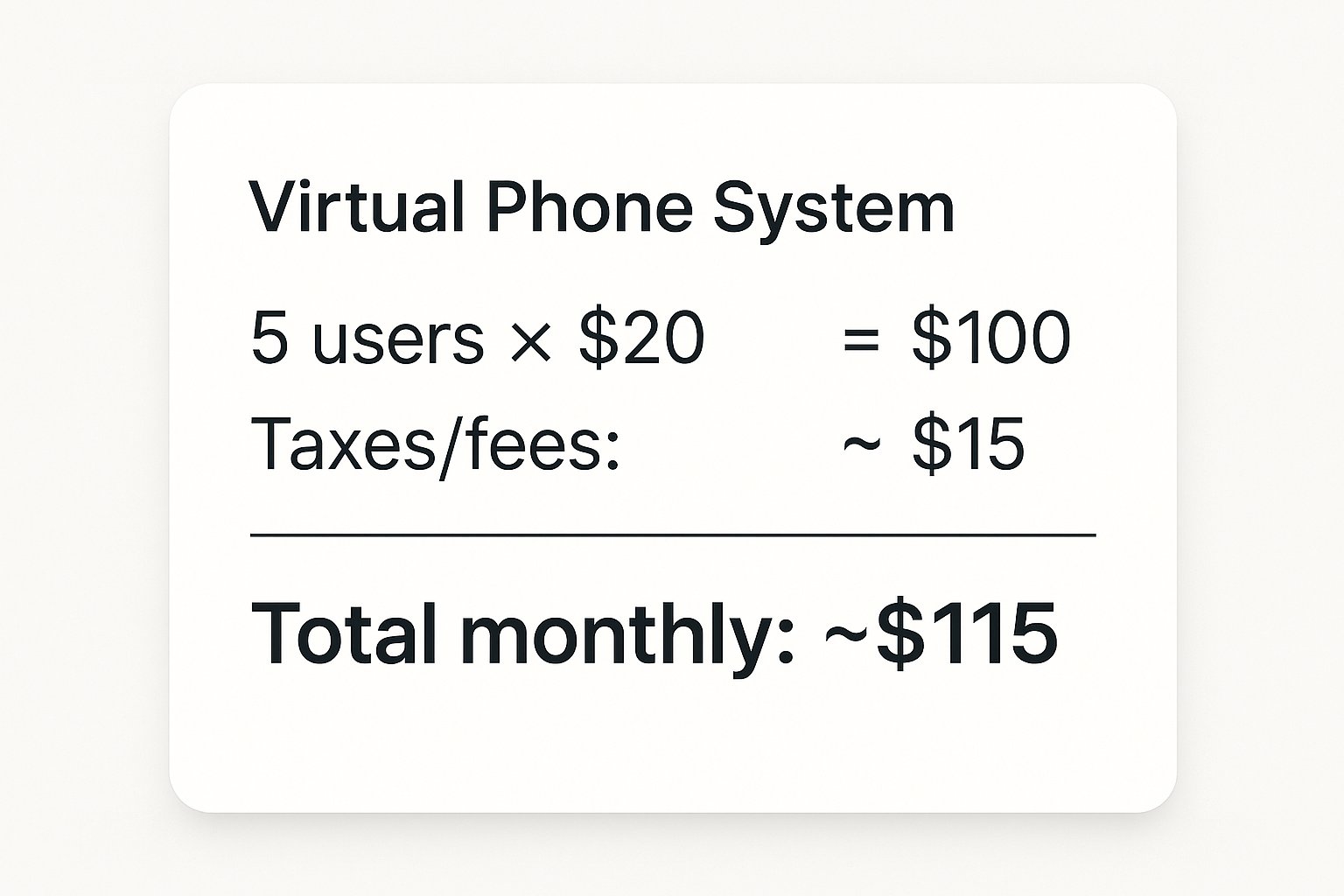
Let's say you have a 5-person small business and choose a plan at $20 per user:
-
Monthly service: 5 users × $20 = $100
-
Taxes/fees: ~$15
-
Total monthly: ~$115
Compare that to what a single missed sales call might cost you, or the price of hiring even a part-time receptionist. For most businesses, the ROI is obvious.
Plus, remember the savings from eliminating your old landline bills and PBX maintenance. Businesses typically save around 65% on communication costs and eliminate hidden costs like downtime and missed connections.
What Are the Latest Virtual Phone System Trends in 2025?#
The virtual phone space keeps evolving. Here's what's happening right now that small businesses should know about:
AI-Powered Features Are Going Mainstream#
Artificial intelligence is making virtual phone systems smarter:
AI call routing analyzes caller history and behavior to intelligently direct calls. For example, detect if a caller sounds frustrated and escalate them to a senior person faster.
Better spam protection. AI-powered filters detect robocall patterns and automatically block them. Machine learning gets better over time at recognizing scams.
Enhanced voicemail transcription with higher accuracy. Some systems even do sentiment analysis on voicemails to flag urgent or upset messages.
Real-time call assistance. More advanced systems can provide live captions during calls or suggest responses to help agents (mostly for call centers, but the tech is filtering down).
How AI Virtual Receptionists Work in 2025#
This is the big one for small businesses in 2025.
Instead of just a phone tree menu, you can now have an AI receptionist that converses with callers in natural language. It's like having a human receptionist available 24/7, except it never sleeps, never takes a break, and costs a fraction of hiring someone.
Here's what modern AI receptionists can do:
-
Answer calls in conversational English (and other languages like Spanish)
-
Understand what the caller needs and respond intelligently
-
Answer frequently asked questions about your business, hours, services, pricing
-
Schedule appointments by checking your calendar and booking available slots
-
Take detailed messages with the caller's name, number, reason for calling, and urgency
-
Route or transfer calls based on the conversation ("You need technical support? Let me transfer you")
-
Send you instant summaries via SMS or email after each call
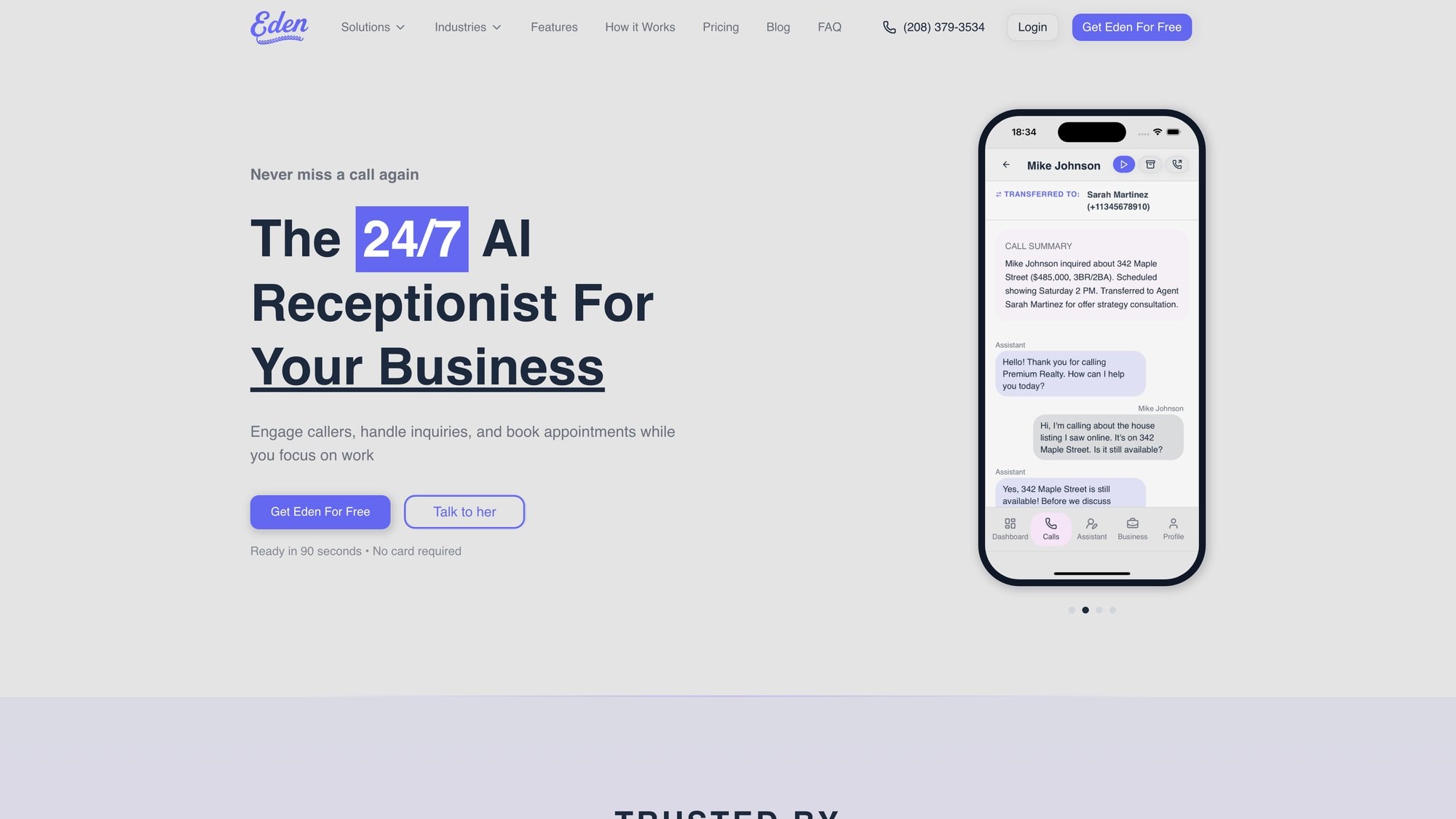
For example, we at Eden built our AI receptionist specifically for small businesses. When calls come in, Eden answers like a real person, handles common questions, books appointments into your calendar, and makes sure you never miss a lead. It works 24/7, speaks English and Spanish, and integrates with your existing virtual phone system. You just forward your calls to Eden and it handles the first line of customer contact.
AI virtual agents can now resolve up to 70% of routine inquiries on their own, which saves you massive time while still giving callers a helpful, immediate response.
Think about it: instead of calls going to voicemail after hours or during busy times, an AI receptionist answers, helps the caller, and captures their information. You follow up when you're available, but the caller felt taken care of right away. This dramatically improves customer experience.
Unified Communications Platforms#
Virtual phone systems are merging with other communication tools into Unified Communications (UC) platforms. This means one app for:
-
Voice calls
-
Video meetings
-
Team messaging/chat
-
File sharing
-
Email integration
Providers offer full UC suites. Even if you don't need all of that now, many phone systems can scale into these broader platforms later if you decide to consolidate your communication tools.
5G and Better Call Quality#
Network improvements mean VoIP call quality keeps getting better. HD Voice (high-definition audio) is now standard with most providers, giving you much clearer sound than old phone lines.
As internet speeds increase and latency drops (especially with 5G wireless), VoIP quality concerns are basically gone. Just make sure you have a stable internet connection. VoIP typically needs only about 100 kbps per call, which is tiny by today's standards. A good router with QoS (quality of service) settings helps if you're sharing the connection with heavy data use.
The Landline Decline Continues#
Here's the macro trend: traditional landlines are disappearing fast. Over 80% of U.S. households have dropped landlines entirely, and businesses are following.
Telecom companies are investing in internet infrastructure rather than maintaining old telephone exchanges. This means over time, keeping a legacy landline or on-premise PBX might get more expensive or less supported.
The future is clearly VoIP and cloud-based. By switching now, you're aligning with where the industry is headed. You won't be scrambling later when support for old systems becomes scarce or costs skyrocket.
How to Switch to a Virtual Phone System#
Ready to move your business to a virtual phone system? Here's how to do it smoothly:
Step 1: Assess Your Needs#
Before shopping around, figure out what you actually need:
How many users need phone access?
What features are must-haves vs. nice-to-haves? (Auto-attendant? Call recording? CRM integration?)
What's your call volume like? Do you need unlimited calling or would a smaller minutes bucket work?
Do you need toll-free numbers or local numbers in specific area codes?
What's your internet bandwidth? Make sure it can handle simultaneous calls. As a rule of thumb, plan for about 100 kbps per simultaneous call, plus your regular internet use.
Will you use desk phones or just apps on computers/mobiles?
Having clear answers helps you compare providers accurately and avoid paying for features you'll never use.
Step 2: Compare Providers and Test#
Narrow down to 2-3 providers that fit your needs and budget. Then:
Sign up for free trials with each. Most offer 7-30 day trials with no credit card required or easy cancellation.
Test call quality from your actual location. Make calls from the office, from home, from mobile. Quality can vary based on your internet connection and location.
Try the apps. Install on your devices and see how intuitive they are. Make sure key features work smoothly.
Test customer support. Reach out with a question during the trial. See how quickly and helpfully they respond.
Pay attention to how the system fits your workflow. The "best" provider on paper might not be the best for your business if the interface frustrates you or the call quality isn't great in your area.
Step 3: Choose Your Plan and Numbers#
Once you've picked a provider:
Select your plan based on the number of users and features you need. Remember, you can usually upgrade or downgrade later.
Choose your business number(s). You can:
-
Get a new local number in your area code
-
Get a toll-free number (800, 888, 877, etc.)
-
Port your existing business number (takes 1-2 weeks usually)
If you're porting an existing number, don't cancel your old service until the port is complete. The new provider will handle the transfer process.
Step 4: Set Up and Configure#
Now configure your system:
Record your greetings. Auto-attendant menu, voicemail greeting, hold music/message.
Set up call routing rules. Who should receive calls when? What happens after hours?
Add your team. Create user accounts and extensions for everyone who needs them.
Configure integrations. Link your calendar, CRM, or other tools if applicable.
Test everything. Call your business number from an outside line. Try different menu options. Leave yourself a voicemail. Make sure call forwarding works. Better to find issues now than when a customer calls.
Most providers have setup guides or support to help you through this. If you're not tech-savvy, some offer onboarding assistance or you can hire a consultant for a one-time setup fee.
Step 5: Train Your Team#
Make sure everyone knows how to:
-
Answer and make calls using the app or desk phone
-
Transfer calls and put callers on hold
-
Access voicemail and messages
-
Update their availability status
-
Use any features relevant to their role (like call recording for sales calls)
Most systems are intuitive enough that 15-30 minutes of hands-on practice is enough. Some providers offer training resources or webinars if you want more formal instruction.

Step 6: Go Live and Monitor#
Once you're confident, fully switch over. Let customers know your new number if you changed it (though if you ported, nothing changes on their end).
In the first few weeks:
Monitor call quality and reliability. Any issues with dropped calls or poor audio?
Check that routing is working correctly. Are calls reaching the right people?
Gather feedback from your team. What's working? What's confusing?
Review call analytics in your dashboard to see patterns and optimize.
Most businesses find the transition smooth. If something isn't working right, contact your provider's support. They can usually fix configuration issues quickly.
Common Pitfalls to Avoid#
Skimping on internet bandwidth. VoIP needs stable internet. If your connection is shaky, call quality suffers. Upgrade your internet if necessary. Consider a dedicated line for VoIP if you have high call volume.
Not testing the app before committing. Some providers have clunky apps or poor mobile experiences. Test during the trial period.
Choosing the cheapest plan without checking features. A super-low price often means limited features and potential overage charges. Make sure you get what you actually need.
Forgetting about emergency calling (E911). Virtual phone systems support 911, but you need to keep your address updated in the system so emergency services know where to send help. This is especially important for remote workers.
Not setting up after-hours handling. Don't just let calls ring forever when you're closed. Set up voicemail, an answering service, or an AI receptionist to capture those calls.
Virtual Phone System FAQ#
What exactly is a virtual phone system?
It's a cloud-based business phone service that uses the internet (VoIP) instead of traditional phone lines. You can make and receive calls from any device (computer, smartphone, tablet, or VoIP desk phone) while sharing the same business number. The system is hosted by the provider's servers, so you don't need on-site hardware.
How much does a virtual phone system cost for a small business?
Most small business plans range from $15 to $40 per user per month, depending on features. This typically includes unlimited calling, voicemail, auto-attendant, and basic integrations. Higher-tier plans ($50-$80) add advanced features most small businesses don't need. Budget options exist but often have limited minutes or feature restrictions.
Can I keep my existing business phone number?
Yes. Almost all providers let you port your existing number to their service. The process usually takes 1-2 weeks and has little to no fee. Don't cancel your old phone service until the port completes.
What internet speed do I need for VoIP?
VoIP uses very little bandwidth. Each call needs roughly 100 kbps (0.1 Mbps). So if you have a 25 Mbps connection, you could theoretically handle 200+ simultaneous calls. For most small businesses, any modern broadband connection works fine. Just make sure it's stable and reliable.
Is it difficult to set up a virtual phone system?
Not at all. Most providers advertise "5-minute setup" and it's not an exaggeration. You sign up online, choose your number, download the app, and configure basic settings through a web dashboard. No technician visit or wiring needed. If you can use a web browser, you can set up a virtual phone system.
What happens if my internet goes down?
If your office internet is out, you can still take calls on mobile devices using cellular data. Most virtual phone systems also let you set up failover routing (automatically forward calls to a cell phone or backup number if the system detects connectivity issues). It's actually more resilient than a traditional landline tied to one location.
Can a virtual phone system handle multiple calls at once?
Yes. Cloud-based systems can handle multiple simultaneous calls without issues. You're not limited by physical phone lines. If multiple people are calling your business number at the same time, the system can queue them, ring different team members simultaneously, or route them to different departments. You won't get busy signals.
Do I need special phones or can I use my existing devices?
You can use your existing computer and smartphone with the provider's app. No special equipment required. If you want physical desk phones, you can buy VoIP phones (most run $80-$200), but it's totally optional. Many small businesses just use the apps and a headset.
How does Eden's AI receptionist work with a virtual phone system?
Eden integrates seamlessly with any virtual phone system. You simply forward your business calls to your Eden number, and our AI receptionist answers them 24/7. Eden can handle common questions, book appointments into your calendar, take detailed messages, and transfer urgent calls to you. You get instant summaries of every call via SMS or email. It's like adding a full-time receptionist to your team without the hiring, training, or payroll costs. And because Eden speaks English and Spanish, you can serve a wider range of customers.
Are virtual phone systems secure?
Reputable providers use call encryption (TLS/SRTP) to secure your conversations. They also typically have security certifications and compliance measures. To protect your business, choose a provider with good security practices, use strong passwords, enable two-factor authentication, and train your team not to discuss extremely sensitive information on unsecured connections.
Why Now Is the Best Time to Switch to a Virtual Phone System#
A virtual phone system isn't just a cheaper way to make phone calls. It's a complete transformation in how your small business communicates.
You get:
-
Massive cost savings (often 50%+ compared to traditional phones)
-
Flexibility to work from anywhere while staying connected
-
Professional features that make you look bigger and serve customers better
-
Easy scalability as your business grows
-
Future-proof technology that keeps improving
And in 2025, you can pair your virtual phone system with AI-powered tools like Eden's AI receptionist to ensure every call is answered professionally, every lead is captured, and you never lose business to competitors just because someone called at the wrong time.
The switch is easier than you think. Faster too. Most businesses are up and running in an afternoon, wonder why they waited so long, and never look back.
If you're ready to stop missing calls and start looking more professional, the time to switch is now. Your customers (and your bottom line) will thank you.
Ready to never miss another call? Try Eden's AI receptionist free for 7 days and see how it integrates with your virtual phone system to handle calls 24/7. No credit card required.
Ready to Transform YourCustomer Experience?
Join hundreds of businesses using Eden AI to handle calls, book appointments, and provide 24/7 customer support.